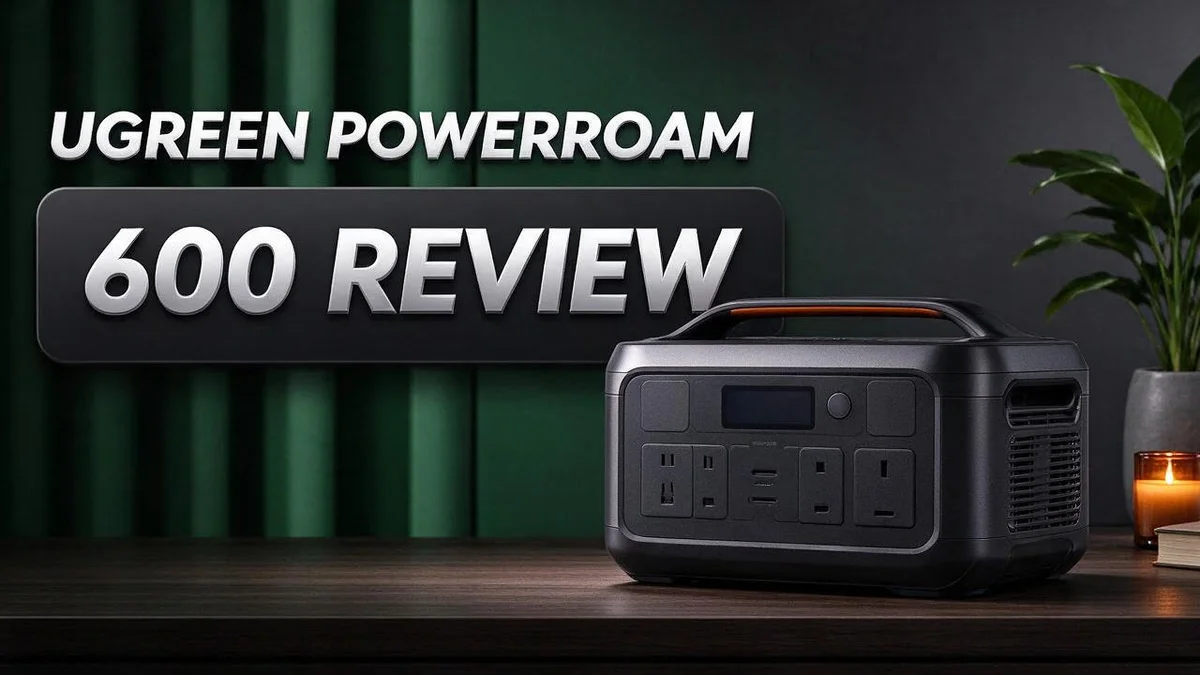
Ugreen PowerRoam 600 Review: Specs, Charging Speed, Ports and Verdict
Are you looking for a portable power station that can keep up with your gear? The Ugreen PowerRoam 600 might be the answer you need. It packs a lot of power into one compact unit.
This unit uses a 680 Wh LiFePO4 battery. It delivers 600 W continuous output with 1200 W peak power.
The output is pure sine wave, so sensitive devices stay safe. Charging also feels fast. The listing claims a 0 to 80 percent recharge in about one hour.
You get 12 ports for laptops, fans, routers, and more. App control lets you check your power levels from your phone.
In this review, we look at what the PowerRoam 600 does well. We also explore how it fits real life. Let’s see if it lives up to the hype.
In a Nutshell
- Fast recharging: The US listing says the battery reaches 80% in about one hour. That speed helps when you need power quickly.
- Solid power output: It delivers 600 W of steady power with 1200 W peaks for short surges. Fans, small coolers, and TVs can run with ease.
- Solar ready: You can recharge the unit with solar panels. This makes it a handy option for camping trips, road trips, and power cuts at home.
- Phone control: The app lets you check charge levels and manage your devices from anywhere.
- Long lifespan claim: The maker lists a battery life of 10 years. That suggests the unit can handle frequent use over time.
- Charge time differences: Listings show different recharge times, so charging conditions likely play a role. Check the details before you rely on a specific number.
Power Output and Capacity

- Large Capacity for Camping: This portable power station has a 48000mAh battery. One Charge, 10 Days of Power...
- Multiple Ports for Daily Use: This portable power station offers a 300W AC outlet, USB-C PD 3.1 140W, and five...

Last update on 2026-11-05 / Affiliate links / Images from Amazon Product Advertising API
Capacity and output work as a team. Capacity tells you how long the unit can run your gear. Output tells you how many devices can run at the same time. You need both numbers to get the full picture.
Think of the battery like a water tank. The bigger the tank, the longer the water flows. A small trickle from a laptop lasts for hours. A heavy draw from a space heater drains it much faster.
Quick runtime math makes planning easier. Divide the battery capacity by the device wattage. A 60 W laptop might run for close to ten hours in theory. Real results often come in lower.
Why lower? Power conversion wastes some energy as heat. Inverters, cables, and battery aging all take a small cut. Plan for about 80 percent of the math result to stay safe.
Peak power matters for devices with motors. Fans, mini fridges, and small coolers pull extra current when they start. The unit handles that short spike, but long heavy loads still drain the battery fast. Keep steady draw well below the continuous rating.
Mixing devices needs care. Add up the wattage of everything you plan to run at once. If the total stays under the continuous limit, you should see smooth performance. Going over may trigger a shutdown.
Many users run a simple test first. Plug in one device and watch the app readout. Then add another and check the change. This shows the real draw of your own gear.
Think about your daily routine too. A weekend camping trip uses less power than a week of remote work. Estimate energy use per day, then multiply by the number of days. That total helps you choose a size that fits.
Getting these numbers right saves frustration later. A unit that matches your needs keeps your devices charged when it counts. Plan ahead, test often, and leave some headroom for surprises.
Charging Speed and Solar Input
Solar charging sounds simple, but real speed depends on several factors. Your panels, your location, and the weather all play a part. Let us look at what to expect.
Panel wattage sets the pace. A higher wattage panel collects more sunlight each hour. More watts usually mean a shorter wait before the battery fills up.
Sun hours shape your results. Most areas offer only a few strong sun hours each day. Count those hours before you plan a full recharge from solar alone.
Angle and placement count too. Point your panels toward the sun for the best input. Shade from trees or buildings can cut output sharply, even on bright days.
Clouds reduce solar input, but they do not stop it completely. Expect slower charging on overcast days. Keep another charging option ready for those times.
Temperature affects charging. Very cold weather can slow the process and limit how the battery accepts power. Charge indoors during winter when you can.
Mixing sources speeds things up. You can combine solar with a wall outlet when sunlight fades. This approach keeps your power station ready without long delays.
Cable quality also matters. Use the cables that come with the unit or certified replacements. Weak cables can limit input and waste valuable time.
Plan a simple charging routine. Start charging in the morning when the sun feels strong. Watch the charge level during the day to see your progress. Small habits keep the battery topped up.
Think of solar as a steady top-up. It works best as one part of your power plan. Your devices stay charged, and you stay in control of your energy.
Ports and App Control
The Ugreen PowerRoam 600 offers 12 ports for many devices. Smart port use keeps your setup neat and safe.
Start by listing what you plan to power. Write down each device and its wattage.
Group devices by use. Place laptops and routers on one side. Keep fans and lamps together on the other side.
Spread the load across ports. Avoid plugging every high draw device into one area. Balanced use helps the unit run steadily.
Turn off ports you do not need. Idle devices can still draw small amounts of power. Switching them off saves energy for what matters.
Connect the app at home first. Learn the layout before you leave. A test run shows you how each control works.
Check the app during long days. Watch charge levels as you use devices. A quick glance helps you decide when to switch off extra ports.
Share the unit with family. Several people can use the ports at once. Set simple rules so everyone gets a fair turn.
Label your cables. Mark which port feeds which device. This small habit prevents mix ups when power runs low.
Keep the app updated. Updates can add features and fix bugs. Check for new versions every few weeks.
Port and app tips work best together. Plan your ports first, then monitor them with the app. This pairing gives you steady power with less guesswork.
Build a simple habit around the screen. Check it before bed and again in the morning. Regular checks stop surprises.
Plan for guests. Visitors may plug in phones or tablets without asking. A short note near the unit sets clear expectations.
Keep ports clean and dry. Dust and moisture can cause poor contact. A soft cloth once a month keeps connections strong.
Good port habits make the PowerRoam 600 feel simple to use. Start small, stay consistent, and let the app guide your choices.
Top 3 Alternatives
If you want other options to the Ugreen Powerroam 600, these three portable power stations are worth a look. Each one suits different needs.
EcoFlow River 2

- [1 Hour AC Recharge] - Power up in just 1 hour! With EcoFlow's X-Stream fast charging technology, recharge...
- [Power All Your Essentials] - With an output of up to 1000W, run 11 essential appliances simultaneously...
Last update on 2026-11-05 / Affiliate links / Images from Amazon Product Advertising API
The EcoFlow River 2 is a compact power station that fits easily in a backpack or car trunk. It charges quickly, so you can get back to your trip sooner. It works well for phones, laptops, cameras, and small fridges. Many campers like its simple display and clean design.
Anker Solix C300

- ...
- 𝗠𝗮𝘀𝘀𝗶𝘃𝗲 𝗣𝗼𝘄𝗲𝗿 𝗼𝗻 𝘁𝗵𝗲 𝗚𝗼: Take portable power anywhere...
Last update on 2026-11-05 / Affiliate links / Images from Amazon Product Advertising API
The Anker Solix C300 offers a sleek look and a solid build. It has several outlets, so you can power multiple devices at once. Its lightweight body makes it easy to carry to the campsite or job site. It is a good pick for people who want backup power during short outages.
Jackery Explorer 300 Plus

- Ultra-Lightweight: At only 7.5 lbs, the Explorer 300 delivers a robust 292Wh capacity while remaining...
- Versatile Power for 6 Devices: Equipped with 2 AC outlets, a 100W USB-C PD port, 2 USB-A ports, and a 120W car...
Last update on 2026-06-09 / Affiliate links / Images from Amazon Product Advertising API
The Jackery Explorer 300 Plus gives you a practical mix of power and portability. It has a clear screen that shows battery level and input and output details. It can run lights, fans, and CPAP machines for many hours. Users often praise its quiet operation and wide range of outlets.
Portability and Build Quality
Portability starts with how you plan to carry it. A power station only helps when it fits your trip. Before you buy, check the official listing for the exact weight and dimensions. Then compare those numbers with your vehicle or storage space.
Think about where the unit will sit. A car trunk, a camper floor, or a home garage each needs its own space. Measure that spot first. Leave room around the vents so air can move freely.
Handles and grip matter more than many people expect. Lift the unit with one hand, then with two, to test comfort. A firm grip helps you avoid drops on gravel, grass, or stairs.
Build quality starts inside the battery. LiFePO4 cells are known for stable chemistry. They handle heat and repeated charging better than many older lithium types. This gives you more confidence during daily use.
Look closely at the housing and port covers. Dust and moisture can slip into loose openings. Wipe the case after outdoor use. Keep the ports closed when you do not need them.
Storage plays a big role too. Keep the unit in a dry, shaded place. Avoid leaving it in a hot car for long periods. Heat can wear down any battery over time, so cool storage protects your investment in daily reliability.
Cable management also affects portability. Coil your cords loosely and store them in a small bag or case. Tangled cables make a simple trip frustrating and slow you down at camp or on site.
Set a simple routine for moving the unit. Turn off connected devices before you lift it. Secure it with a strap in the vehicle so it does not slide during turns or sudden stops. A little care keeps the unit looking good and working well for many trips ahead.
Lifespan and Long-Term Value
Battery lifespan matters more than many buyers expect. The Ugreen PowerRoam 600 uses a LiFePO4 battery, also called lithium iron phosphate. This chemistry handles many charge cycles well.
The listing claims a battery life of 10 years. This is a manufacturer claim, not a result from independent testing. Treat it as a starting point, not a promise.
Real life often depends on how you use the unit. Frequent deep discharges to zero put more stress on any battery. Keeping charge levels between about 20 and 80 percent may help the cells last longer.
Capacity fade is normal. Over time, the battery holds slightly less energy than it did on day one. A small drop each year is expected.
Heat is another factor. Leaving the unit in a hot car or direct sun can speed up wear. Store it in a cool, dry room when you are not using it.
Storage charge also matters. Leaving the battery empty for months can hurt its health. Top it up every few months so it stays in a healthy range.
Firmware updates through the app can improve how the unit manages power. Check for updates now and then. Keep the app installed so you can see alerts.
Track your usage in the app. Note how many days you run it each month. This simple log shows how hard the battery works.
Your usage pattern decides how fast the battery ages. A weekend camper uses far fewer cycles than someone running it daily on a job site. Think honestly about your routine before you decide.
Replacement is part of the long term plan. Batteries eventually lose enough capacity that you may need a new unit. Ask the seller about parts support and service options before you buy.
Warranty terms tell you what the maker covers. Read the details about battery coverage and cycle limits. This step can save headaches later.
Disposal matters too. Lithium batteries need proper recycling. Check your local rules for safe disposal when the unit reaches the end of its life.
Careful habits turn a good unit into a dependable tool for years. Small steps like cool storage and gentle charging add up. Good care helps you get the most from every charge cycle.
Pros and Cons
Pros
- Pure sine wave output keeps sensitive electronics like laptops and routers running safely.
- The unit can recharge from 0 to 80 percent in about one hour, according to the US listing.
- The 1200 W peak rating handles short power surges from fans and small motors.
- Its app control lets you check the unit from your phone.
- The 600 W continuous output covers everyday loads like TVs, LED lamps, and small coolers.
Cons
- Recharge times differ between listings, so confirm the exact figure before you buy.
- The 1200 W peak is only a short burst, so heavy tools may not run for long.
- Independent owner reviews are limited, so real world feedback is still thin.
Who Should Buy It
This unit suits people who want quiet backup power at home. Many households lose power for a few hours during storms. A portable station like this keeps a router, laptop, and phone charged during that time.
Remote workers and students often get the most use from it. A home office needs a stable connection. Nothing kills a video call faster than a dead router.
Campers and van owners may also find it helpful. Weekend trips need lights, fans, and a way to charge gear. The unit handles those basics without a noisy generator running all night.
Renters make up another good match. Many renters cannot install rooftop solar panels or wire a battery into the home. This unit skips that process and simply plugs into a standard outlet.
Families can treat it as a basic emergency kit item. Kids can charge tablets, and adults can keep phones working through a long night. A quick check of the charge level before bad weather makes a real difference.
Hobbyists who fly drones or run small projects can benefit too. Drone batteries and camera gear need regular charging on location. Having a steady power source saves time and trips back to the wall.
Anyone who wants to avoid gas fumes will like this option. A battery unit runs indoors without exhaust, which suits apartments and small spaces.
This unit may not suit everyone. Households that run space heaters, air conditioners, or electric stoves need far more power. Those buyers should look at larger systems.
People who rely on medical equipment should talk with their doctor first. They should also confirm the runtime for their specific device before relying on this unit.
Think about your daily loads before you decide. Write down every device you plan to run. Add up the watt rating for each one. Then compare that total with the unit’s 600 W continuous rating. That simple check shows whether this model fits your needs.
Final Verdict
The Ugreen PowerRoam 600 earns a solid place in a backup kit. It offers steady output, many ports, and quick charging. Still, it suits some needs better than others.
Buyers should look at their own power habits first. Light loads like phones and lamps will last well. Heavy daily loads will drain it much faster.
Large appliances are the main weak spot. Power saws, space heaters, and kitchen appliances can exceed the rated output. Check wattage labels before you plan around them.
Compare the size and weight before buying. A portable unit only helps when it fits your car or closet. Measure your storage space first.
Overall, the PowerRoam 600 makes a sensible choice for home and travel. Its port count and quick charging stand out. It shines most when power needs stay modest.
Match the unit to your daily use. Think about your devices and outage risks. A good match brings steady power when it matters most.
Ask a few key questions before ordering. Which devices need power most? How often will you use it? Where will it sit between uses?
Final answer: the unit deserves a close look. It handles everyday needs with ease. Just keep its limits in mind and plan accordingly.
Think about how you will recharge it. Wall outlets work well at home. A car adapter helps on the road. Solar panels add a useful backup in sunny areas.
Plan for a clear setup spot. Choose a place near the outlets you need. Cables should reach devices without stretching across walkways.
Set realistic expectations for run time. Runtime depends on the load, not the label alone. Test your own devices early to learn what works.
Our overall take is positive but measured. Most households will find it useful. Those with heavy equipment should look for a larger model. It earns a spot on the shortlist.
Frequently Asked Questions
How long will it run a mini fridge?
A 680 Wh battery gives you a rough guide. Divide the battery size by the fridge’s average power draw to estimate runtime. Compressor fridges cycle on and off, so they often run longer than a quick guess suggests.
Can I use it while it recharges?
Many portable power units allow this, but you should confirm it in the manual first. Running devices during a recharge can slow down the refill. Plan your outage use before you plug it in.
Does it need sunlight to be useful?
No, sunlight is not required. Solar is one option for refilling the battery. You can also charge it from a standard outlet before a storm hits, so it stays ready when you need it.
How should I store it between uses?
Keep it in a cool, dry place away from direct heat. Give it a top up every few months, even if you do not use it. Regular top ups help the battery stay healthy for years.
Where should I place it during an outage?
Set it on a flat, stable surface away from water. Keep the air vents clear so heat can escape. Good airflow helps the unit run safely while you power your devices.

DK is a technology expert who specializes in AI tools, software, and tech gadgets. He writes for How to Tech Info, providing detailed reviews and practical guides. DK helps readers discover the best AI applications, navigate new software, and choose the right tech gadgets.