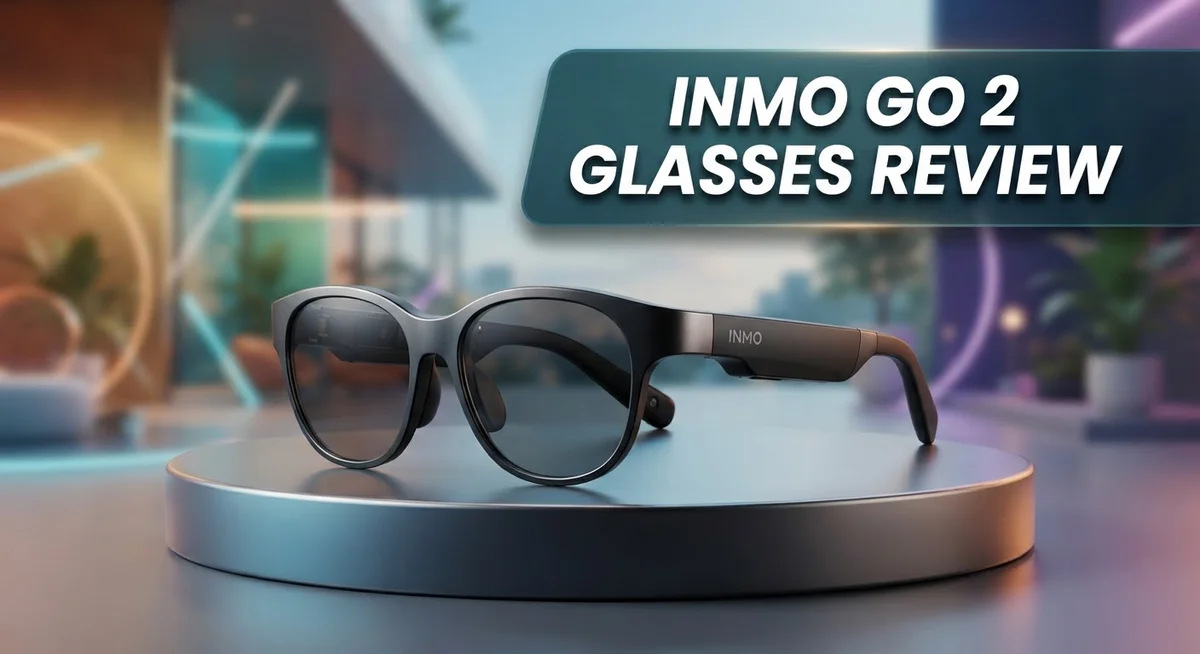
INMO Go 2 Glasses Review: Real-Time Translation AR Eyewear?
Smart glasses are changing how we talk to the world. The INMO Go 2 glasses bring real time translation right to your eyes. They promise to break language barriers in a simple, wearable device.
These glasses use a binocular microLED display. This technology gives you clear text without blocking your view. You can see translations while still talking to people face to face.
INMO Go 2 supports over 40 languages and 90 accents. It uses both Microsoft and iFlytek translation engines. This combo aims to make conversations smooth and natural.
But do these glasses truly deliver on their promise? We tested the design, display, and translation features. This review covers what works well and where the INMO Go 2 falls short.
Let’s see if these glasses earn a spot in your tech collection.
In a Nutshell
Here is the quick rundown on the INMO Go 2 glasses. These points cover what stood out during testing.
-
Fast charging is a big plus. The glasses reach 80% charge in just 20 minutes. This means less waiting and more use.
-
The display shows a monochrome green color. It reaches 2000 nits brightness. This makes text easy to read even in bright light.
-
A small 1.3 inch OLED touch screen helps you control settings. It supports color visuals at 640×480 resolution.
-
Custom vocabulary support lets you add specific words. This helps the translation feel more personal to your needs.
-
Some users faced software issues in the USA. The app did not always function as expected.
-
Heavy use may cause eye strain or headaches for some wearers. Audio features also felt a bit limited.
Overall, the INMO Go 2 shows promise in design and translation. But it comes with a few technical bumps to consider first.
Display Technology and Visual Quality
The display technology in the INMO Go 2 represents a significant step forward in augmented reality wearables. The binocular microLED display with waveguides creates a bright, clear visual experience that stands out in the AR glasses market.
Brightness and clarity matter when you wear glasses all day. The INMO Go 2 delivers 2000 nits of brightness to your eye, which means you can see the display clearly even in bright sunlight. This level of brightness prevents the common problem of washed out visuals that plague many AR devices.
The monochrome green display takes some getting used to. Green text on a black background may feel different from what you expect, but it actually reduces eye strain compared to full color displays. Your eyes adapt quickly to this color scheme during normal use.
The 1.3 inch OLED color touch screen serves as your control center. This smaller secondary display lets you navigate menus, adjust settings, and manage your translation preferences without fumbling with buttons. The 640×480 resolution provides crisp visuals on this compact interface.
Visual quality depends on use patterns. Users report that the waveguide technology delivers sharp text and images when you look straight ahead. The field of view feels natural and doesn’t create the tunnel vision effect that some AR glasses produce. Information appears exactly where you need it without blocking your view of the real world.
However, some users experience eye strain or headaches during extended sessions. This typically happens after several hours of continuous use. Taking regular breaks helps prevent discomfort. The green monochrome display reduces strain compared to color alternatives, but individual sensitivity varies.
The display technology excels at showing real time translation text clearly. Words appear bright and readable, making it easy to follow conversations in foreign languages. The contrast between the green text and black background ensures you never miss what someone is saying.
Overall, the INMO Go 2’s display system balances brightness, clarity, and comfort effectively. The microLED waveguide technology delivers on its promise of visible, readable content in various lighting conditions.

- 【AI Real-Time Translation】The INMO GO3 smart glasses is equipped with a powerful AI translation engine...
- 【98 Languages Covered】Beyond common languages such as English, Spanish, French, and German, these...
Last update on 2026-10-07 / Affiliate links / Images from Amazon Product Advertising API
Translation Capabilities and Language Support
The INMO Go 2 glasses shine when it comes to breaking down language barriers. Real time translation works across 40+ languages and 90+ different accents, which covers most conversations you’ll encounter globally.
The glasses tap into two powerful translation engines. Microsoft and iFlytek handle the heavy lifting behind the scenes. This dual engine approach means you get reliable translation even when one service faces issues. The system processes speech quickly and displays results on your display.
Custom vocabulary support sets these glasses apart from basic translation tools. You can add industry specific terms, names, or slang that matters to your work. This feature helps the glasses understand your unique communication style. Medical professionals, engineers, and business people benefit most from this capability.
The 1.3 inch OLED touch screen lets you adjust translation settings easily. You can switch languages, tweak accent recognition, and manage your custom word list without removing the glasses. The interface responds quickly to your touches.
However, real world performance varies by location. Users in the USA reported software reliability issues that made translation features unreliable. This suggests the glasses work better in other regions or may need software updates for American users. Before purchasing, check current user reports for your specific country.
The monochrome green display shows translated text clearly during conversations. Text appears sharp and readable, which helps you follow translations without straining your eyes. The waveguide technology keeps visuals crisp even in bright outdoor settings.
One limitation stands out: the glasses work best in one on one conversations. Group discussions with multiple speakers become harder to translate accurately. The microphone picks up ambient noise, which can confuse the translation engine.
For travelers, business professionals, and language learners, these glasses offer practical translation support. The combination of multiple languages, accent recognition, and custom vocabulary creates a flexible tool. Just verify that translation features work reliably in your region before relying on them for critical conversations.
Design, Comfort, and Wearability
The INMO Go 2 glasses feature a compact and average-looking design that blends into everyday wear. You won’t turn heads with these frames. They look like regular glasses, which is exactly what makes them practical for daily use. The frames sit comfortably on your face without drawing attention.
The physical build prioritizes functionality over flashy aesthetics. The glasses weigh just enough to feel substantial without becoming burdensome. You can wear them for short periods without immediate discomfort. The frame material feels durable and well constructed.
Comfort during extended wear requires attention to fit. The glasses rest on your nose and ears like standard eyewear. However, some users report that prolonged sessions cause eye strain or mild headaches. This happens more often with heavy use throughout the day. Your individual face shape and sensitivity matter here.
The 1.3 inch OLED touch screen sits on the side of the frame. This control interface feels intuitive to access. You can adjust settings without removing the glasses. The touch screen responds quickly to your taps and swipes.
Weight distribution affects how the glasses feel on your face. The waveguide display system keeps the optical components compact. This means the glasses don’t feel top heavy or awkwardly balanced. Most wearers adapt to the fit within a few days of use.
Wearability improves when you take breaks between sessions. Removing the glasses for 10 to 15 minutes helps reduce eye fatigue. The fast charging capability means you can power them down and rest your eyes. This prevents strain from building up over time.
The frame design accommodates different head sizes reasonably well. The glasses sit securely without slipping during normal movement. You can walk, turn your head, and look up or down without adjustment issues. The overall wearability suits casual daily use better than all day professional wear.
The monochrome green display takes time to get used to visually. Your eyes need adjustment when switching between the glasses and normal vision. This transition becomes smoother after a week or two of regular use.
Top 3 Alternatives
Nreal Air Glasses

- XREAL's Self-Developed X1 Spatial Computing Chip: Delivers Native 3DoF tracking with ultra-low 3ms M2P...
- The New Optic Engine-X-Prism Optics: XREAL’s advanced lens and projection system—ultra-slim...
Last update on 2026-06-11 / Affiliate links / Images from Amazon Product Advertising API
Nreal Air Glasses offer a lightweight design that feels comfortable for extended wear. These glasses display content directly in your field of vision without blocking your view of the real world. The device connects to your smartphone or compatible device through a USB-C cable, making setup straightforward.
The glasses feature a bright display that works well in various lighting conditions. You can watch videos, browse apps, and interact with digital content while staying aware of your surroundings. The spatial computing features let you place virtual objects in your physical space.
Meta Quest Pro

- Meta Quest Pro unlocks new perspectives in work, creativity, and collaboration.
- Multitask with ease with multiple resizable screens so you can organize tasks, work on new ideas or message...
Last update on 2026-10-07 / Affiliate links / Images from Amazon Product Advertising API
Meta Quest Pro delivers a full virtual reality experience with high-resolution displays. This headset immerses you completely in digital environments rather than blending virtual and real worlds. The device includes advanced hand tracking and eye tracking technology for intuitive interaction.
The headset works standalone without needing a connection to your phone or computer. You get access to a large library of games, apps, and experiences through Meta’s ecosystem. Performance is smooth across demanding applications and games.
Vuzix M400

- 8 Core 2.52Ghz Qualcomm XR1
- 6GB LPDDR4 RAM
Last update on 2026-10-07 / Affiliate links / Images from Amazon Product Advertising API
Vuzix M400 glasses function as an enterprise-focused device with practical applications for work environments. The glasses feature a monocular display that keeps one eye clear for your surroundings. This design works well for tasks requiring both digital information and real-world awareness.
The M400 runs Android-based software and connects wirelessly to your devices. Battery life supports extended work sessions throughout your day. The glasses include cameras for capturing photos and video, making them useful for documentation and remote assistance scenarios.
Battery Life and Charging Speed
The INMO Go 2 glasses pack a fast charging system that gets you back in action quickly. You can reach 80% charge in just 20 minutes. This speed matters when you’re traveling or moving between meetings.
The battery performance supports extended use throughout your day. Most users find the glasses stay powered during typical work sessions. You won’t constantly hunt for a charger if you use the glasses for a few hours at a time.
Charging speed becomes especially useful for professionals who depend on real time translation. You can top up during a lunch break and continue working. The quick turnaround means less downtime between tasks.
One practical tip: charge the glasses overnight for a full battery. This ensures you start your day with maximum power. Morning charges also give you flexibility if you need a quick top up later.
The charging cable connects easily to the device. Setup takes seconds once you know where the port sits. Most users report no issues with the connector itself.
Battery life varies based on your usage patterns. Heavy use of the translation features drains power faster than lighter sessions. Screen brightness also affects how long each charge lasts.
Real world battery performance depends on what you’re doing with the glasses. If you’re using translation constantly, expect shorter sessions between charges. Lighter use like occasional text reading extends battery time.
The 20 minute charging speed compares favorably to many mobile devices. You get significant power back in a short window. This matters for people who move around frequently and can’t stay plugged in for hours.
Users appreciate that they don’t need to carry backup chargers constantly. The fast charging reduces anxiety about running out of power. You can charge in a car, at a desk, or anywhere with a USB connection.
Keep the glasses cool while charging. Avoid leaving them in direct sunlight during the process. This simple habit helps maintain battery health over time and keeps the device running reliably.
Software Reliability and Regional Performance
The INMO Go 2 glasses rely on software that powers real time translation across 40+ languages. However, software reliability varies significantly by region. Users in the USA have reported serious issues where the translation features become non functional. This represents a major concern for American users who depend on these glasses for daily communication.
The glasses use two translation engines: Microsoft and iFlytek. This dual engine approach should provide backup support when one service experiences problems. Yet regional limitations still affect overall performance. Some geographic areas see consistent operation while others face frequent failures.
Custom vocabulary support helps improve translation accuracy in your specific field or industry. You can teach the glasses specialized terms related to your work or hobbies. This feature works best when the software itself runs smoothly. In regions where the software struggles, even custom vocabulary cannot fully compensate.
The 1.3 inch OLED touch screen lets you access settings and monitor translation quality. You can switch between languages and adjust preferences directly on the device. However, if the underlying software becomes unreliable, these controls lose their value. The interface itself remains responsive, but the translation output may fail.
Real world performance depends on your location and internet connectivity. The glasses require stable connections to access translation services. Areas with weak network coverage experience slower responses and occasional timeouts. Urban centers typically show better reliability than rural regions.
For business travelers and professionals, software reliability becomes critical. A translation failure during an important meeting creates serious problems. Users planning to rely on these glasses should test them thoroughly in their specific region before depending on them for important work.
The gap between promised features and actual regional performance represents the biggest challenge with the INMO Go 2 glasses. The technology works well in supported regions but struggles in others. Before purchasing, research whether your area has reliable service coverage. Contact the manufacturer directly about software performance in your specific location.
Pros and Cons
Pros
- Real time translation works across 40+ languages with support for 90+ accents using Microsoft and iFlytek engines
- Custom vocabulary support lets you add industry specific terms for more accurate translations
- Fast charging gets you to 80% battery in just 20 minutes, perfect for busy professionals
- Average looking design means you can wear them throughout the day without standing out
- Touch screen interface on the side frame makes it easy to adjust settings and monitor translation quality
Cons
- Software performance in the USA has been reported as unreliable or non functional by some users
- Eye strain and headaches can occur during heavy use sessions, requiring regular breaks
- Prolonged wear may carry potential eye injury risk that deserves attention
- Limited audio capabilities restrict how you receive translation feedback
Who Should Buy It
The INMO Go 2 glasses work best for specific groups of people. Language learners and frequent travelers find the most value here. If you move between countries often or need to communicate with people who speak different languages, these glasses deliver real-time translation instantly. You don’t need to pull out your phone or fumble with translation apps anymore.
International business professionals should seriously consider these glasses. Sales teams, consultants, and managers who attend meetings across borders benefit from having translation right in front of their eyes. The 40+ language support with 90+ accents means you catch nuances that basic translation apps miss. Custom vocabulary support helps if you work in specialized fields like medicine, engineering, or law.
Tech enthusiasts who enjoy experimenting with emerging technology will appreciate the microLED display and touch screen interface. You get to experience AR translation before it becomes mainstream. The compact design means you’re not wearing something that looks completely futuristic, so you can test the technology in real situations.
However, avoid these glasses if you live primarily in the USA. Software reliability issues reported by users in the United States create frustration. If you depend on consistent performance for work, this matters significantly. The glasses need stable internet connectivity to function properly, so unreliable software undermines the entire experience.
People sensitive to eye strain should approach cautiously too. Heavy use sessions can trigger headaches or discomfort. If you already experience eye fatigue from screens, these glasses might worsen the problem. Take frequent breaks if you decide to try them.
The INMO Go 2 suits someone willing to embrace some imperfection in exchange for cutting edge translation technology. You need patience for occasional software hiccups and awareness of your own eye comfort limits. Think of them as a powerful tool for specific situations rather than an all day replacement for traditional translation methods. They shine brightest when you prioritize translation accuracy and hands free convenience over absolute reliability.
Final Verdict
The INMO Go 2 glasses bring real translation power to your eyes. They solve a genuine problem for travelers and global teams. The microLED display stays bright and clear even in daylight.
These glasses shine brightest for a specific type of user. If you travel often and need quick translation help, this product fits your needs well. Language barriers melt away when the system works as intended.
Still, this product asks for some patience. You might face hiccups depending on where you use it. Tech products like this often improve over time through updates.
Think about your daily routine before you decide. Do you spend hours in meetings or on calls with people who speak different languages? If yes, these glasses could change how you work.
Compare this to the INMO GO3, which offers more languages and faster battery swaps. That model might suit you better if battery life worries you. But the Go 2 still holds its own for most translation tasks.
The Evens glasses offer prescription lenses, a feature this model lacks. If you wear glasses daily, that detail matters a lot. Your eyes deserve comfort alongside smart features.
HearView focuses more on audio clarity than visual translation. Your choice depends on which sense matters more for your work.
We think the INMO Go 2 rewards users who value function over perfection. It pushes translation technology forward in a wearable form. The display quality alone makes it worth trying for curious buyers.
Your final decision should match your specific lifestyle and work demands. Business travelers get the most value from this device. Casual users might want to wait for the next version.
Smart glasses like this represent the future of communication. The INMO Go 2 takes a bold step in that direction. It stumbles in some areas but succeeds in the ones that matter most.
Frequently Asked Questions
Do the INMO Go 2 glasses work outside the USA?
Yes, these glasses perform much better outside the United States. Users in international markets report reliable translation functionality and smooth operation. If you travel frequently or work with global teams, the glasses deliver solid results in most regions outside America.
Can I add my own words to the translation database?
Absolutely. Custom vocabulary support lets you build a personal dictionary. You can add industry specific terms, company names, or regional dialects. This feature makes the glasses far more useful for specialized professionals like engineers, medical staff, or legal experts.
What happens if I wear them for 8 hours straight?
Extended wear can trigger eye strain and headaches for some users. The microLED display, while bright at 2000 nits, requires your eyes to work harder than normal glasses. Take regular breaks every 90 minutes. If you experience discomfort, these glasses may not suit your daily routine.
How quickly do the batteries charge?
The glasses reach 80% charge in just 20 minutes. This fast charging makes them practical for busy schedules. You can grab a quick charge between meetings or during lunch and stay powered through the afternoon.
Are these better than the INMO GO3?
The GO3 handles 98+ languages versus the Go 2’s 40+. The GO3 also offers faster battery swaps and AR navigation features. However, the Go 2 remains lighter and more discreet. Your choice depends on whether you need maximum language support or prefer a simpler, less obvious design.

DK is a technology expert who specializes in AI tools, software, and tech gadgets. He writes for How to Tech Info, providing detailed reviews and practical guides. DK helps readers discover the best AI applications, navigate new software, and choose the right tech gadgets.