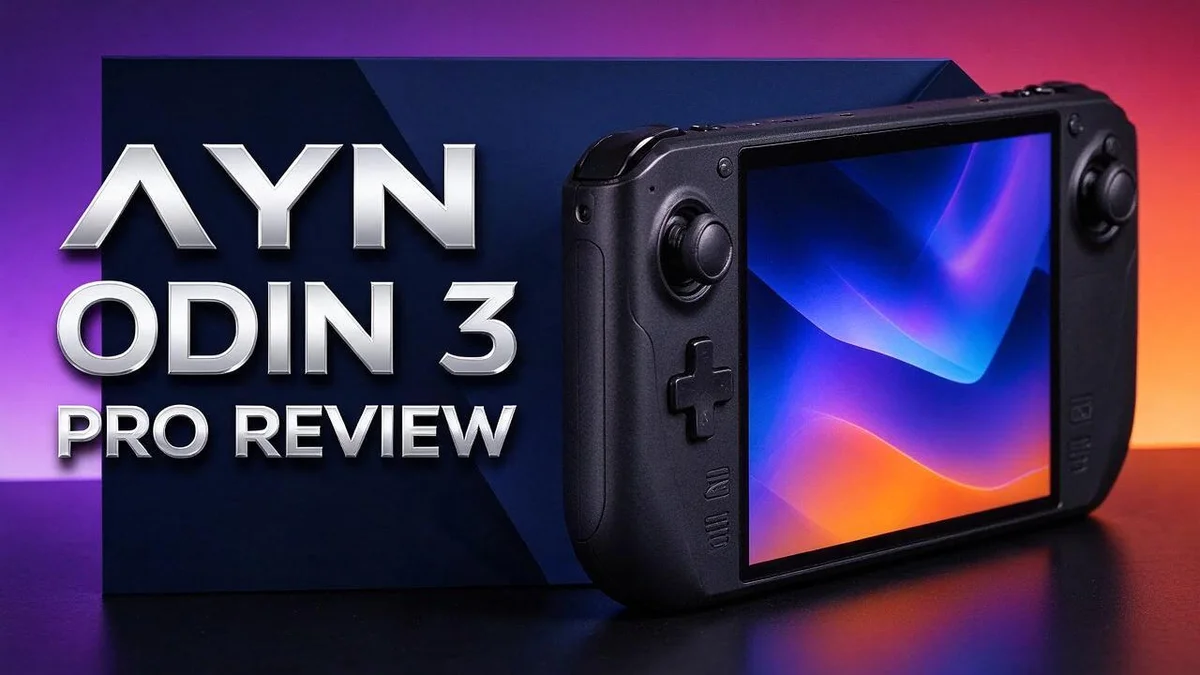
Ayn Odin 3 Pro Review: Specs, Steam Deck Comparison and Verdict
Are you hunting for a handheld that can run serious PC games on the go? The Ayn Odin 3 Pro might be the answer you need. It packs a 120Hz AMOLED display that makes colors pop and motion look smooth.
Many players compare it with the Steam Deck, and the results often surprise them. In many cases, the Odin 3 Pro outperforms the Steam Deck in games. Its buttons stay silent, so your gaming sessions stay quiet and focused.
This device also handles Android apps, retro emulation, cloud gaming, and streaming. It even supports productivity tasks. Keep reading to see how it performs, where it falls short, and whether it suits your playstyle.
In a Nutshell
-
Vibrant 120Hz AMOLED screen gives games smooth motion and rich colors. The bright OLED panel makes every scene pop, so fast action stays crisp and clear.
-
Strong raw power puts this handheld in a competitive spot. Theoretical performance sits around twice that of the Steam Deck, though real results depend on the game you choose.
-
Modern wireless support comes from WiFi 7 and Bluetooth 6.0. Fast, steady connections help with large downloads, cloud play, and controller pairing.
-
Useful ports and storage include a memory card slot, USB-C video output, and a 3.5mm headphone jack. You can add storage and connect to a larger screen with ease.
-
Quiet, smooth controls keep the buttons silent during play. Late night sessions stay calm, and nobody nearby gets disturbed by clicks.
-
Real drawbacks to weigh include extra setup time and a heavier, bulkier body than many players expect. If you want a simple experience right out of the box, the Steam Deck may suit you better.
Display and Visual Quality

- Flagship Snapdragon 8 Elite Power: Equipped with the cutting-edge Qualcomm Snapdragon 8 Elite processor (Oryon...
- Ultra-Fluid 120Hz AMOLED Display: Immerse yourself in games on a vibrant 6-inch AMOLED touchscreen with a...
Last update on 2026-11-07 / Affiliate links / Images from Amazon Product Advertising API
Visual quality plays a big role in how a handheld feels during long sessions. The screen on this device uses OLED technology, so dark scenes look deep and clear. Black areas stay truly black because each pixel can switch off on its own.
This matters most in games with dark caves, night skies, or horror themes. Shadows keep their detail instead of turning into muddy gray patches.
Text also looks sharp on the screen. Menus, maps, and game guides stay easy to read. Small icons and fine lines appear crisp, which helps during fast action.
Glare is another point to think about. OLED panels can handle bright rooms well, but direct sunlight may still wash out the image. Playing near a window or outdoors may call for a shaded spot.
Eye comfort also deserves attention. Many players spend hours with a handheld in their lap. A clear panel can reduce strain compared with dull or blurry displays. Your eyes often feel less tired after a long session.
Contrast is where OLED really stands out. Bright stars or lights pop against a deep background. This gives scenes a sense of depth that flat screens often miss.
Watching videos adds another layer. Streaming shows, movies, and clips from cloud services look lively. Skin tones and bright highlights appear natural, so the device works as a small personal theater.
Overall, the display gives a strong reason to pick this handheld. Dark scenes, sharp text, and comfortable viewing make it a good choice for visual fans. Just keep the glare and lighting in mind.
Performance Against the Steam Deck
Performance matters most when you compare the Ayn Odin 3 Pro with the Steam Deck. On paper, this handheld reaches about twice the theoretical performance of Valve’s device. Real results depend on the game, though.
Some titles run smoothly at high settings. Others need a few tweaks before they feel right. Players often adjust resolution and graphics options to find the sweet spot between speed and detail.
The 12GB RAM variant gives extra breathing room. Large game worlds and multitasking feel less cramped. Switching between a game and a background app takes less effort.
Frame rates also change from title to title. Some games hold a steady pace for long stretches. Others dip during busy scenes, and those drops can feel choppy during fast action.
Getting the best results takes some effort. Updating drivers and testing different launchers can help a lot. Many owners share their settings online, which saves time.
Battery life tells a different story. ARM chips usually sip power, yet this advantage fades when you play demanding PC games. Expect the battery to drain at a pace closer to other handhelds during heavy sessions.
Steam Deck still wins on consistency. Its hardware and software work together with fewer surprises. Many owners simply launch a game and play. The Odin 3 Pro asks for more patience, so it suits people who enjoy experimenting.
Think about your playing style. If you want a stable routine, the Steam Deck may feel easier. If you enjoy tuning settings and pushing hardware limits, this handheld rewards you with extra power and flexibility. Both systems deliver fun, but they suit different moods.
Design, Size and Weight
The Ayn Odin 3 Pro sits in your hands in a clear and simple way. Its shape gives a firm grip.
Many players notice the weight after a while, though. Extended play reveals how the body really feels.
Size is the first thing you notice. Compared with the Odin 2 Portal, many users say this model feels a little more compact. Reports vary, so try it in person if you can.
Weight matters more than most people expect. Long sessions can make your wrists feel tired. Your grip style changes how the weight feels.
A handheld this size fits a large bag more easily than a small pocket. Plan your carry case before you head out.
Your hand size matters too. Players with larger hands often feel more at ease. Smaller hands may need a few minutes to settle into the layout.
Build quality also shapes the experience. A solid frame gives confidence during fast action. The shell feels sturdy in the palm, which helps during intense moments.
Button layout deserves a look too. Your thumbs need to reach each control without strain. Check how the sticks and face buttons sit under your thumbs over time.
Grip texture can also change the feel. Some players like a softer surface, while others prefer a cleaner finish. Try a few options first if possible.
Carrying the device on a commute brings its own challenges. A sleeve or small bag protects the screen from scratches. Pick one that fits the body snugly.
Overall, the Odin 3 Pro suits players who value a compact feel. Those who want the lightest option may prefer a different handheld. Try holding it for a few minutes to decide.
Top 3 Alternatives
Retroid Pocket 5

- NO PRELOAD GAMES - Please note that no games are preloaded on Retroid Pocket 5. Before first use or after a...
- Powerful Performance – Equipped with a high-performance quad-core processor and advanced GPU, the Retroid...
Last update on 2026-11-06 / Affiliate links / Images from Amazon Product Advertising API
Retroid Pocket 5 is a strong pick for retro gamers who want flexibility. It runs Android, so you can install many emulators and apps. The bright screen shows classic games with sharp detail.
Many players love its comfortable grip. It feels light in the hands during long sessions. You can also stream videos and browse the web during breaks. Battery life works well for trips and commutes.
Best for players who want a flexible Android handheld.
Anbernic RG556

- 【RG556 NO Preload Games】Important Note : The RG557 Package don’t included Game Card, NO Preload Games...
- 【5G WIFI & 4.2 Bluetooth & TV Output】Built-in 2.4/5G WIFI 802.11a/b/g/n/ac , New generation of 5G WIFI...
Last update on 2026-11-07 / Affiliate links / Images from Amazon Product Advertising API
Anbernic RG556 focuses on a clean retro gaming experience. Its large OLED screen shows vivid colors and deep blacks. The buttons feel firm, and the layout feels natural for classic controllers.
It handles classic consoles with ease. Setup takes little time, so you can start playing fast. Many fans enjoy its simple menus and direct controls. Sessions feel smooth for most older titles.
Best for fans of older console games who want a simple setup.
Ayaneo Pocket S

- 【Snapdragon G3x Gen 2 Performance】 The AYANEO Pocket S Mini features the Snapdragon G3x Gen 2 platform...
- 【4.2" 1280×960 IPS Display】 Enjoy a borderless 4:3 IPS touchscreen with 1280×960 resolution, 130% sRGB...
Last update on 2026-11-07 / Affiliate links / Images from Amazon Product Advertising API
Ayaneo Pocket S brings a premium feel to handheld gaming. Its solid build quality stands out right away. The compact body fits easily in a bag or jacket pocket.
It runs modern and retro titles well. Performance stays smooth in most games with the right settings. Some users may find the screen a bit small for detailed play. Still, it works well for quick sessions on the go.
Best for gamers who want power in a small body.
Connectivity and Ports
The Ayn Odin 3 Pro offers a strong set of connections. It supports WiFi 7 and Bluetooth 6.0, so you can link controllers, earbuds, and networks with ease.
Fast wireless speed matters when you stream games or download large titles. A quick link keeps lag low and downloads moving. Modern standards like WiFi 7 help a lot here.
Storage is easy to expand. A memory card slot gives you room for a growing game library. This matters because many modern games take up huge amounts of space. Keep a spare card handy for emulators and older titles.
The USB C port does more than charge. You can send video output to a TV or monitor. Hook it up and play on a bigger screen with friends.
Audio fans will appreciate the 3.5mm headphone jack. Wired headphones work without needing a battery or pairing. Many players prefer this option for quick sessions or long trips.
Cable placement also affects comfort. When cords hang from the sides, they can get in the way during play. Plan your setup so wires stay clear of your hands.
Connection quality depends on your home network too. A strong router and a clear signal make a big difference. Some users may need to adjust settings for the best results.
Think about how you plan to play. If you stream often, prioritize WiFi 7 and a steady router. If you play on a TV, the USB C video output becomes the key feature.
Pair your gear before a trip. Connect headphones and controllers at home first. This saves time when you want to play right away.
Software and Emulation Support
Software is where this handheld shows its range. It runs Android, so you can open many apps and game stores on one device. Many users treat it as a full pocket computer.
Retro emulation is a major highlight. Classic consoles and older arcade titles run smoothly on this machine. Many players use it as a dedicated retro station.
Cloud gaming opens another door. You can stream titles from a remote server when local power falls short. A fast and stable connection makes this experience much better.
Streaming apps also fit into daily life. You can watch shows and videos during a commute or a quiet evening at home.
Productivity tasks work here too. Android supports note apps, browsers, and office tools. The screen becomes a small workspace when you need one.
Performance can feel uneven across software. Some games run very well, while others need extra attention. Expect a learning curve when you first set up your favorite titles.
Emulation takes some setup. You may need to adjust settings for each system. Keep notes of what works so you can repeat good results later.
Check compatibility before you install games or apps. Not every title runs the same way on every setup. Reading recent user reports helps you avoid surprises.
Updates matter for software too. New Android versions and emulator releases can bring better compatibility. Check for updates now and then to keep the device running smoothly.
Software choice shapes your whole experience. Pick apps that match your favorite genres and habits. This keeps the device useful long after the first week.
Setup and Ease of Use
Getting started takes some patience. The first boot walks you through language, network, and account choices. Take your time here, because these early steps shape everything after.
Expect a learning curve. Many players report that the handheld needs more tinkering than a Steam Deck. You may spend an evening adjusting settings before games feel smooth.
Performance tuning is the real task. Each game can behave differently. Some titles run at high frame rates, while others stutter until you change a profile.
Power profiles give you control. You can switch between performance and quiet modes. Quiet modes keep fan noise low, which helps during late night sessions.
Launcher setup also matters. Some users install a custom front end to organize their library. This step feels optional, but many people find it saves time later.
Controller mapping needs attention. Default layouts may not suit every game. Remapping inputs in settings takes only a few minutes once you find the menu.
Patience also helps when a game refuses to launch. Restart the device, then test again. Many fixes take only a minute.
Community guides fill the gaps. Official documentation can feel thin for newcomers. Forums and video tutorials walk you through tricky fixes step by step.
Display settings deserve a quick check too. The bright screen can run at different refresh rates, so match them to each game. This keeps motion looking clean and avoids wasted power.
Save a backup of your settings once everything works. A saved profile helps you recover quickly after a bad update or crash. Keep that file in a safe place.
Patience pays off here. Once configured, the handheld feels smooth and quiet. Setup simply asks more from you than most rivals.
Pros and Cons
Pros
- It often beats the Steam Deck in many games.
- The 120Hz AMOLED screen makes motion look smooth and colors look rich.
- The buttons stay quiet during long play sessions.
- It runs very well once you find the right settings.
- The body is smaller than the Odin 2 Portal.
Cons
- Setup asks for more tinkering than the Steam Deck.
- Performance can feel hit and miss from one PC game to the next.
- The weight and size can feel heavy after a long session.
- Battery gains from ARM fade when you run PC games.
Who Should Buy It
Hands on tinkerers are the ideal buyer. If you enjoy adjusting settings, this handheld rewards your curiosity. Trial and error can feel like part of the fun for you.
Dedicated retro collectors fit the profile too. You can build a personal library and adjust each title. Many fans enjoy that ritual as much as the games themselves.
Frequent travelers who want one device may appreciate the variety. Games, videos, and light work can live in one place. Just remember the extra heft when you pack your bag.
Home setup fans get the most from it. Connecting the handheld to a TV through USB C can create a bigger screen for friends. Couch play feels different when the action fills the room.
Curious newcomers can still thrive. A willingness to learn matters more than past experience. Each setting you master builds confidence for the next game.
People who want something ready out of the box should look elsewhere. A device that needs setup can frustrate them. Choose the handheld that matches your patience level.
In short, this handheld suits curious players. If you love experimenting, it can become your favorite gadget. If you want simplicity, consider a different path.
Final Verdict
Here is the bottom line on the Odin 3 Pro. It is a powerful little machine that rewards effort. Think of it as a tool you shape, not a console you simply switch on.
Its feature list adds real flexibility. WiFi 7, a memory card slot, and a 3.5mm headphone jack all help. Android, retro emulation, and cloud gaming also run on it.
The 12GB RAM variant gives extra room for heavier titles. Pick it if you plan to push demanding PC games on the go.
Compare it with the Steam Deck before you decide. The Steam Deck still wins on simplicity. The Odin 3 Pro wins on open software choices and raw potential.
The AYN Loki sits close as a sibling model. Shoppers who like this design often weigh both options side by side.
Odin 2 Portal and Odin 2 Pro fans will notice clear progress. The new model builds on that line with newer wireless tech and a more modern feature set.
Raw power is only half the story. Software choices, storage, and connectivity shape daily use just as much.
Think about your daily routine before buying. A gamer who mostly plays one favorite title may prefer something simpler.
The device shines when you match it to your habits. Read the specs, then test the setup in your own space.
Treat the early days as a learning stage. Menus and settings become familiar with time. Each small win feels earned.
Final thought: this handheld suits players who want full control. It rewards patience and curiosity more than any spec sheet can show. It is a rewarding choice for anyone who wants to own every setting.
Frequently Asked Questions
Can you play Android games on the Odin 3 Pro?
Yes, the handheld supports Android apps. Many mobile games work with the physical buttons, but you should check controller support before you install each title. Simple puzzle and retro games often run the smoothest.
Does cloud gaming work well on this device?
Yes, cloud gaming and game streaming both work here. A strong home network matters most. A stable connection keeps the picture sharp and the input responsive.
Is this handheld a good choice for a teen?
It can be, especially for a teen who enjoys tech projects. An adult should help with the first setup. Menus and settings take time to learn, but the learning process can be fun.
How can you test a game before you commit?
Start with a title you already own on another device. Play for about 30 minutes and watch the frame rate, heat, and battery level. Online community lists can also show which games run smoothly.
Can you use the Odin 3 Pro for work?
Yes, it can handle light productivity tasks. Writing, web browsing, and video calls all work on the device. A small screen and compact keys may feel tight for long documents, so an external keyboard can help.

DK is a technology expert who specializes in AI tools, software, and tech gadgets. He writes for How to Tech Info, providing detailed reviews and practical guides. DK helps readers discover the best AI applications, navigate new software, and choose the right tech gadgets.