Anker Prime 250W Charger Review: Features, Charging Speed, and Verdict
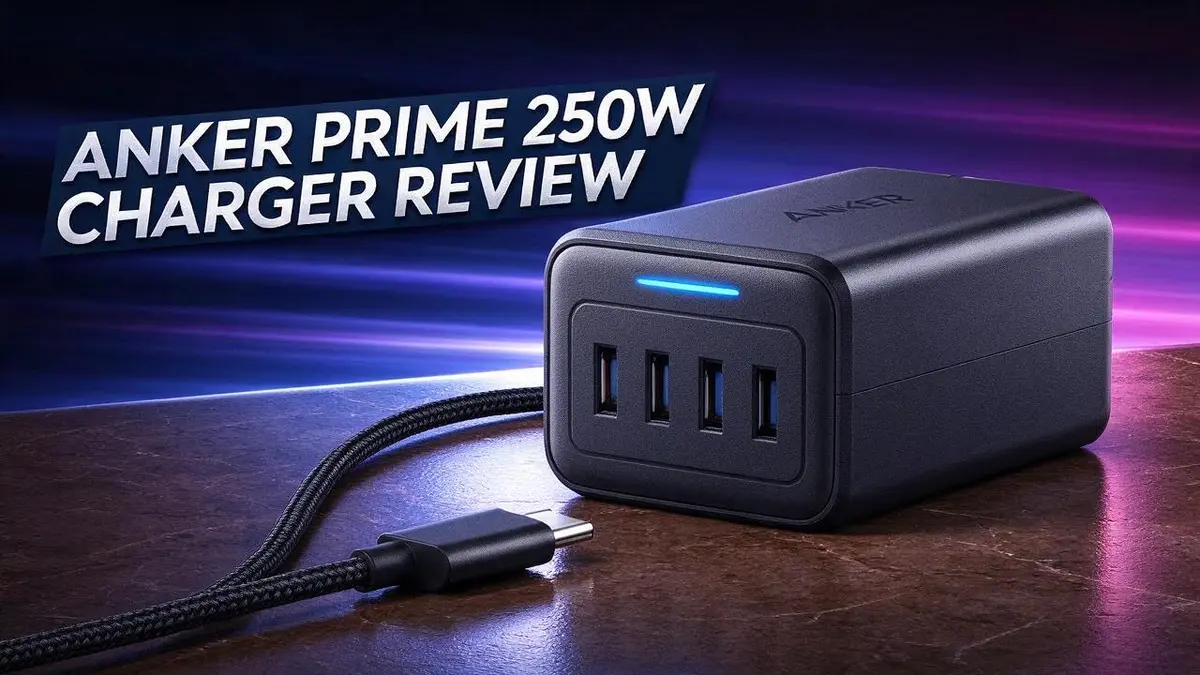
Tired of carrying a pile of chargers? The Anker Prime 250W Charger may solve that problem. This desktop unit packs six ports into one compact design. You get four USB-C ports and two USB-A ports.
Charging a MacBook, iPhone, Pixel, or Galaxy phone at the same time is easy. The charger uses GaNPrime technology to deliver fast power on every output. It also includes an LCD display and a smart control dial to keep things clear.
Here is what this review covers. We look at the key specs, the honest pros and cons, and who this charger suits best. Let us start with the big picture.
In a Nutshell
- Six ports in one unit: The charger offers four USB C ports and two USB A ports. This layout suits people with many gadgets on one desk.
- Clear display and dial: An LCD screen and a smart control dial make the charger easy to read and adjust. The clock switches between 12 hour and 24 hour formats.
- Built-in heat checks: The charger monitors its temperature in real time. This feature helps the unit stay safe during long charging sessions.
- Wide device support: The charger works with MacBook Pro and Air, iPhone 13 to 15, Pixel, and Galaxy phones. Most common gear in a typical home or office fits this list.
- Fast output on every port: The research reports fast charging across all outputs. Each port keeps pace with demanding devices.
- App setup caveat: The Pro+ variant links only to the CN version of the app, based on user testing. Check app access before you rely on it for daily use. Low power gadgets, around 5 to 10W, remain unclear in current research.
Key Features and GaNPrime Technology

- Super Fast 250W Output: Experience the convenience of high-capacity charging with this 250W desktop charger...
- High-Efficiency Charger: Power up your 16-inch MacBook Pro to 50% in just 25 minutes using the first USB-C...
Last update on 2026-11-07 / Affiliate links / Images from Amazon Product Advertising API
This charger runs on GaNPrime technology. GaN stands for gallium nitride, a material that handles electricity with less wasted energy than standard silicon. That difference lets Anker pack a lot of power into a compact shell.
For you, this means a desk brick can supply serious power without feeling bulky. The research does not list exact dimensions or weight. Measure your desk or charging spot before you set it up.
Power sharing is the key idea. The 250W rating is a total limit, not a fixed amount for every port. When one laptop pulls the most power, the other ports receive less. Plan your charging order with this in mind.
Match the load to the job. A laptop needs more wattage than a phone or a pair of earbuds. Put the laptop on a main port and let phones use the others. This keeps charging speeds high where you need them most.
Small gadgets need extra checks. The research leaves low power devices, which often draw about 5 to 10W, unresolved. Test these accessories once before you rely on the charger overnight. You will know quickly if they charge as expected.
Your cables matter too. Each port reaches top speed only with a cable rated for that power level. A weak cable can slow charging, even when the charger is strong. Keep a good cable ready for your laptop.
Heat stays a concern for any fast charger. GaN technology can help keep the unit cooler than older designs. Less heat can also support a longer life on a crowded desk.
Who benefits most? Desk users with several devices gain the most from this design. Travelers with only one phone may prefer a smaller charger that is easier to pack.
Overall, GaNPrime technology drives the main strengths of this charger. Understanding power sharing and cable needs helps you get the best results from every port.
Design, Display, and Smart Control Dial
The design fits a busy desk. The Anker Prime 250W Charger is a desktop unit. It sits in one spot, so you do not need a cluster of separate bricks taking up space.
The screen doubles as a clock. The LCD display can show time in either a 12 hour or 24 hour format. You pick the style that fits your daily habit, which keeps the charger useful even when your devices are full.
The dial gives you direct control. A dial feels more natural than a row of tiny buttons. It suits a hands on setup and keeps your attention on your work instead of fiddly controls.
Placement matters for the screen. Put the charger where you can see the display without leaning over cables. A spot near the front edge of your desk works well and keeps the time easy to check at a glance.
The build feels practical. The shape stays simple with no extra parts sticking out. That tidy look helps the charger blend into a home office or a studio shelf.
Cable routing counts too. Plan a clean path for each cable before you plug in. Loose wires near the dial can get in the way, so bundle them with a clip or a tie.
Dim corners still work. Many desks sit near a window or in a shadowy corner. The screen stays readable for quick checks, so you rarely need to move closer or switch on a lamp.
Small touches add up over time. The dial, the screen, and the compact body each play a small role. Together they make the charger feel thoughtful rather than fussy on busy workdays.
A good setup makes daily use smooth. When the screen, dial, and cables sit in order, the charger feels easy to live with. You spend less time moving things around and more time getting work done.
Charging Speed and Power Delivery
Power delivery works like a quick handshake. Each time you plug in a device, the charger and that device agree on a safe level of power. The device asks for what it needs. The charger answers with what it can give.
Ports share power based on demand. When only one phone connects, that phone can pull a large share of the total output. Add a laptop, and the charger splits the wattage between both. Your phone may charge a little slower, but nothing gets overloaded.
Plug in the big devices first. A laptop often needs the most power, so connecting it first helps it reach a high speed quickly. Smaller gadgets can join afterward. This simple habit gives you steadier charging during busy mornings.
Think about the whole evening routine. Many people charge a phone, tablet, earbuds, and a laptop at the same time overnight. Check which devices need speed and which only need a slow top up. Spread the big draws across different times of day when you can.
Watch for slow charging clues. If a phone charges slower than expected, look at the wattage shown on the device. Some phones accept only a fixed maximum. The charger cannot force more power than the device accepts.
Use the charger for travel too. Its compact desktop shape suits a hotel room desk better than a bag full of separate bricks. One unit can handle several gadgets. Pack a few sturdy cables and you can start charging right away.
Expect some warmth during big jobs. Fast charging can make the unit feel warm for a short time. This is normal during high output. Leave some open air around the sides.
Check phone settings too. Some phones slow charging when battery optimization or heat limits run. Review those options if speed feels low. The charger alone rarely explains every delay.
Top 3 Alternatives
Ugreen Nexode 100W

- 65W Fast Charging Efficiency: Power up your MacBook Air M3 to 51% in just 30 minutes with the 65W 3-port GaN...
- 3-Port Convenience: Equipped with 2 USB-C ports and 1 USB-A port, it simultaneously charges multiple devices...

Last update on 2026-09-04 / Affiliate links / Images from Amazon Product Advertising API
The Ugreen Nexode 100W is a great pick for everyday travelers and remote workers. It uses GaN technology, which keeps the charger small and cool during use. You can power a laptop, a tablet, and a phone at the same time.
Its USB-C ports support Power Delivery fast charging. The compact body slides easily into a backpack or carry-on bag.
Baseus GaN5 Pro

- 3-in-1 Intelligent Charging: Power a laptop, phone, and earbuds at once time with three USB-C ports. Support...
- Active Battery Care: Designed to help keep long-term battery health with smart power-off protection which...
Last update on 2026-11-07 / Affiliate links / Images from Amazon Product Advertising API
The Baseus GaN5 Pro works well for people who want a compact desk charger. It offers strong output for its size. Many users also like its clean look and sturdy build.
Multiple ports let you charge several devices at once. It supports fast charging protocols for many popular phone and laptop brands. This makes it a smart choice for a busy home office.
Satechi 165W Charger

- AirPods-Size 160W Power: Delivering 1.35W/cm³ of power density, this sleek 3-port usb c charger provides a...
- 140W Single-Port Output: Enjoy a consistent 140W single-port output without derating, keeping laptops charging...
Last update on 2026-11-07 / Affiliate links / Images from Amazon Product Advertising API
The Satechi 165W Charger is built for heavy-duty charging. It delivers 165W total output, which can power larger laptops with ease. Several ports mean one charger can replace a pile of separate bricks.
This model suits creators and power users who need speed across many devices. Keep in mind that it is larger than smaller GaN chargers. It still makes a great match for a full desk setup.
Low-Power Device Charging Performance
Many everyday gadgets need only a small amount of power. Earbuds, fitness bands, and smart watches often pull around 5 to 10 watts.
The research does not yet show how the Anker Prime 250W Charger handles this range. That gap is worth knowing before you plug in.
Many chargers adjust output to match what a device asks for. This means a small gadget takes only the power it needs. Nothing is wasted, and the device stays safe.
Expect a slower top up for light gear. A smart watch may gain only a few percent in an hour. This is normal and does not signal a fault.
A simple test helps you judge the result at home. Plug in one earbud case and note the battery level. Check again after thirty minutes with a timer nearby.
Watch the status light if your gadget shows one. A light that stays the same may mean the case is already full. Trust the battery reading over the light alone.
Overnight charging suits most low power gear. Devices have time to reach full capacity without any rush. Place them on a stable surface near the charger.
Room temperature matters too. Cold spaces can slow charging for many batteries. Test in a warm room for a fairer result.
Phones in low power mode may request less current. Turn that mode off during tests so you compare fairly. Each device should show a clear percentage change.
If results disappoint, the charger may not be the cause. Old cables, dusty ports, or worn batteries can also slow things down. Try a second cable first to find the problem.
Bottom line: the charger should handle small gadgets safely. Real speed data for low power use remains limited in current research. Share your own test notes to help other readers.
Safety and Thermal Management
Heat is the main safety concern with any fast charger. The Anker Prime 250W Charger uses active temperature monitoring to keep an eye on its internal parts. When the unit gets too warm, it can adjust its output to cool down.
This matters most when several devices charge together. Six ports pulling power at once create more heat than a single phone ever would. The charger watches this load and works to stay within safe limits.
Gallium nitride chips, the GaN technology behind the GaNPrime design, tend to waste less energy as heat than older silicon parts. Less wasted energy means less warmth to manage. That said, no charger is heat free. Expect the case to feel warm during heavy use.
Good airflow helps the charger do its job. Keep the top and sides clear of blankets, papers, and stacked items. Give it a few centimeters of open space so air can move freely.
Safety also depends on your cables. A damaged or cheap cable can heat up at the connector and cause problems. Use certified cables that match the wattage you need. Replace any cable with frayed sheathing or bent pins.
Many chargers in this class include safeguards built into the design. These features cut power when something goes wrong. They protect both the charger and your devices.
Check the charger from time to time. A case that feels hot to the touch, a burning smell, or a crackling sound means you should unplug it right away. Let it cool before you use it again.
Good habits keep things safe. Use the charger on a hard, flat surface. Avoid charging under a pillow or on a bed. Following these simple steps helps protect your gear for years.
Pros and Cons
Pros
– Fast charging works on every output port.
– Both USB-C and USB-A ports work with many devices.
– The active temperature monitoring helps keep the charger safe during use.
– Up to six devices can charge at the same time.
– The clock display switches between 12-hour and 24-hour formats.
Cons
– The Pro+ variant links only to the CN version of the app.
– Non-English app menus may confuse some owners.
– Six ports take up more desk space than a small charger.
– The research does not name any rival brands for a direct comparison.
Who Should Buy It
Home offices are a strong fit. Many people work from a desk and carry a laptop, a phone, and a tablet every day. This charger can keep all of them ready without crowding the wall sockets near your workspace.
Families with a shared charging spot also benefit. A kitchen counter or hallway table often becomes a pile of cables by evening. One central unit gives everyone a clear place to plug in their gear.
Renters and people with few outlets should take note. Older homes often have limited sockets near beds or sofas. A single desktop unit on one outlet can free up space for lamps, fans, and other plugs.
Streamers and gamers often have extra gear. A desk may hold a controller, a headset, a phone, and a tablet. Keeping them charged in one spot saves time between sessions.
Students sharing a small room can benefit too. Dorm rooms often have only a few sockets. A central charging station keeps phones, laptops, and tablets organized during busy exam weeks.
Frequent travelers should look elsewhere. This unit stays put on a desk. It is not easy to pack for trips, so a small portable charger makes more sense on the road.
Light users may not need this much power. If you only charge one phone now and then, a smaller plug may suit you better. Large desktop gear is best for people with a steady stream of devices.
Here is a quick way to decide. Count how many gadgets you charge each day. Check how many free outlets you have near your desk. If the answer is three or more gadgets, this charger fits your routine well.
Final thoughts. Most people with several daily gadgets will find this setup helpful. Check your daily routine before you decide.
Final Verdict
Our final verdict leans positive for the right buyer. The Anker Prime 250W Charger packs serious power into one desktop block. It works best for people who want a single hub that keeps many gadgets ready.
Start with your own routine. Count how many devices you charge at the same time on an average day. If the number stays low, a smaller charger may fit your needs better.
The biggest open question involves very small gadgets. Research has not settled how it handles devices that draw about 5 to 10 watts. Test your earbuds or smart watch first.
Make a simple charging routine that fits your day. Plug in your most used devices first. Then add the rest as your needs grow.
Who should skip it? Owners who only charge one device will not use most of the ports. A compact charger may save them space and effort.
The core strengths stand out clearly. Strong output, broad device support, and a clear display make daily use easy. The mix of power and controls suits a busy desk well.
Final advice: Test the charger for one week with your real devices. Track how each gadget charges and note any problems. Then decide if it earns a spot on your desk.
Think about future growth too. Many households add gadgets each year. A charger with spare ports can handle new arrivals without another box.
Bottom line: Buy it if you want one charging hub for many devices. Choose a smaller unit if your needs stay simple. Either way, a short trial will show you the truth.
Frequently Asked Questions
Which cable should I use with the charger?
Your cable matters as much as the charger. A good cable helps each port reach its best speed. Choose a cable that fits your device and your power needs. Replace any old or frayed cable to keep charging steady.
Where is the best place to put it?
Choose a spot with open air around the case. Keep it away from paper, fabric, and bedding. Good airflow keeps the unit cool during long charging sessions.
What does the smart dial do?
The smart control dial works with the LCD display. Turn it slowly and watch the screen. You can move through the options and choose the one you want. Practice a few times so the controls feel natural.
How can I tell if a device charges fast?
Check the battery percentage about ten minutes after you plug in. A quick rise means the port works at full speed. A slow rise may mean the cable or the device limits the speed. Test each port with the gear you use every day.
Should I unplug it during a storm?
You can leave it plugged in on normal days. During a thunderstorm or a long trip, unplug it from the wall. This step protects the charger and your devices from power surges.

DK is a technology expert who specializes in AI tools, software, and tech gadgets. He writes for How to Tech Info, providing detailed reviews and practical guides. DK helps readers discover the best AI applications, navigate new software, and choose the right tech gadgets.