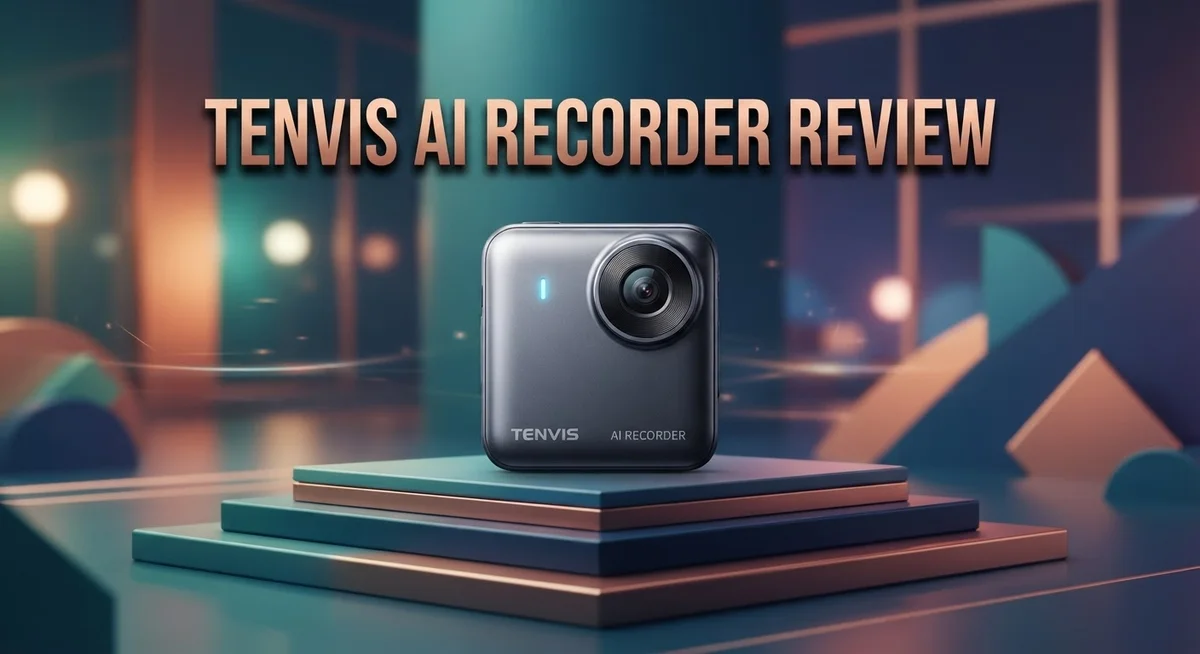
Tenvis AI Recorder Review: Is It Worth Your Money In 2026?
Do you want a smart camera that keeps your home safe? The Tenvis AI Recorder might be your answer.
This device offers night vision, motion detection, and digital zoom. It sends alerts in under 3 seconds when it spots movement.
Setup is simple. You just scan a QR code, and the app configures everything for you.
You can watch live video or check recorded clips from anywhere. The mobile app works on both iOS and Android devices.
Picture quality stands out as a strong feature. You can also flip, rotate, and adjust settings easily through the app.
But is it truly reliable? Some users report WiFi issues and app glitches.
This review covers everything you need to know. We will look at real performance, honest pros, and genuine cons.
By the end, you will know if this camera fits your needs. Let’s get started with a full breakdown.
In a Nutshell
Here is a quick rundown of the Tenvis AI Recorder for readers who want a fast summary.
-
Alerts arrive fast. The camera sends motion notifications in under 3 seconds, so you get real time updates when something happens.
-
Video clips capture the action. Each triggered clip runs 15 seconds, giving you enough footage to see what triggered the alert.
-
Control features add flexibility. You can flip the view, rotate the angle, and adjust quality settings right from the app.
-
App pairing feels smooth at first. QR code scanning makes setup quick, though some users face issues once the camera runs for longer periods.
-
Support falls short for some buyers. Several users mention slow or unhelpful customer service when problems pop up.
-
Older app versions cause headaches. The previous TENVISTY app version shows reliability problems, and some camera functions get disabled unexpectedly.
This camera works best for buyers who want fast alerts and simple controls. But connectivity hiccups and app inconsistencies mean you should weigh your patience for troubleshooting before you commit.
Key Features and Specifications
The Tenvis AI Recorder packs several hardware capabilities that make it stand out for home monitoring. Night vision lets you see clearly even when the lights go off, so your home stays under watch 24/7. The camera uses infrared technology to capture footage in complete darkness without requiring extra lighting.
Motion detection is the camera’s core security feature. The device responds in just 3 seconds when it spots movement, sending alerts straight to your phone. Each triggered video clip lasts 15 seconds, which gives you enough time to see exactly what caused the alert. This quick response time means you won’t miss important moments.
Digital zoom allows you to get closer to details without moving the camera itself. You can zoom in on suspicious activity or check specific areas of your home from the app. The zoom maintains decent image clarity, so you can identify people and objects reliably.
The mobile app works on both iOS and Android devices. You pair the camera using QR code scanning, which takes just a few minutes. Once connected, you can view live video streams or watch previously recorded clips anytime, anywhere. The app also lets you flip the view, rotate the angle, and adjust video quality based on your internet speed.
Remote access is a major convenience factor. Whether you are at work, on vacation, or simply in another room, you can check on your home instantly. The app shows real time feeds and lets you review past recordings without visiting the camera physically.
Control options give you flexibility in how you monitor your space. You can adjust camera angles, change video resolution, and customize alert settings directly from your phone. These features work smoothly when the connection stays stable.
However, some users report that certain app functions stop working after extended use. WiFi connectivity issues can interrupt service, and older app versions have caused problems for some buyers. These reliability concerns are worth considering before purchasing.

- GPT-5.2 AI Transcription & Summary Turn hours of audio into clear text and concise key-point summaries with...
- Language Speech-to-Text Support Record in up to 112 languages and accents and convert speech to text with high...

Last update on 2026-09-13 / Affiliate links / Images from Amazon Product Advertising API
Setup and Mobile App Experience
Getting your Tenvis AI Recorder up and running takes just a few minutes. The setup process relies on QR code scanning, which means automatic configuration happens without manual tweaking. You simply point your phone’s camera at the code, and the device connects to your WiFi network.
The mobile app works on both iOS and Android, so most users can access it regardless of their phone type. Once paired, you gain remote access to live video feeds and recorded clips from anywhere. This convenience lets you check on your home while at work, traveling, or anywhere with internet.
The app interface gives you several control options right at your fingertips. You can flip the camera view, rotate the angle, and adjust video quality settings based on your needs. These features add flexibility when you want to change how you monitor your space.
Alert notifications arrive incredibly fast. The system sends motion alerts in under 3 seconds, keeping you informed the moment activity occurs. Triggered video clips capture 15 seconds of footage each, providing enough context to see what caused the motion detection to activate.
However, some users report WiFi connectivity issues after the initial setup completes. The camera may struggle to maintain a stable connection in certain home environments. Additionally, several users mention that certain app functions become disabled or stop working after extended use, which frustrates those relying on full feature access.
The QR code pairing feels smooth at first, but problems can emerge once you start using the app regularly. Some buyers encounter glitches that limit their ability to control camera functions remotely. These reliability concerns suggest you should test the app thoroughly during the first week to catch any issues early.
Customer support becomes important if problems arise, yet multiple users report slow or unhelpful responses when they contact Tenvis. This gap in support can leave you stuck if your app stops responding or your camera drops offline unexpectedly.
Video Quality and Night Vision Performance
The Tenvis AI Recorder delivers solid performance when it comes to capturing clear video footage during daylight hours. The camera processes images smoothly, and users consistently report that general picture quality meets expectations for home monitoring purposes. You get enough detail to identify people and objects moving through your space.
Night vision is where this camera shows its strengths. The infrared capability kicks in automatically when light levels drop, so you don’t need to adjust settings manually. The camera switches seamlessly between day and night modes. Infrared night vision provides decent visibility even in complete darkness, letting you monitor your space around the clock. Objects remain identifiable, and motion detection continues to work reliably after sunset.
One thing to note is that night vision performance depends on distance. Subjects closer to the camera appear clearer than those far away. This is normal for cameras at this level. The infrared range covers most standard room sizes without issues.
The digital zoom feature adds flexibility to how you view your footage. You can get closer to details without physically repositioning the camera. This proves helpful when you want to examine specific areas or events more closely. The zoom works on both live feeds and recorded clips.
However, some users report that video quality settings can be adjusted through the app, which is helpful when you need to balance between file size and clarity. This flexibility lets you optimize performance based on your internet connection and storage needs.
One limitation worth mentioning is that certain users experience inconsistent performance over extended periods. Some report that video quality degrades or that features stop responding as expected after weeks of continuous use. This may relate to the WiFi connectivity issues some users have encountered.
Overall, the Tenvis AI Recorder handles video capture and night vision reasonably well for standard home security needs. The automatic night vision switching and digital zoom features add practical value. Just keep in mind that performance can vary depending on your setup and internet stability.
Top 3 Alternatives
Wyze Cam v3

- Motion & Sound Detection: Wyze Cam sends an alert to your phone when baby is crying. 24/7 Continuous video...
- Indoor/Outdoor: Wyze Cam v3 is a wired video camera with an IP65 rating so you can confidently install it...
Last update on 2026-08-22 / Affiliate links / Images from Amazon Product Advertising API
The Wyze Cam v3 offers clear night vision and works both indoors and outdoors. You get a live feed straight to your phone whenever you need it. The camera records video automatically when motion happens. Setup takes just a few minutes. You don’t need any special wiring or complex installation. The app lets you watch your space from anywhere in the world.
Reolink PoE Camera

- Important Notice: Please ensure your Reolink NVR firmware is updated to version 3.6.4 or later. Earlier...
- High-Resolution Triple-Lens Coverage: Total 18MP triple-lens system: 10MP dual-lens panoramic camera for...
Last update on 2026-09-13 / Affiliate links / Images from Amazon Product Advertising API
Reolink PoE cameras connect through your network cable, so they stay powered and online all the time. No batteries to replace means less maintenance work. These cameras deliver sharp, detailed footage in any lighting condition. They record continuously to a local storage device you control. You keep all your video files private on your own system instead of uploading to the cloud.
Eufy Security Camera

- 𝐔𝐥𝐭𝐫𝐚 𝐇𝐃 𝟒𝐊 𝐂𝐥𝐚𝐫𝐢𝐭𝐲: Features true 4K UHD resolution to...
- ...
Last update on 2026-09-13 / Affiliate links / Images from Amazon Product Advertising API
Eufy Security cameras focus on privacy and local storage. The system works without requiring a subscription to cloud services. You get two-way audio, so you can talk through the camera. Motion detection alerts reach your phone instantly. The cameras work in low light and bad weather. Installation is straightforward for most homeowners who want a reliable setup without monthly fees.
Each option gives you different benefits. Wyze works great if you want affordability and cloud access. Reolink suits you if you prefer wired reliability and local control. Eufy makes sense if privacy matters most to you. Consider what features matter most for your specific needs before deciding.
Motion Detection and Alert Response
The Tenvis AI Recorder uses motion detection as its primary security tool. When movement occurs in front of the camera, it responds in just 3 seconds. This quick reaction time means you get notified fast about potential activity in your space.
Once motion triggers, the camera automatically records a 15-second video clip. This gives you enough footage to see what caused the alert without storing endless hours of unnecessary video. The system captures the action that matters most to you.
Alert notifications reach your phone in less than 3 seconds. You don’t sit around wondering if something happened. The speed here is genuinely impressive for a device in this category. Your phone buzzes, and you know something moved near your camera.
The mobile app handles all alert management. You receive push notifications on both iOS and Android devices. Tapping the notification takes you straight to the recorded clip. This workflow keeps everything simple and direct.
One important detail is that motion detection works around the clock. Night vision enables the camera to spot movement even in complete darkness. You get the same quick response whether it’s noon or midnight.
However, some users report WiFi connectivity problems that affect alert reliability. If your connection drops, you might miss notifications or experience delays. A strong WiFi signal near the camera helps prevent these issues.
The 3-second response time assumes your WiFi stays stable and your phone has an active internet connection. Real world performance depends on your network setup. Users with solid WiFi networks report excellent alert timing. Those with weaker signals sometimes experience lag.
The 15-second clip length is a smart balance. It’s long enough to identify what triggered the motion but short enough to keep storage manageable. You can review these clips directly in the app at any time.
Overall, motion detection and alerts work well when conditions are optimal. The speed of response is a genuine strength. Setup takes minutes, and notifications arrive quickly on your phone. Just ensure your WiFi connection stays strong for consistent performance.
Connectivity and Reliability Issues
The Tenvis AI Recorder relies on WiFi connectivity to function properly. This is where reliability becomes a real concern for many users. Once you move past the smooth initial setup, connectivity problems can start appearing without warning.
The QR code pairing process feels seamless at first. Your phone connects to the camera quickly, and everything seems to work great. However, this honeymoon period doesn’t always last. Several users report that WiFi drops occur after regular use begins. When your connection drops, the camera stops sending alerts to your phone. This defeats the entire purpose of having a security device.
The app interface gives you multiple control options right at your fingertips. You can flip, rotate, and adjust video quality remotely. Unfortunately, some users find that these camera functions become disabled or unresponsive after a few days of use. This suggests deeper stability issues within the app itself.
Alert notifications normally arrive in less than 3 seconds when everything works correctly. This speed is genuinely impressive. But here’s the catch: this fast response time depends entirely on stable WiFi and an active internet connection. If either of these fails, your alerts disappear completely.
Customer support becomes critically important when problems emerge. Multiple users report slow or unhelpful responses from the support team. This leaves you stuck troubleshooting connectivity issues on your own.
The older TENVISTY app version reportedly has worse reliability problems than newer versions. If you’re using outdated software, expect more frequent disconnections and app crashes.
Connectivity and reliability issues represent the biggest weakness of this device. The hardware captures good video and responds quickly to motion. The software, however, struggles to maintain consistent performance. Your WiFi network quality directly impacts how well this camera works. A strong, stable connection helps, but even that doesn’t guarantee smooth operation over time. Before purchasing, honestly assess whether you have reliable WiFi coverage in your recording area and whether occasional app problems would frustrate you.
Pros and Cons
Pros
- Setup takes just minutes with QR code scanning and automatic configuration
- Alert notifications reach your phone in under 3 seconds when WiFi is stable
- Night vision captures clear footage in low light conditions
- Mobile app lets you flip, rotate, and adjust video quality on the fly
- Remote viewing works from anywhere with internet access
Cons
- WiFi connectivity problems frequently disrupt alert reliability and live streaming
- Customer service responses are slow and often unhelpful when issues arise
- Some app functions stop working without warning, leaving you unable to control the camera
- Older app versions have serious reliability issues that newer updates haven’t fully fixed
Who Should Buy It
The Tenvis AI Recorder works best for people who want quick motion alerts without complex setup steps. If you value fast notifications and easy smartphone control, this device fits your needs.
Homeowners with WiFi coverage should consider this camera. You get night vision for dark areas and motion detection that triggers within 3 seconds. The QR code pairing means you skip confusing installation instructions and get recording within minutes.
Remote monitoring matters to you? This device lets you watch live footage from anywhere. You can flip, rotate, and adjust video quality right from your phone. The automatic 15-second video clips capture key moments when motion happens.
This recorder suits people who accept some trade-offs. You need strong WiFi signals for reliable alerts. Some users experience connectivity drops that delay notifications. If your internet goes down, live viewing stops too.
Avoid this camera if you need constant support. Customer service responses are slow and often unhelpful when problems occur. Older app versions have reliability issues that cause camera functions to stop working without warning.
The Tenvis AI Recorder appeals to users who want straightforward motion detection. You get clear picture quality and fast alert responses when everything connects properly. Multiple control features let you customize how the camera works.
This device works poorly for people with unstable WiFi. Connectivity problems frequently disrupt alerts and live streaming. If your network drops often, this recorder becomes unreliable.
Buyers should know that app functions sometimes stop working unexpectedly. Newer app versions perform better than older ones, but issues still happen. You’ll need patience when troubleshooting problems on your own.
The Tenvis AI Recorder suits people who want a straightforward security tool with minimal setup. You get fast alerts and remote viewing capabilities. However, you must accept WiFi reliability concerns and limited customer support options. This camera works best in homes with stable internet connections and users who can solve technical issues independently.
Final Verdict
The Tenvis AI Recorder delivers a mixed experience overall. It shines in quick setup and fast alerts, but stumbles when WiFi conditions turn rocky.
Think of this camera as a solid entry point into smart home security. It gives you clear night vision and simple app controls without heavy technical steps.
Reliability remains the biggest question mark. Users who enjoy stable internet at home will likely get more value than those with patchy connections.
Bold performance in ideal conditions contrasts with frustrating gaps when things go wrong. This gap defines the whole ownership experience.
Compare this device to note-taking gadgets like Plaud NotePin or Otter.ai, and you see a different purpose entirely. Those tools focus on audio transcription, while Tenvis focuses purely on visual security monitoring.
That said, direct security camera rivals still offer stronger customer support networks. This makes Tenvis a bit riskier for buyers who value long term peace of mind.
Software stability also needs attention from the manufacturer. Regular updates could fix many of the connectivity headaches users currently face.
Until then, buyers should treat this camera as a functional but imperfect solution. It handles basic monitoring tasks well, yet lacks polish in critical support areas.
Should you buy it? That depends on your patience level with occasional glitches. If quick alerts and simple video review matter most, this camera meets those needs.
If you expect flawless uptime and responsive help desks, look elsewhere first. The Tenvis AI Recorder rewards flexible users more than demanding ones.
In short, this device works as a decent starter camera for casual home monitoring. It is not a premium security solution, but it gets basic jobs done reasonably well.
Weigh the pros and cons carefully before deciding. Your home network stability will likely determine your overall satisfaction with this product.
Frequently Asked Questions
Does the Tenvis AI Recorder work in complete darkness?
Yes, it does. The camera has night vision built in, so it captures clear footage even when there’s no light. You’ll see what’s happening in dark rooms or outdoor spaces at night without any issues.
The infrared technology handles low light situations well. Just keep in mind that picture quality in darkness won’t match daytime footage, but you’ll still get usable video for security purposes.
How fast are the motion alerts?
The camera sends alerts in less than 3 seconds when it detects motion. This speed matters because you get notified almost instantly about activity in your space.
When motion triggers, the recorder creates a 15 second video clip automatically. You can review these clips through the mobile app from anywhere you have internet access.
Can I control the camera from my phone?
Yes, the mobile app gives you several control options. You can flip and rotate the video view, adjust picture quality, and watch live footage remotely. The setup process is simple too—you just scan a QR code and the camera configures itself automatically.
However, some users report that app functions occasionally stop working without warning. This means you might lose control features temporarily until you troubleshoot the connection.
What internet speed do I need?
The Tenvis AI Recorder requires a stable WiFi connection to function properly. Motion alerts and live streaming depend on consistent connectivity.
Many owners experience WiFi issues that disrupt alerts and streaming quality. If your home has weak WiFi coverage or frequent disconnections, this camera may frustrate you. Strong WiFi stability is essential for reliable performance.

DK is a technology expert who specializes in AI tools, software, and tech gadgets. He writes for How to Tech Info, providing detailed reviews and practical guides. DK helps readers discover the best AI applications, navigate new software, and choose the right tech gadgets.