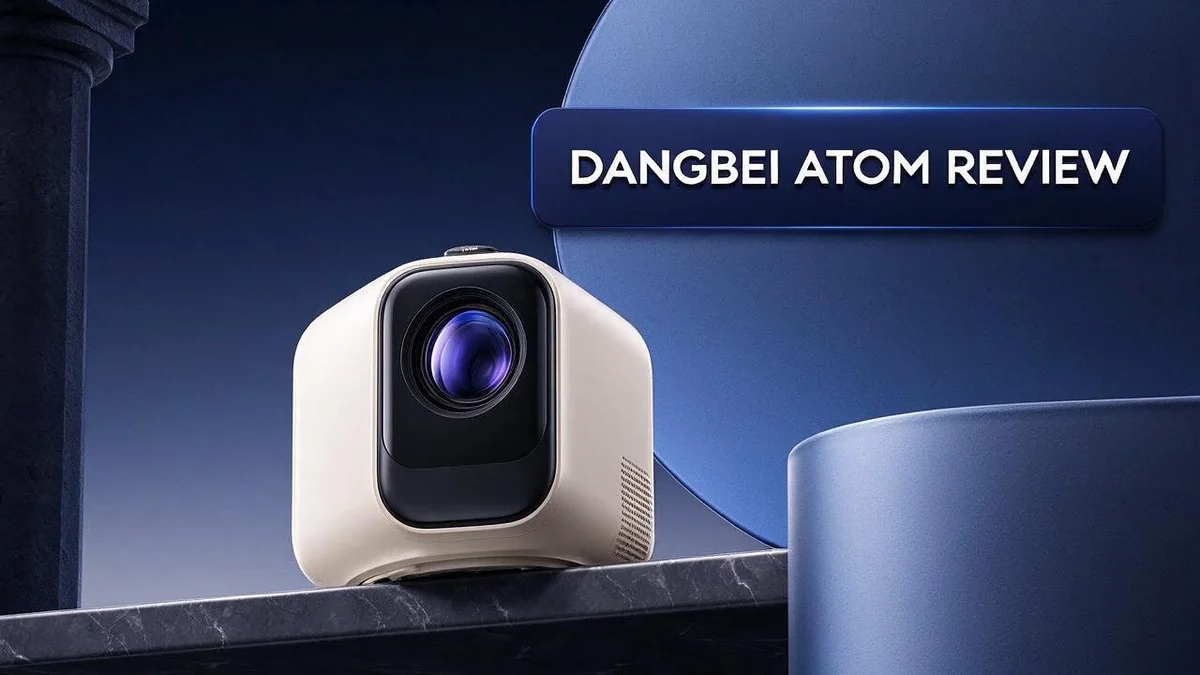
Dangbei Atom Review: Ultra-Slim Laser Projector Tested for Picture, Setup and Sound
Are you looking for a projector that fits almost anywhere? The Dangbei Atom might be the answer. It is very slim, yet it still delivers a bright and clear picture.
Setting it up takes minutes. Autofocus and keystone correction do most of the work for you. You can place it on a shelf, aim it at the wall, and start watching right away.
Inside, you get a 1080p laser projector rated at 1200 ISO lumens. It supports 3D playback, Google TV, Chromecast, and HDR10. The laser runs cool and quiet, so movie nights stay peaceful.
Is it perfect? Not quite. Some users notice a little blur at first, but the refocus button fixes it fast. The speakers are fine for casual viewing.
This review covers design, picture quality, and daily use. Read on to see if the Dangbei Atom belongs in your home theater setup.
In a Nutshell
-
Slim and light: At 1.87 inches thick and 2.82 pounds, it slides easily into a backpack or onto a shelf. Moving it between rooms feels effortless for most people.
-
Quiet operation: The laser light source stays cool, and the fans are barely audible during movie nights. This helps when dialogue is soft or the room is calm.
-
Simple fix for blur: Occasional blur can appear on some walls or at certain angles. The quick refocus button clears it in seconds, so you rarely need to dig through menus.
-
Streaming ready: Google TV and Chromecast come built in, so you can open apps without buying extra devices. Your favorite shows load right from the home screen.
-
Mixed 3D results: The projector supports full 3D playback for films and games. However, the image looks dimmer than ideal in 3D mode, so dark rooms work best.
-
Sound needs a boost: The speakers sound alright for casual viewing. Many owners later add a soundbar or wireless speaker for richer audio.
Picture Quality and Brightness

- Built-in Netflix: Access 10,000+ apps from Google Play and enjoy a vast library of 700,000+ movies and shows...
- Laser-Powered Brilliance: Elevate your viewing experience with unparalleled brightness, thanks to the 1200 ISO...
Last update on 2026-11-05 / Affiliate links / Images from Amazon Product Advertising API
Picture quality decides whether a projector feels worth your time. The Dangbei Atom creates a lively image with clean edges.
Colors look rich without appearing fake. Skin tones look natural, and greens and blues stand out nicely.
Brightness is the strongest part of this projector for its size. Many compact models struggle in lit rooms, but this one holds up.
Daytime viewing asks more from any projector. Closing the curtains helps a lot. With some room light on, the picture still stays watchable.
Screen size changes how bright the image feels. A smaller picture looks punchier, while a large wall image spreads the light thinner.
Contrast is another strength for a projector this compact. Dark scenes show more depth than you might expect. Shadows keep their detail, so night scenes do not turn into mud.
Color accuracy works well out of the box. You can still tweak the picture settings to suit your taste.
Tip: Start with the default picture mode. Then adjust the sharpness only if the image looks harsh.
Wall color matters too. A white wall gives the cleanest result. Cream or grey walls can dull the colors a little.
Overall, the picture earns high marks. It looks bright, colorful, and clear for everyday movies and shows. Is it the finest image you can buy? No, but it comes close for the size.
Who benefits most? Viewers who want a bright picture in a small body will like it. Families with kids also enjoy the vivid cartoons.
Dark movies look their best in a dim room. Dim the lights before you press play. Your eyes will thank you.
Final thought on the picture: it rewards a little planning. Good light control and a plain wall let the image shine.
Simple habits make a clear difference. Close the blinds, keep the wall clean, and start with a favorite film.
Setup and Autofocus
Setting up the Dangbei Atom feels easy from the start. Place it on a table, shelf, or stand.
Then plug it in and press the power button. The start screen guides you through the rest.
Autofocus starts working right away. The lens moves on its own until the picture looks sharp. You never need to twist a dial or guess the right distance.
This saves time when you move the projector to a new spot. Each shift in position needs a quick check, but the lens handles most of the work.
Keystone correction fixes the tilt. If the projector sits at an angle, the image can look like a wide trapezoid. The system squares the shape so the edges line up.
Some viewers still check the corners by eye. A small tweak often gives the cleanest result.
Screen fit gives you another helpful option. It stretches the picture to fill your wall or screen. This step helps you avoid black bars along the top or sides.
You can switch between fit modes until the image matches your room. Try each one and pick the best match.
Obstacle sensing adds a useful layer of safety. The sensors look for objects in front of the lens.
If something blocks the beam, the projector reacts. This helps most in busy rooms with pets, kids, or people walking by.
Placement matters more than many people expect. Aim the projector straight at the wall when you can. This keeps the image shape close to a true rectangle.
Leave a small gap around the vents so air can flow. Good airflow keeps the unit working well during long viewing sessions.
Here is a simple setup routine:
- Place the projector and plug it in.
- Wait for autofocus to finish.
- Check the keystone and adjust if needed.
- Choose the screen fit that suits your wall.
Repeat this routine each time you move the unit. A few minutes of checks keeps every movie night looking sharp.
Built-In Sound and Smart Platform
Sound is only half of the story with this projector. The smart platform matters just as much when you sit down to watch.
The home screen feels familiar. Google TV shows suggested titles from many apps in neat rows. You can pick a movie without opening each service one at a time.
Profiles keep viewing history separate for each person. Everyone sees picks that match their own taste. This helps families share one projector without mixing up recommendations.
Voice search saves even more effort. Just speak a title, and the system checks supported apps for a match.
Results appear in a clear list, so picking the right show takes seconds.
Dolby sound adds another layer. The Atom supports Dolby audio, which can add depth when the source file offers it.
Look for Dolby labels in the app before you press play. Good soundtracks feel more lively as a result.
A slim body leaves little room for large drivers. Deep bass stays limited, so action scenes may lack punch. Many people choose an outside option for a fuller sound.
Pairing a soundbar is the easy fix. Connect a soundbar or speaker system to the projector. The picture stays sharp while the external setup handles the audio.
HDR10 and HLG support brings another benefit. Compatible shows can display a wider range of light and detail. Dark scenes often look more layered as a result.
Software updates keep the platform fresh. Check for updates now and then so new apps and fixes arrive. A few minutes of setup each month keeps the experience smooth.
Overall, the smart features make the Atom a strong pick for casual viewers. You get a clean menu, easy searching, and helpful audio options. Families, students, and movie fans will all find something useful here.
Top 3 Alternatives
Looking for a compact projector that does more than the basics? These three options are worth a look.
Anker Nebula Capsule

- Super-Sized Screen, Portable Design: Capsule 3 is an all-new ultra-portable Google TV projector licensed by...
- Take the Big Screen Anywhere: With a max screen size of 120 inches, Capsule 3 delivers a cinema-level...

Last update on 2026-10-07 / Affiliate links / Images from Amazon Product Advertising API
The Anker Nebula Capsule is a small, portable projector that fits in a pocket. It runs on Android TV, so you can stream your favorite shows and apps without extra gear. Its built-in battery lets you watch movies in the backyard or on a camping trip. It is easy to carry and simple to set up.
Samsung Freestyle

- POINT & PLAY: Pick a spot, place it, tilt it and watch content come to life with the smart theater that makes...
- EASY SET UP: Let The Freestyle 2nd Gen with Gaming Hub do the work with its Auto Leveling, Auto Focus and Auto...
Last update on 2026-06-09 / Affiliate links / Images from Amazon Product Advertising API
The Samsung Freestyle works well for people who already use Samsung devices. It offers access to Samsung’s smart TV apps and supports voice control. It can adjust the image to fit many spaces, which helps when you do not have a perfect wall. It also works as a mood light or a small speaker when you need one.
XGIMI MoGo

Last update on 2026-11-05 / Affiliate links / Images from Amazon Product Advertising API
The XGIMI MoGo is another portable choice with a clear, bright picture for its size. It runs on Android TV and includes a built-in battery for flexible viewing. Some versions include a higher resolution, so check the model details before you buy. It suits movie nights, gaming sessions, and casual family viewing.
Portability and Design
The Dangbei Atom is easy to carry. It weighs 2.82 pounds, so one hand can lift it with ease. Most people can move it from the living room to the bedroom in seconds.
The body measures only 1.87 inches thick. This slim profile fits on a crowded shelf or a narrow console table. It also slides into a bag without much fuss.
Small size changes how you use it. You can set it up in a dorm room, a guest room, or a home office. Moving it between rooms takes almost no effort.
The design stays simple. A clean body keeps the look tidy on any shelf. Guests often notice how little space it takes up in the room.
A compact body rests well on a stable table. Keep the power cable tucked away so nobody trips over it. Tidy cables make the room feel calm.
Cooling runs quietly too. The laser light source stays cool during long sessions. The fans barely make a sound, so your film stays the focus.
Portability also helps on busy weekends. Take it to a friend’s place for a movie night without a heavy load. Pack light and enjoy the big screen on any plain wall.
Placement matters more than you might think. Point the lens at a plain wall and keep a clear path between the lens and the seating area. A small body makes that step easy.
Compared with the XGIMI MoGo 3 Pro, this model uses a single laser source. That difference matters for people who want one clean light source in a compact body.
In short, the slim frame suits people who move often. It fits small spaces and travels well between rooms. Anyone who values a light, quiet projector will appreciate this design.
Laser Light Source and Noise
The Dangbei Atom laser light source sets the tone for every movie night. This projector uses an ALPD laser to create its bright image. Laser light stays steady, so colors look rich from start to finish.
Brightness matters a lot in a compact design. The projector rates at 1200 ISO lumens. That output works well in a lightly lit room. Dark rooms still give the best results.
Noise is a common concern for small projectors. Many compact models use tiny fans that whine during playback. The Dangbei Atom handles this better. Its fans stay barely audible during normal viewing.
Low fan noise helps quiet scenes. Dialogue and soft music come through without distraction. You can hear the story instead of the machine. Many buyers look for this in a bedroom setup.
The picture has a few limits too. Viewers sometimes notice soft focus after a move. The refocus button fixes this in seconds.
Brightness drops a little in 3D mode. The 3D output is not as bright as the standard picture. Viewers who love 3D should keep the room dark.
Dark curtains help the laser shine. Close the blinds before you start a film. This small step makes colors pop and reduces glare on the wall. Your eyes will thank you after a long night.
Lamp projectors need more care. Traditional lamps grow dimmer and louder as they age. Laser sources generally hold steady for longer periods. That means fewer replacements and less upkeep for busy households.
A quiet projector suits shared spaces. Roommates and family members can relax nearby without a constant hum. Quiet operation makes the Dangbei Atom a friendly choice for shared rooms.
Ask yourself one simple question. Do you watch in a quiet room or a busy one? The answer shapes how bright and how quiet the projector needs to be.
Pros and Cons
Pros
- Autofocus and keystone correction make setup fast
- Obstacle avoidance adjusts the image when something blocks the beam
- The refocus button clears up blur in seconds
- Full 3D playback works with compatible content
- Google TV and Chromecast give you plenty of apps
- Picture quality stays strong for the size
Cons
- The image can look soft until you press refocus
- A 1080p panel shows less detail on very large screens
- Built-in speakers sound only alright during loud scenes
Who Should Buy It
This projector suits people who want a big picture without a big commitment. Many buyers fall into a few clear groups. See if one of them describes you.
Renters make a strong match. You can pack the projector up when you move. No drilling, mounting, or permanent setup is needed. A landlord rarely needs to approve a wall change.
Students also benefit from this model. Small shared flats often lack wall space and shelving. This projector sits on a desk or sideboard, so study breaks can turn into film nights with friends.
Couples who enjoy cozy evenings can enjoy it too. Pick a plain wall, dim the lamps, and share a movie without a crowded television stand. The night feels more like a cinema trip. Nobody needs to leave the sofa.
Families with children often love the setup. Cartoons and weekend movies look bigger and more fun on a wall than on a tablet. Kids can gather on the floor and watch together.
Frequent travelers who stay in temporary homes may appreciate it. Short stays feel more comfortable when entertainment travels with you. Packing a bag takes minutes, not an afternoon.
Look elsewhere if you want a permanent home theater. Buyers who plan a dedicated cinema room with a huge screen and powerful speakers may want a larger system. Those who need top brightness in a sunny living room should compare other models first.
Think about your daily routine. Ask where you will watch most often. A bedroom or study fits this projector well. A bright open plan room may need more light output for daytime viewing. Your habits matter as much as the specs.
The right choice depends on your space and habits. Measure your wall and think about your viewing hours. A short check now saves frustration later.
Final Verdict
Overall, the Dangbei Atom earns a strong recommendation. It packs solid performance into a slim, light body. Most people will enjoy what it delivers.
The biggest win is balance. Many small projectors force you to choose between brightness, picture quality, and easy setup. This model offers all three in one package.
Think of the Atom as a flexible companion rather than a fixed fixture. It brings the feel of a cinema to spaces that never had room for one.
Compared with the XGIMI MoGo 3 Pro, the Atom takes a different route. The MoGo 3 Pro uses a triple laser design. The Atom relies on a single laser instead. That choice keeps the Atom lighter and simpler.
Who should buy it? Shoppers who want flexibility will find the Atom a smart pick. It fits people who move rooms often or want a simple setup.
Think about how you will use it after the first month. A projector that moves between rooms needs to stay easy to handle. The Atom handles that job well.
No projector suits every home, and the Atom is no exception. Still, its strengths outweigh its small limits for most shoppers.
A simple final thought. The Atom suits casual viewers who want a big picture without a complicated setup. It rewards people who value easy movement and quick starts. It also makes a thoughtful gift for someone starting a new home.
Few products in this class offer such a clear mix of portability and picture quality.
Consider the Atom your next step if you want a bright, quiet, and flexible projector. Pair it with an external speaker if sound matters most to you. A small speaker upgrade can lift your movie nights.
Pick the Atom if your goal is a flexible screen that works in many spaces.
Frequently Asked Questions
Can I move the Dangbei Atom between rooms?
Yes, you can move it easily. Its slim body and light frame make it simple to carry. Place it on a shelf or side table, then let autofocus adjust the image for each new spot.
Does the Atom work in rooms with some daylight?
It handles mild room light well. For the best picture, close the curtains and dim the nearby lights. Direct sunlight can wash out the image, so keep the lens away from bright windows.
Is fan noise a problem during late movie nights?
Usually not. The laser runs cool and quiet, so the fans are barely audible. Late-night viewing stays calm, even in a small bedroom.
Can I add a soundbar for better audio?
Yes, you can. The built-in speakers work fine for casual shows, but a soundbar adds more punch for action films. Check your ports first so you know which connection works best.
How do I choose the right spot for my projector?
Start by measuring the space between the lens and your wall. Mark a few possible spots with painter’s tape. Test each one at night and during the day, then pick the spot that gives the clearest image.

DK is a technology expert who specializes in AI tools, software, and tech gadgets. He writes for How to Tech Info, providing detailed reviews and practical guides. DK helps readers discover the best AI applications, navigate new software, and choose the right tech gadgets.