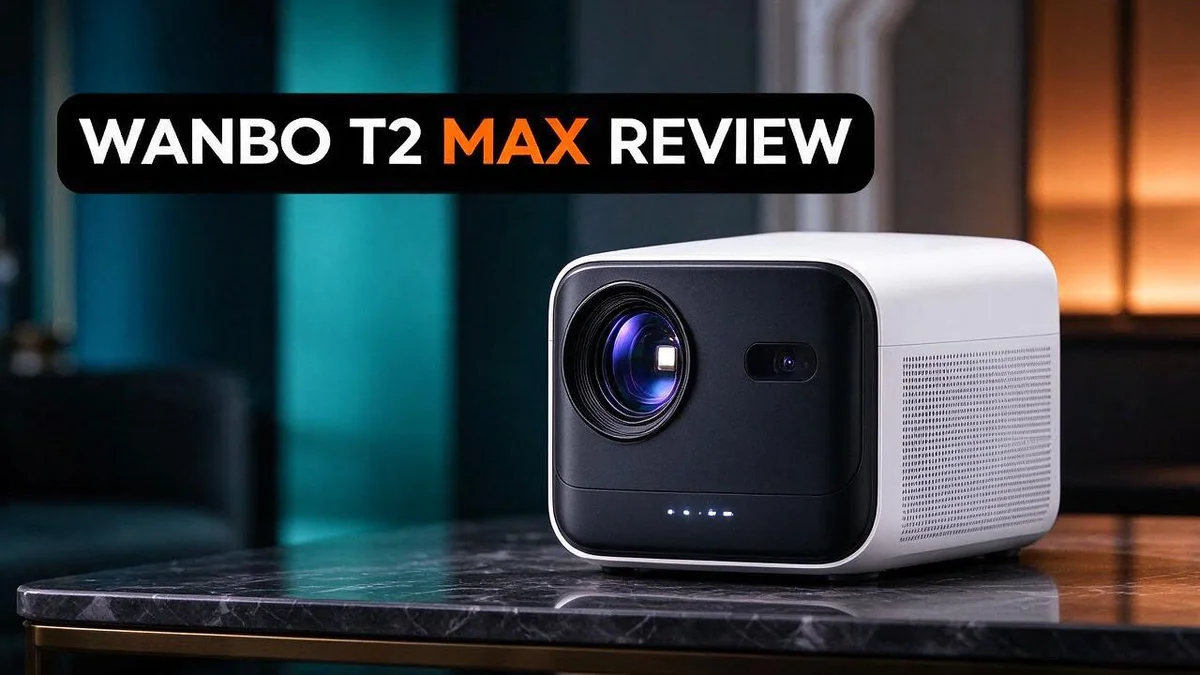
Wanbo T2 Max Review: Brightness, Auto Focus, Keystone Correction and Verdict
Are you tired of spending your movie nights fixing projector settings? The Wanbo T2 Max aims to make setup much easier. It offers auto focus and auto vertical keystone correction, so you spend less time adjusting the image.
Movie lovers will enjoy the big screen feel. It supports 1080p resolution and can decode 4K content. It also runs Android 9 and offers wireless mirroring for both Android and iOS devices.
In this review, we take a closer look at the specs, the real pros, and the cons. We also compare it with close rivals so you can decide if it fits your home. Let’s dive in.
In a Nutshell
- Quick start for busy evenings: The projector handles focus and tilt on its own. You can place it on a shelf and start watching in minutes.
- Works with most phones: Wireless mirroring supports both Android and iOS. Friends can share photos, videos, or games right from their own devices.
- Runs on a familiar system: Android 9 gives access to many popular apps. Viewers can stream shows without plugging in extra gear.
- Best for simple setups: This model focuses on core features. It suits a bedroom or living room where people want easy, straightforward viewing.
- A sibling worth comparing: The Wanbo T2 Ultra offers 500 ANSI lumens, a gimbal, and Android TV 11. Buyers who want more movement and extra features should look at both models.
- Watch for a few user reports: Some owners saw unexpected app selections on screen. Another user lost the remote, so store the remote in a safe spot.
Brightness and Image Quality

- 【Seamless Entertainment Galore】Built-in Google TV 14 without extra devices—access Netflix, Disney...
- 【Ultra-Long 3.5H Playback】Enjoy up to 3.5 hours of video playback or 12.5 hours of music playback on a...
Last update on 2026-11-05 / Affiliate links / Images from Amazon Product Advertising API
Brightness shapes how the picture looks in your room. The Wanbo T2 Max is listed at about 450 ANSI lumens in one comparison. That number suggests a clear image in a dim room, but it does not promise a bright picture in daylight.
Dark rooms bring out the best image. Projected light needs darkness to stand out. Close the curtains and turn off extra lamps. You will see brighter whites and deeper shadows.
Daytime viewing is harder. Sunlight washes out most projected images. Plan your movie time for the evening. Keep the room as dark as you can.
Newer software updates add extra claims. Some listings mention 80% brightness and a 99% color gamut. These numbers come from the maker, so treat them as goals to check, not guarantees.
A color gamut describes how many shades a screen can show. A wider range can make skin tones, grass, and sky look more natural. Play a film with bright scenes and dark scenes. Notice whether the colors look rich or flat.
Contrast matters too. Dark scenes show detail only when the projector blocks extra light. Many viewers find the image looks best with the lights off. Test a few scenes before you settle in.
Your screen choice changes everything. A plain white wall reflects light unevenly. A simple projector screen can lift brightness and make colors pop. Even a light gray wall can help a little.
Small and medium rooms suit this model best. It handles casual movie nights well. Viewers who expect cinema sharpness in bright rooms may want a stronger projector.
Focus and Keystone Correction
Focus and keystone correction are two features many buyers care about. Nobody wants a blurry picture after moving a projector. The Wanbo T2 Max tries to handle both jobs for you.
The autofocus system checks the image and sharpens it on its own. You do not need to twist a dial until the text looks clear. Newer software versions describe AI autofocus, so the feature may improve over time.
Keystone correction fixes the shape of the image. When a projector sits low or tilted, the picture turns into a trapezoid. The T2 Max uses automatic vertical correction to square that shape back into a rectangle.
Why does this matter? Many people place projectors on a shelf, a dresser, or a coffee table. These spots rarely line up with the center of the screen. Automatic correction saves time and frustration.
Here is a simple setup routine. Place the projector on a stable surface. Turn it on and let it find the image.
Then check the corners and the text edges. If anything looks off, move the projector slightly and let the system adjust again.
Keep in mind that vertical correction works best for up and down tilt. Side angles may still look uneven. Position the projector roughly straight ahead of the wall for the cleanest result.
Also remember that heavy correction can soften the image a little. Digital adjustments reshape pixels, so the very edges may look less crisp. A centered placement keeps the picture sharp with less correction needed.
Good placement gives the best start. Aim for a spot where the lens faces the screen head on. Keep the projector a comfortable distance from the wall. Then let the automatic features fine tune the rest.
Remote control matters too. One owner lost the remote, so keep it in a fixed spot. That simple habit saves trouble on busy evenings.
Sound Performance
Sound matters just as much as the picture. Many people forget this part when they choose a projector.
The Wanbo T2 Max lists a Hi Fi sound upgrade among its features. This claim sounds promising. The research for this review does not include independent sound tests.
Keep your expectations realistic. Small projectors usually have small speakers. Dialogue often comes through clearly in a quiet room.
Big action scenes may sound thinner than the picture looks. Sound quality also depends on where you place the unit.
Hard walls bounce sound back. Soft items like rugs, curtains, and sofas absorb it. Try to keep the projector away from corners for a cleaner tone.
Try a simple sound test. Play a scene with quiet talking first. Then play a scene with music and loud effects. Listen for clear voices and steady bass.
Volume needs care too. Pushing the volume to the maximum can make small speakers sound harsh. Keep the level at a comfortable middle point.
Room size changes the sound as well. A small room helps voices feel full and clear. A large room may need more volume, which can strain small speakers.
External audio adds richness. Many viewers pair an external speaker or soundbar when they want fuller audio, if their setup allows it. Check the ports and connection options on your unit first.
Streaming apps also offer their own audio settings. Look for stereo, surround, or night mode options in the app menu. Night mode can soften loud scenes.
Background noise matters too. A fan, a fridge, or street traffic can hide quiet dialogue. Close the windows and turn off nearby devices during movie time.
Who should care most about sound? Casual viewers often feel happy with the built in audio. Serious audio fans may want a separate speaker setup for the best results.
Top 3 Alternatives
Looking for a different projector? These three options make great alternatives for movie nights, sports, and gaming. Each one brings a fun home theater feel to your space.
Anker Nebula Capsule

- Super-Sized Screen, Portable Design: Capsule 3 is an all-new ultra-portable Google TV projector licensed by...
- Take the Big Screen Anywhere: With a max screen size of 120 inches, Capsule 3 delivers a cinema-level...

Last update on 2026-10-07 / Affiliate links / Images from Amazon Product Advertising API
The Anker Nebula Capsule is a compact projector that fits easily in a backpack. It runs Android TV, so you can open streaming apps without a separate device. The built in speaker delivers clear sound, which makes it a good pick for small rooms, dorms, and camping trips.
XGIMI MoGo 2

- Multi-angle Rotation: 120° Adjustable Angle. Easily switch your projected image from the wall to the ceiling.
Last update on 2026-11-05 / Affiliate links / Images from Amazon Product Advertising API
The XGIMI MoGo 2 offers a bright and sharp picture for living rooms and bedrooms. It also uses Android TV, so you can stream your favorite shows with ease. Its rechargeable battery lets you move it from room to room without searching for an outlet.
Vankyo Leisure 3

- [ Native 1080P Full HD Resolution ] - Enjoy crystal-clear visuals with HAPPRUN H1's native 1920x...
- [ Mini & Portable ] - Designed to fit your backpack and your lifestyle. From cozy bedroom corners and compact...
Last update on 2026-07-11 / Affiliate links / Images from Amazon Product Advertising API
The Vankyo Leisure 3 is a simple choice for first time buyers. It supports wireless screen sharing from phones and laptops, so you can display videos and photos right away. Setup takes only a few minutes, which means you can start watching sooner.
Each of these projectors suits a different lifestyle. Think about where you plan to use it and what you want to watch. With the right fit, your home cinema will feel just as enjoyable as a trip to the theater.
Connectivity and Mirroring
Connecting your phone takes very little effort. The Wanbo T2 Max supports wireless mirroring for Android and iOS. You can share your screen without digging out a single cable.
This feature suits homes with mixed phones. An Android owner and an iPhone owner can both use the same projector. Nobody needs to swap gear or hunt for adapters.
The projector runs on Android 9. This gives the screen a layout that Android users will recognize. Your phone and the projector can work together in a simple way.
Mirroring needs a stable link. Keep your phone close to the projector during setup. Thick walls and crowded rooms can weaken the connection. A clear path helps the link stay steady.
Power on the projector first. Then open the screen mirroring option on your phone. Pick the projector from the device list.
Your phone becomes the main control panel during mirroring. You can scroll photos, open apps, and pick videos right from your hand.
Mirroring suits photos and short clips best. A slideshow of family photos works well on a big wall.
Expect a short delay sometimes. Fast action games or quick video edits may lag a little. Movies and slideshows usually run smooth.
Streaming apps need an internet connection. Keep your home network active during movie nights.
Keep your phone charged during shows. Mirroring uses power on the phone. Plug in a charger if the session runs long.
Pick a spot with a clear line. Place the projector where your phone can reach it easily. Avoid placing it behind furniture or in a closed cabinet. Good connections make movie nights more fun.
Test before the party starts. Run a short test with your phone a day early. Check the picture, the audio, and the connection stability.
Check for software updates from time to time. Fresh versions can help keep mirroring steady.
Ease of Use and Remote Control
The menu feels familiar for Android users. The home screen follows the standard Android layout. Anyone who owns an Android phone will spot the icons quickly.
Moving around the screen takes practice. Use the directional keys to highlight apps, settings, and video files. Press the center button to open a choice.
Remote control keeps the experience smooth. The included remote covers basic moves like navigation and volume. Keep it within easy reach during movie nights.
Watch for unexpected selections. One owner reported that the screen chose apps and options on its own. Check the highlighted item before you press the center button.
A lost remote causes real trouble. One user reported losing the remote and feeling stuck. Store the remote in the same spot after each session.
Spare batteries deserve a place too. Keep a fresh set in a labeled drawer nearby. Dead batteries can stop the remote mid movie.
Typing can feel slow. Searching for apps or logins takes many button presses. Try voice search if your apps support it.
Settings deserve a quick review. Open the settings menu before your first movie. Adjust the display and language options so daily use feels easier.
Short menus save time. Put your favorite app on the home screen. This small step cuts down on endless scrolling.
Who benefits most? Families and casual viewers usually adjust quickly. Tech fans may want more control over app choices and menu layouts.
Hidden options can confuse new owners. Some menus pack many choices into one page. Take your time and read each label before pressing select.
Small habits make a big difference. Practice the arrow keys for five minutes. You will feel more confident during your next movie night.
Final thoughts on the controls. The remote and menu work well for simple tasks. Heavy app use may need more patience and a few extra taps.
Pros and Cons
Pros
– Autofocus keeps the picture sharp with less setup work.
– Vertical keystone correction straightens the image on angled surfaces.
– Mirroring works with both Android and iOS phones.
– The Android home screen feels familiar to most users.
– The remote handles basic moves like navigation and volume.
Cons
– It lacks the gimbal and extra features of the T2 Ultra.
– The screen may pick apps or options on its own.
– A lost remote can leave you stuck until you find a spare.
– Typing and app searches take many button presses.
Who Should Buy It
If you love relaxed movie nights, this projector fits your style well. It works best for people who watch family films and short shows.
Small rooms and bedrooms suit it nicely. Students in a dorm can use it for study breaks and fun videos.
Families with young children also find it useful. Kids can enjoy cartoons on a wall without a large television.
Renters often like this option. It avoids permanent wall changes, so it fits rented homes well.
Weekend travelers may also appreciate its simple setup. Anyone who values a quick setup will feel at ease.
The 1080p picture suits everyday streaming and home videos. Viewers who want a huge, bright image may need a stronger model.
Friends can gather for a shared movie night. A projector turns a blank wall into a big screen.
Couples who enjoy cozy evenings often choose projectors over televisions. This model keeps the setup simple for first time buyers.
Movie fans may want external speakers for richer sound. Teachers may show short lessons to small groups.
Retirees who like classic films may enjoy the big picture. Plan your seating before you set up the screen.
Measure your room before you decide. Check your wall color, since light walls give the brightest picture.
A plain white wall often gives the cleanest image. Curtains help a lot during daytime viewing.
Skip this model if you mostly watch in bright daylight rooms. Strong sunlight washes out projected images, so dim rooms work best.
Keep the projector at a comfortable distance from seating. Shoppers who want simple home theater fun will likely be happy.
Overall, this model suits casual viewers with simple needs. Give it a try in your own room to see if it fits.
Final Verdict
The Wanbo T2 Max makes a sensible pick for people who want a simple projector. It handles everyday streaming well and sets up quickly on most walls.
Its best quality is how little effort it asks from you. Switch it on, point it at a wall, and let the automatic features do most of the work.
The numbers deserve a careful read. The 450 ANSI lumen rating comes from one comparison. Real brightness depends on your room lighting.
Claims about 80 percent brightness, 99 percent color gamut, and Hi-Fi sound come from newer updates. Confirm them before you buy.
Think of this model as a first projector rather than a full entertainment center. If you want a gimbal or Android TV 11, the T2 Ultra fits your needs better.
Choose the T2 Max when you value simplicity over extra features. It delivers a clear picture with minimal fuss, which suits casual viewers well.
Set up for the best results. Dim the lights, pick a plain light colored wall, and place the projector on a steady table or stand. Good conditions matter more than any spec sheet.
Give it a fair trial before you decide. Test the picture in your own room at night and during the day. Your space will tell you more than any review can.
Software updates may add useful improvements over time. Wanbo has shared newer features, so a model that feels basic today could improve later. Keep the software current and check release notes now and then.
In short, the T2 Max is a dependable choice for relaxed home viewing. It offers easy setup, wireless mirroring, and a picture that works well for movie nights at home. Weigh that simple setup against the missing extras, and the right answer should become clear.
Frequently Asked Questions
Who should skip the Wanbo T2 Max?
Some buyers want more than a basic projector. If you need a gimbal or a full Android TV experience, a sibling model fits better. The T2 Ultra covers those extra needs.
Does the Wanbo T2 Max work in bright rooms?
Bright light can wash out a projected image. Close the curtains and dim the lights before you watch. Room darkness matters more than the projector itself.
Can I set it up outdoors?
Yes, you can use it outside on a calm night. Place it on a flat surface and aim it at a clean, pale wall. Keep the lens dry and away from wind.
Do I need extra devices to get started?
Not always. The Android system includes many streaming apps. You can also connect a laptop or game console with a cable. Check the ports on the back before you buy any accessories.
How do I keep the picture clear over time?
Dust can build up on the lens after months of use. Wipe the lens gently with a soft, dry cloth. Let the projector cool before you move it. This simple habit keeps the image sharp and the device working well.

DK is a technology expert who specializes in AI tools, software, and tech gadgets. He writes for How to Tech Info, providing detailed reviews and practical guides. DK helps readers discover the best AI applications, navigate new software, and choose the right tech gadgets.