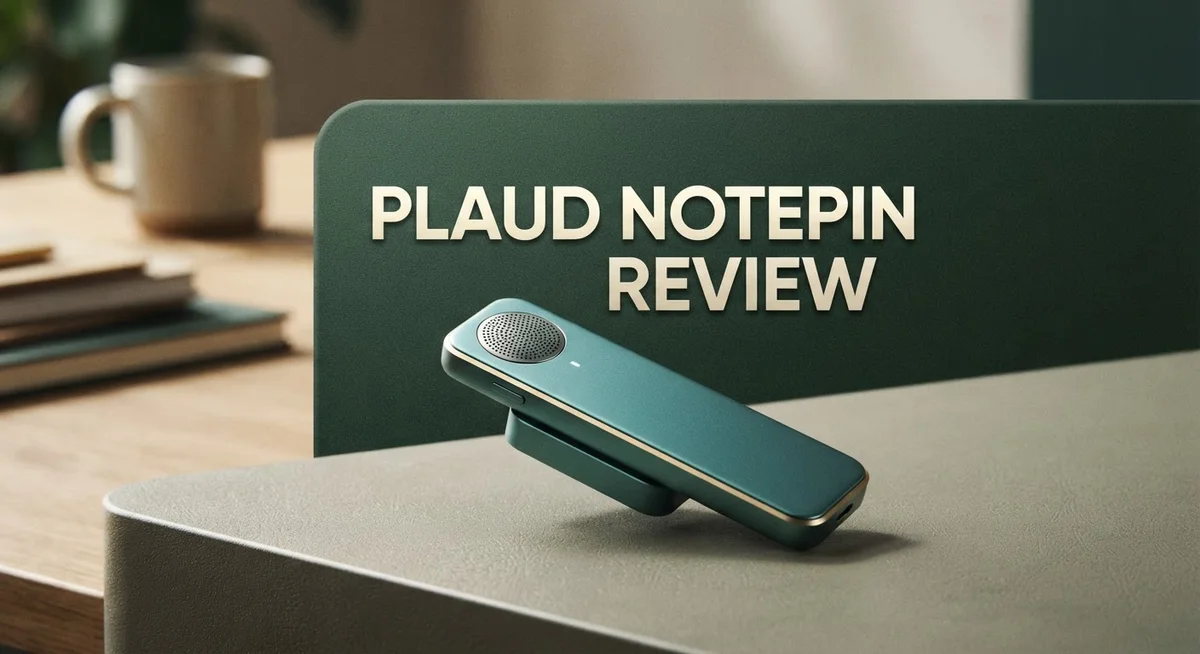
Plaud NotePin Review: AI Voice Recorder for Professionals
Ever missed important details during a meeting? The Plaud NotePin wants to fix that problem.
This tiny capsule shaped device records your conversations hands free. You can wear it, clip it, or carry it anywhere.
The NotePin supports 112 languages. It stands by for 40 days on a single charge. That means less time charging and more time capturing what matters.
Inside the app, you get speaker labels and auto paragraphing. Your voice notes turn into clean, readable text within seconds.
We tested this device for meetings, interviews, and daily notes. This review shares what works well and what needs improvement.
If you want a simple way to capture conversations, this device might interest you. Let’s look at how the Plaud NotePin performs in real life.
In a Nutshell
The Plaud NotePin works well for people who need quick, hands free recording. Here is what stands out after our tests.
-
Battery life impresses. You get 40 days of standby time. Continuous recording lasts up to 20 hours. This beats most competitors on the market.
-
Transcription accuracy is strong. The app processes audio fast. Speaker labels and text highlights make reviewing notes simple.
-
Design feels professional. The capsule shape stays discreet during meetings. You can wear it without drawing attention.
-
Controls need improvement. Some users report syncing issues. The physical button can feel finicky at times.
-
Subscription costs add up. The device itself works fine. But extra features may need ongoing payments.
-
Templates boost productivity. With 10,000+ templates inside the app, formatting notes takes less effort. This suits professionals who juggle multiple projects.
Overall, the NotePin delivers solid performance for meetings and interviews. It is not perfect, but it handles daily recording tasks well. If battery life and portability matter most to you, this device deserves a look.
Design and Form Factor
The Plaud NotePin arrives in a capsule or pill shaped form factor that fits comfortably in your palm. This compact design makes it genuinely portable for professionals who move between meetings, interviews, and field work.
The device measures small enough to clip onto a lanyard, pocket, or bag without drawing attention. You can place it on a conference table during meetings, and most people won’t notice it’s recording. The professional appearance works well in formal settings where visible recording devices might feel intrusive or awkward.
The physical construction feels solid. The capsule shell protects the internal components from accidental drops and minor bumps. A dedicated record button sits on the top surface, making it easy to start and stop recording with one hand. You can also control recording through the companion app on your smartphone, giving you flexibility in how you operate the device.
Weight distribution across the body keeps the NotePin balanced and comfortable to hold. The button responds quickly without requiring excessive pressure. This matters when you’re juggling multiple tasks during a busy day.
The form factor supports hands-free operation effectively. You can set it down on a table, clip it to your shirt collar, or hold it naturally during conversations. The microphone placement captures audio from multiple directions, so you don’t need to point it directly at speakers.
One design consideration: the small size means some users might misplace it if they’re not careful. It’s easy to leave behind on desks or forget which pocket you placed it in. However, this same compactness is precisely what makes it appealing for discreet recording scenarios.
The capsule shape also influences how you interact with the device. Unlike rectangular recorders, the rounded edges won’t snag on fabrics or create uncomfortable pressure points if you carry it in a pocket. The overall aesthetic feels modern and intentional rather than industrial or bulky.
This form factor succeeds at its core mission: capturing conversations without disrupting the natural flow of interaction. Whether you’re conducting interviews, attending lectures, or recording personal notes, the NotePin stays out of the way while doing its job effectively.

- Plaud Intelligence: Capture conversations in 112 languages and generate accurate transcripts with the Plaud...
- Multiple Ways To Wear With Included Accessories: Adapt Plaud NotePin S to any workflow instantly with four...
Last update on 2026-06-17 / Affiliate links / Images from Amazon Product Advertising API
Transcription Accuracy and Language Support
Transcription accuracy matters when you’re capturing important conversations. The Plaud NotePin handles this job well. The device converts speech to text quickly, and the app processes audio files without lag. You get results fast, which means you can review your notes right after a meeting ends.
Language support is where the NotePin really shines. The device recognizes 112 different languages. This breadth matters if you work in international settings or speak multiple languages at home. You don’t need to switch devices or apps when your conversation shifts languages. The system adapts on the fly.
The transcription engine catches speaker details automatically. You see who said what without manual editing. The app labels each speaker and separates their comments into distinct paragraphs. This feature saves you hours of cleanup work. Your notes arrive organized and readable.
Text highlighting adds another layer of usefulness. Important phrases stand out in your transcripts. You can scan through long recordings and spot key takeaways instantly. This matters for busy professionals who need quick reference points.
One practical consideration: accuracy depends on audio quality. Clear speech in quiet rooms produces excellent results. Noisy environments or heavy accents may require a second pass. The app lets you edit transcripts manually, so corrections take just minutes.
The 112 language support includes major languages like Spanish, Mandarin, French, German, and Japanese. Less common languages also appear in the list. You can mix languages within a single recording. The system handles code switching naturally.
Processing speed keeps you moving forward. Audio uploads to the app and transcribes within seconds for most files. Longer recordings take a few minutes. You’re never stuck waiting around for results.
The combination of accurate transcription and broad language support makes the NotePin useful across different work scenarios. Whether you’re interviewing sources in another country or capturing team meetings in your native language, the device delivers consistent performance. The accuracy remains strong enough for professional documentation and content creation.
Battery Life and Recording Capacity
The Plaud NotePin gives you 40 days of standby battery when you’re not actively recording. This means you can clip it to your bag and forget about charging for over a month if you use it sparingly.
When you do press record, the device delivers 20 hours of continuous recording time. That’s enough for multiple full workdays of capturing meetings, interviews, or lectures without needing to recharge.
Real world usage shows the battery holds up well during typical work scenarios. Most professionals use the NotePin for short bursts throughout the day. A single charge easily covers a week of regular use for most users.
The standby time is genuinely impressive compared to other wearable recorders on the market. You won’t find yourself hunting for a charger every few days. The extended standby means the device stays ready when you need it.
Recording capacity depends on your cloud storage plan. The NotePin syncs audio files to the companion app automatically. You can store unlimited recordings if you subscribe to the premium tier. Without premium, you get limited cloud storage.
One practical note: the device stores audio locally before uploading. This means you can keep recording even if your internet drops temporarily. The app catches up and syncs once you reconnect.
Users report that the battery drains faster if you enable speaker labels and continuous processing features. These AI functions work on the device itself, which uses more power. You can toggle these settings to extend battery life if needed.
The charging port uses USB C, which is standard across most modern devices. A typical charge takes about two hours from completely empty. Most users charge overnight and go several days between sessions.
Battery performance remains consistent over time. Users report minimal degradation even after months of regular use. The device doesn’t suffer from the rapid battery drain that affects some competing recorders.
If you record frequently throughout your day, you might need to charge every two to three days. Light users can easily go a week between charges. The flexibility works well for different usage patterns and schedules.
Top 3 Alternatives
Otter AI Recorder

- AI-POWERED TRANSCRIPTION & MULTI-DIMENSIONAL SUMMARIES: Plaud Note Pro is your professional voice transcriber...
- ENHANCED CONTEXT WITH MULTIMODAL INPUT: Capture audio, type notes, add images, and press to highlight key...
Last update on 2026-07-31 / Affiliate links / Images from Amazon Product Advertising API
Otter AI Recorder captures your voice and turns it into text automatically. You speak, and the app listens. It works great for interviews, lectures, and personal notes. The software understands different speakers and separates their voices in conversations.
Key features include real-time transcription and cloud storage. You can search through your recordings by keyword. The app syncs across your phone and computer. You get automatic summaries of long recordings too.
Rewind AI Assistant

- A family member: constant companionship. We've created not just another screen, but a shoulder you can lean...
- A photo, a 30-second voice message—let the most familiar face speak the words you most want to hear. When...
Last update on 2026-09-13 / Affiliate links / Images from Amazon Product Advertising API
Rewind AI Assistant records everything on your screen and audio. It acts like a digital memory for your work. You can search for any moment from your day using simple words or phrases.
The app runs quietly in the background. It captures screenshots, audio, and video clips. You ask it questions about what happened earlier, and it finds the answer. Privacy stays protected because everything stays on your device. No cloud uploads happen without your permission.
Fireflies AI Meeting
- AI-POWERED TRANSCRIPTION & MULTI-DIMENSIONAL SUMMARIES: Plaud Note Pro is your professional voice transcriber...
- ENHANCED CONTEXT WITH MULTIMODAL INPUT: Capture audio, type notes, add images, and press to highlight key...
Last update on 2026-07-31 / Affiliate links / Images from Amazon Product Advertising API
Fireflies AI Meeting joins your video calls and records them automatically. It works with Zoom, Google Meet, and Microsoft Teams. The app creates transcripts while the meeting happens.
You get speaker identification, so you know who said what. The software highlights important moments and creates action items. You can search through past meetings easily. Team members can access recordings and notes anytime. The app also generates summaries, so you don’t need to watch long videos again. Fireflies works best for teams that hold frequent video meetings and need organized records of discussions and decisions.
App Features and Template Library
The Plaud NotePin includes 10,000+ templates that adapt to your specific workflow. Whether you’re conducting interviews, attending meetings, or capturing creative ideas, these templates provide structured formats for different scenarios. You can customize templates to match your industry or personal preferences.
The app organizes templates by category. Business professionals find meeting notes, project updates, and client call formats. Journalists access interview templates with built-in sections for quotes and sources. Researchers benefit from study session and experiment log templates. This variety means you spend less time formatting and more time capturing what matters.
Templates work alongside the automatic features. The app applies auto-paragraphing to organize your transcribed text into logical sections. Speaker labels identify who said what during conversations. This combination transforms raw audio into structured, readable documents without manual editing.
The template library grows regularly. Plaud adds new templates based on user feedback and emerging use cases. You can also browse community templates shared by other users. This creates a dynamic resource that evolves with your needs.
Integration with the transcription system makes templates even more powerful. When you start recording with a selected template, the app knows what information to prioritize. The transcription engine emphasizes relevant details for your specific template type. This smart processing saves you time during review and editing.
Text highlighting within templates draws attention to important moments. You can mark key quotes, decisions, or action items directly in the app. These highlights sync across your devices, so you access them anywhere.
The template system reduces friction in your workflow. Instead of deciding how to organize each recording, templates provide instant structure. New users appreciate the guidance, while experienced users customize templates to match their exact process.
One consideration: exploring 10,000+ templates might feel overwhelming initially. Start with templates matching your primary use case. You can explore additional templates as you become comfortable with the app. The search function helps you find relevant templates quickly rather than scrolling through the entire library.
Ease of Use and Controls
The Plaud NotePin keeps controls simple and straightforward. You get a physical record button on the device itself, which means you don’t need to fumble with your phone every time you want to capture something. This button sits right where your thumb naturally lands.
The app handles everything else. You control settings, review recordings, and manage templates from your smartphone. The interface feels clean and organized. Most users pick it up without needing a manual.
One real advantage: the device works standalone. You can record without opening an app or waiting for connections. Press the button, start talking, and you’re done. The audio syncs to your phone later when you have wifi or data.
However, some users report that syncing can be finicky. Occasionally recordings take longer to appear in the app than expected. Connection drops happen more often than they should. This isn’t a dealbreaker, but it’s worth knowing about.
The speaker labels feature activates automatically in the app. You don’t need to manually tag who’s speaking. The system learns voices and applies labels as you record. Text highlighting works similarly. Important phrases pop out without extra effort from you.
Navigation through the app feels natural. You scroll through recordings, tap to play, and swipe to delete. The template system sits front and center, making it easy to apply them to your notes. The 10,000+ options might seem overwhelming at first, but good search and filtering help you find what you need quickly.
One practical tip: physical controls take some getting used to. The button requires a deliberate press. Accidental recordings don’t happen often, which is actually a strength for professional use.
Battery drain accelerates when you enable continuous processing features. Speaker labels and auto paragraphing work in real time, which costs power. You’ll still get solid daily use, but keep this in mind if you record for extended sessions.
Overall, the Plaud NotePin keeps things accessible. The combination of physical buttons and app control gives you flexibility. Controls don’t feel complicated or overwhelming.
Pros and Cons
Pros
- Captures hands free during meetings and interviews without interrupting your flow
- Transcription accuracy stays high across 112 languages for global teams
- Standby battery reaches 40 days, so you charge less often than competing devices
- Discreet pill shaped design fits in your pocket without drawing attention
- 10,000+ templates adapt to your specific meeting and interview formats
Cons
- Physical buttons feel awkward at first and take time to master
- Syncing between the device and app drops occasionally and causes delays
- Subscription costs add up beyond the initial purchase price
- Battery performance lags behind the larger Plaud Note model for heavy users
Who Should Buy It
Professionals who conduct frequent meetings, interviews, or client calls benefit most from the Plaud NotePin. The device captures conversations hands-free without interrupting your flow or drawing attention in the room.
Journalists and researchers find real value here. You can focus on asking questions while the NotePin handles recording and transcription automatically. The 112 language support means global teams stay connected across borders.
Content creators love this device too. Podcasters, video producers, and writers use it to capture ideas quickly. The pill-shaped design fits in your pocket, so inspiration never catches you unprepared.
Sales professionals and recruiters should consider it seriously. The speaker labels feature identifies who said what automatically. This saves hours of manual editing when you review conversations later.
Students and academics gain an advantage during lectures and research interviews. You attend class fully present instead of scribbling notes. The automatic transcription creates searchable records of important information.
However, some users need to know the limitations first. If you rely on perfect syncing between devices, you might experience occasional delays. The physical controls take time to master, so expect a learning curve initially.
Heavy users who record continuously throughout the day should note something important. Battery drain accelerates when you enable speaker labels and continuous processing features. The Plaud Note model offers better endurance if that matters to your workflow.
Teams with existing subscription services should budget accordingly. The NotePin works best when paired with the app’s features, and those come with additional costs beyond the device purchase.
The NotePin works well for people who value portability and discretion. It’s not ideal if you need a device that disappears into your workflow immediately. You’ll spend the first week learning the controls and adjusting your habits.
People who already use AI transcription tools will transition smoothly. The template system integrates with your existing processes. If you’re new to voice recording devices, expect a modest adjustment period.
Ultimately, buy this device if you capture conversations regularly and want something truly portable. Skip it if you prefer simplicity over features or need guaranteed flawless syncing every time.
Final Verdict
The Plaud NotePin stands out as a smart tool for anyone who talks for a living. It captures ideas fast and turns them into clear text. This makes daily work simpler.
Freelancers, coaches, and consultants will find this device fits smoothly into their routine. It stays out of sight during client talks. That quiet presence builds trust in sensitive conversations.
Compared to apps like Otter.ai or Fireflies.ai, the NotePin offers something different. It works without a phone nearby. This gives users more freedom during fieldwork or travel.
Still, this gadget is not for everyone. If you need a device that disappears into your daily gear without any setup, expect a short learning curve first.
People who switch between many recording tools may find the app sync process slows things down. Give yourself a few sessions to adjust to its rhythm.
For those who record short bursts throughout the day, the NotePin performs well. For marathon recording sessions, plan around its battery limits compared to the larger Plaud Note.
Who should buy it?
Anyone who values a clean, pocket sized recorder with strong transcription will enjoy this device. Teams already using AI note tools should check how NotePin fits their existing stack.
Who should skip it?
If your work demands nonstop recording for many hours daily, look at alternatives with steadier battery life. Heavy podcasters or all day monitors may want a different setup.
In short, the Plaud NotePin delivers a smooth, hands free way to capture conversations. It shines in meetings, interviews, and lectures where portability matters most.
Its small size and smart features make it a strong companion for professionals on the move. With a bit of patience for the controls, most users will find real value here.
Frequently Asked Questions
Does the Plaud NotePin work in noisy environments?
Yes, it handles background noise reasonably well. The device captures audio and processes it through AI transcription. You’ll get cleaner results in quiet settings, but it won’t fail in a busy coffee shop or conference room. The transcription engine handles multiple speakers and separates voices fairly accurately.
For very loud environments like construction sites or concerts, expect some accuracy loss. The microphone works best when speakers stay within normal conversation distance.
Can I use the NotePin for languages other than English?
Absolutely. The device supports 112 languages total. You can switch languages in the app before recording or let the AI detect the language automatically. This makes it useful for international teams, multilingual interviews, and global research projects.
Transcription quality varies by language. English and major European languages perform best. Less common languages may have slightly longer processing times.
How does the battery actually perform during all day use?
The NotePin delivers 20 hours of continuous recording on a single charge. For most professionals, this covers a full workday plus meetings. The 40 day standby time means you won’t drain the battery sitting idle between uses.
Heavy users who record back to back for 8+ hours daily will notice the battery depletes faster than specs suggest. If you need nonstop recording across multiple days, the larger Plaud Note model offers better endurance.
What happens if the app sync fails?
Syncing issues do occur occasionally. When they happen, recordings stay on the device and sync once connection restores. The app usually catches up within minutes, but some users report delays of several hours.
Keeping your app updated and your phone connected to stable WiFi reduces sync problems significantly.

DK is a technology expert who specializes in AI tools, software, and tech gadgets. He writes for How to Tech Info, providing detailed reviews and practical guides. DK helps readers discover the best AI applications, navigate new software, and choose the right tech gadgets.