Kobo Clara Colour Review: Is This Colour E-Reader Worth It for Manga and Reading?
Looking for an ereader that shows full colour pages? The Kobo Clara Colour might be the right pick for you.
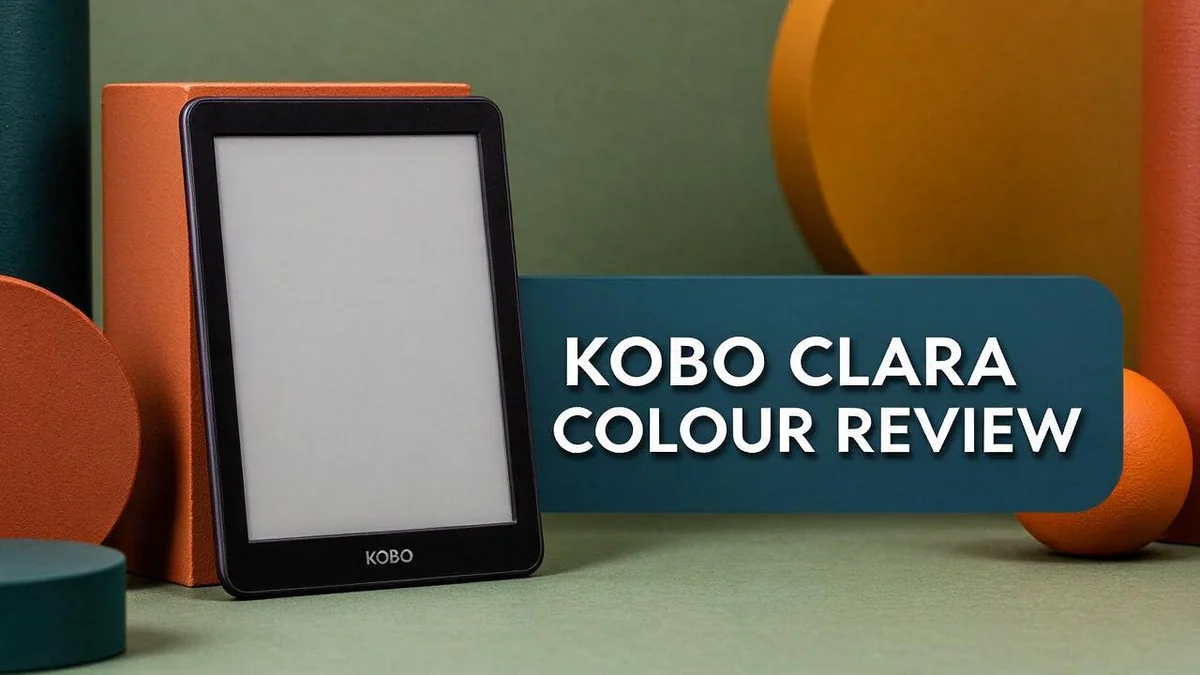
This compact device brings manga, magazines, newspapers, and PDFs to life. It uses a 6 inch E Ink Kaleido 3 screen with a sharp 1488 by 1072 resolution.
Its warmer front light makes night reading easier on the eyes. Dark mode adds another layer of comfort.
Many readers also care about the planet. This model is partly made from recycled and ocean bound plastic.
Is it the right ereader for you? Let us explore what this colour ereader offers, where it shines, and where it falls short.
In a Nutshell
- Best for colour pages: Manga, magazines, newspapers, and PDFs all show their colours on this reader.
- Water-friendly reading: The IPX8 rating lets you read near the pool or in the bath. It handles up to 60 minutes in 2 metres of water.
- Trade-offs to expect: Colour screens look softer than plain black and white text, so long novels may feel less crisp.
- Comic fans may want more space: The 6 inch display can feel cramped for full colour comic spreads.
- Easy file switching: It supports the same file formats as the Libra Colour, so your library moves smoothly between devices.
- No stylus support: Note takers should know that Kobo Stylus does not work with this model.
- Sibling options: Choose the Clara BW if colour is not essential, or the Libra Colour if you want a bigger screen.
Colour Display and Screen Performance

Last update on 2026-11-06 / Affiliate links / Images from Amazon Product Advertising API
Colour is the main reason people choose this device. The screen shows images in a soft, calm style. Pages feel easy to view during long sessions.
The Kaleido 3 panel places a colour filter over a gray base layer. Colours look lighter than on a tablet. Bright reds and blues appear muted but pleasant.
Text stays sharp thanks to the 1488 by 1072 pixel resolution. Words remain clear even at smaller font sizes. Many readers find the page easy to scan.
Refresh speed matters when you flip through a magazine. The FastGLR feature aims to speed up page changes. Less waiting means a smoother reading rhythm.
Dark mode changes the feel of the screen at night. Light text sits on a dark background. Colours may look dimmer, so adjust brightness for comfort.
Newspapers and magazines benefit most from this panel. Photos, charts, and headlines keep their colour. Cover art looks lively and inviting.
Manga shows a different side of the display. Colour panels look bright and eye catching. Line art stays readable when you set the page view well.
Plain paragraphs can look a little lighter on this panel. Most readers will not mind the change. Text still feels comfortable over an evening.
Lighting plays a big role in how colours appear. Daylight shows the most vivid tones on the screen. Indoor lamps can shift the look a little.
The panel reflects light rather than glowing like a phone. Eyes often feel less tired during long reads.
Some readers want to test before they decide. Open a colour cover page and check the tones. Compare how a magazine spread looks in different rooms.
Overall, the screen suits people who value colour first. Plain text fans may prefer a simpler panel. Choose the screen that matches your reading habits.
Reading Experience and Front Light
A good reading light matters more than most people think. The front light on this reader spreads evenly across the page. Text looks clean without harsh bright spots.
The light feels stronger than the one on the Clara BW. Dim rooms feel much brighter. You can read a chapter without turning on a lamp.
Many people read at different times of day. Mornings often bring bright daylight, while evenings bring soft room light. This front light works well in both settings.
Shared rooms become easier to manage. If your partner wants the lights off, you can keep the glow low on your side of the bed. Both of you can rest without fuss.
Sunny spots also suit this reader. E Ink screens avoid the harsh glare of a phone. You can read on a balcony or in a park with a more relaxed feel.
Brightness settings give you control. Lower levels suit bedtime reading, while higher levels suit busy cafés or train rides.
Choosing the right level takes a little practice. Try a few settings at different times of day to find your favourite.
Travel reading becomes simpler. You do not need to pack a separate book light for hotel rooms or night trains. The front light covers those moments.
Bedtime habits also matter. Some readers find that a gentle glow helps them wind down after a busy day. This reader offers that calm option.
Long reading sessions feel more comfortable when the light stays steady. Steady light helps readers focus on the story rather than the screen.
Small touches add up over time. A light that feels comfortable invites you to read more often. That is the real goal for most readers.
Overall, the front light supports reading in almost any setting. It turns this reader into a reliable companion from the morning commute to late night chapters.
Waterproofing and Everyday Durability
The Kobo Clara Colour carries an IPX8 rating. That means the body resists water better than most basic readers. The rating covers submersion up to 2 metres for about 60 minutes. This protection level suits everyday splashes, rain, and accidental drops into a sink.
Think of the rating as a safety margin, not a reason to test it. Water can still find its way into any device over time. Rinse the reader with clean water if it gets sticky. Dry it with a soft cloth before you put it away.
Skip hot water, soap, and harsh cleaners on the screen. Such products can damage the surface and affect how colours look. The body uses recycled and ocean bound plastic. That mix gives the reader a greener edge for daily use.
Bags and backpacks can take a beating. A reader tossed in a tote with keys and water bottles needs extra care. A simple sleeve adds a cushion layer.
Grit can cause slow wear over time. Wipe away sand or dust before it drags across the glass.
Travel adds more risk than home use. Beaches, camp sites, and rainy train platforms all bring sand, damp air, and bumps. If the reader takes a hard fall, check the edges for cracks. Then charge it only once it looks sound.
Store the reader in a dry spot after every outing. A shelf or drawer away from steam keeps it safe. Think about the cover too. A case with a firm edge protects the corners when the reader slides off a table.
Kids and pets can also change the picture. Keep the reader high and away from sticky fingers and paws.
Durability gives you peace of mind. You can read with more confidence in messy places. Simple care keeps this reader ready for daily reading.
Good habits matter more than any spec sheet.
Top 3 Alternatives
Kindle Colorsoft

- Kindle Colorsoft Signature Edition, now in aluminum: Thinner, 7" paper-like color display. New edge-to-edge...
- Color your pages: Paper-like color perfect for comics, graphic novels, and more. Highlight your favorite...

Last update on 2026-11-06 / Affiliate links / Images from Amazon Product Advertising API
The Kindle Colorsoft brings color to the Kindle family. It has a color E Ink screen that shows book covers, comics, and illustrated pages clearly. Comic fans and kids often love its vivid art.
Readers who want color on a simple, lightweight device will like it. The front light shifts from warm to cool. This helps you read in bright sun or dark rooms.
Kobo Libra Colour

Last update on 2026-11-06 / Affiliate links / Images from Amazon Product Advertising API
The Kobo Libra Colour offers a larger 7-inch color screen. The bigger display shows more detail on maps and photos. Many readers enjoy its physical page turn buttons for reading with one hand.
The ComfortLight Pro reduces eye strain at night. The device is also waterproof, so it works well at the beach or in the bath. Frequent travelers often pick it for its flexible reading options.
Kindle Paperwhite

- Our fastest Kindle Paperwhite ever – The next-generation 7“ Paperwhite display has a higher contrast ratio...
- Ready for travel – The ultra-thin design has a larger glare-free screen so pages stay sharp no matter where...
Last update on 2026-08-16 / Affiliate links / Images from Amazon Product Advertising API
The Kindle Paperwhite is a great choice for readers who mostly enjoy text. Its glare-free display feels close to real paper. Words look sharp even in direct sunlight.
The adjustable warm light makes night reading easy on the eyes. The battery can last for weeks on a single charge. Many people pick this model because it is simple and focused on reading.
Manga, Comics and Document Support
Comic fans should think about panel size first. Many colour comics pack small words into speech bubbles. On a 6 inch screen, you may zoom in more often than you expect.
Zooming takes only a few taps. Pinch the page to enlarge a panel, then drag to follow the action. This small habit keeps every line easy to read.
Manga works well one chapter at a time. Long series can feel easier to follow in short sessions. This style suits busy schedules and quiet moments on a commute.
Page turns matter more with visual stories. Action scenes often need quick flips between panels. Test a few pages from your favourite series to see how the flow feels.
PDF files are a useful strength here. You can load study notes, manuals, and work reports onto the reader. Colour charts and photos show up clearly on the screen.
Some PDFs use fixed layouts, so the text can look small. Zoom in to read comfortably. When possible, choose a version that reflows text to fit the screen.
The reader supports the same file formats as the larger Libra Colour. Your files work across both devices. This makes switching between them simple.
Students can keep textbooks and class handouts in one place. Carrying one light device is easier than lugging a heavy stack of paper.
A larger model may suit daily comic readers. More screen space helps with dense artwork and wide spreads. Your choice depends on how often you read visual stories.
Think about your reading habits before you decide. If you mostly read novels with the occasional comic, this reader fits well. Visual fans may want extra room to enjoy the art.
Sustainability and Materials
Good sustainability starts with the materials. The Kobo Clara Colour is made partly from recycled plastic. Some of that plastic is ocean bound, which means it was gathered before it could reach the sea.
This matters because every recycled part keeps old plastic in use. It also means less new plastic needs to be made from scratch.
Think of the reader as one device that replaces a stack of paper books. A single library fits in your bag. Fewer paper books also means less printing and less shipping of heavy boxes.
Still, the greenest device is the one you keep using. Replacing gadgets often adds to electronic waste. Holding onto this reader for years helps the planet more than any material claim.
E Ink screens use power mostly when the page changes. A static page needs very little energy. Fewer charges mean less electricity over time.
Colour screens also come with trade-offs. Think about your reading habits before you choose. If most of your reading is plain text, a black and white model may match your needs.
Buy only the features you will use. Less stuff means less packaging and fewer materials to produce. The Kobo Clara Colour does not support the Kobo Stylus, so you will not add a pen to your shopping list.
Simple habits also extend the life of the device. Use a soft cloth for cleaning, keep the software updated, and store the reader in a case when you carry it.
When the time comes to let it go, do not toss it in the household bin. Electronic waste needs special handling. Look for a local drop off point or a take back program from the retailer.
Sustainability is a personal choice, and small habits add up. Keep the reader close, read often, and let one device hold your whole library.
Pros and Cons
Pros
– Colour pages make magazines and picture books stand out.
– The warmer front light feels gentle during evening reading.
– The compact body slips easily into a jacket pocket.
– E Ink avoids screen glare, so reading outdoors feels comfortable.
– The light weight makes long reading sessions easier on your hands.
Cons
– Colours look softer and paler than tablet screens.
– The Kobo Stylus does not work with this model.
– It is built for reading, not for videos or games.
Who Should Buy It
This reader suits people who read far more than novels. Many readers now want one device for books, news, and magazines. This model covers all three without much fuss. It also fits people who switch between reading styles often.
Plain text fans may not need colour. If most of your reading uses black text on white pages, a black and white model could be enough. The colour screen only shines when pages use colour.
Hobbyists who collect guides and plans will find it helpful. Craft patterns, travel maps, and recipe books keep their charm on this screen. Everything stays in one slim package.
Anyone who wants fewer distractions should consider this model. Phones pull attention with alerts, feeds, and messages. A reader keeps the focus on the page, so long chapters feel easier to finish.
People who want a bigger display should look elsewhere. The 6 inch screen works for many books but feels small for wide spreads.
Readers who want more room can compare the Kobo Libra Colour. The Boox Go Color 7 is another option worth a look.
Note takers who write in margins should keep looking. This model does not work with the Kobo Stylus. Shoppers who need handwritten notes will need a device with stylus support.
Simple tools suit people who dislike fuss. Turn on the reader and open your book. Few steps stand between you and your next page.
Short reading breaks fit this device well. Short sessions fit into busy days without any trouble.
Ask one question before you decide. What do you read most each week? Think about the genres you enjoy and the places you read. Your answers will point you toward the right choice.
Final Verdict
The Kobo Clara Colour earns a strong place on your reading shelf. It gives you colour pages in a light and simple package.
This reader fits best for people who want colour without a large tablet. It handles the job well and keeps your focus on the words.
Think about your daily habits before you buy. A phone or tablet can do more, but it also pulls your eyes away from the page. This device stays focused on reading.
Its biggest win is the balance between colour and comfort. The screen shows colour, yet it still feels like paper for most of the session. You can read for long stretches without much effort.
Compare it with the Clara BW and the Libra Colour. The BW model suits anyone who reads mostly text. The Libra Colour suits anyone who wants a larger canvas for pictures. The Clara Colour sits in the middle, and that middle spot works for many readers.
Some readers will want something different. Anyone who needs a full tablet for video calls or web browsing should choose another device. This model reads, and it does that job well.
Bath time reading also becomes an option with its waterproof body. Splashes and steamy bathrooms pose no threat during a short soak. Many readers enjoy that freedom, especially those who relax with a chapter after a busy day.
Our final take is simple. The Kobo Clara Colour delivers a calm, focused reading experience with colour added. It suits readers who prefer pages over screens full of noise. It also makes a thoughtful gift for a friend who loves magazines.
Try it for a week before you decide. Read your usual books and magazines, then ask yourself whether colour matters to you. A week of real use shows more than any spec sheet can. Your answer will guide your choice.
Frequently Asked Questions
Can the Kobo Clara Colour handle manga well?
Manga fans can read comfortably on this model. The 6 inch screen works best with simple panels. Dense colour spreads may look busy on such a small display. Text stays sharp, so speech bubbles remain easy to follow.
Can it read newspapers and PDF files?
Yes, it supports newspapers, magazines, and PDFs. Long PDFs with small text may need zooming. Reflowable formats like EPUB adjust nicely to the screen. Fixed layout files look best when you turn the device sideways.
How does it differ from the Kobo Libra Colour?
The Libra Colour offers a larger screen with more room for page layouts. This model suits readers who want a smaller device for a bedside table. Both models share the same file format support.
Is dark mode useful for night reading?
Yes, dark mode helps during late evening sessions. Light text on a dark background reduces glare in a dim room. Your eyes may feel less strain when you read in bed.
How does it compare with the Boox Go Color 7?
Both models offer a colour E Ink display for reading. The Kobo focuses on reading from start to finish. If you want a simple, distraction-light reader, this Kobo fits that goal well.

DK is a technology expert who specializes in AI tools, software, and tech gadgets. He writes for How to Tech Info, providing detailed reviews and practical guides. DK helps readers discover the best AI applications, navigate new software, and choose the right tech gadgets.