Fossibot F2400 Review: 2048Wh Portable Power Station Tested and Explained
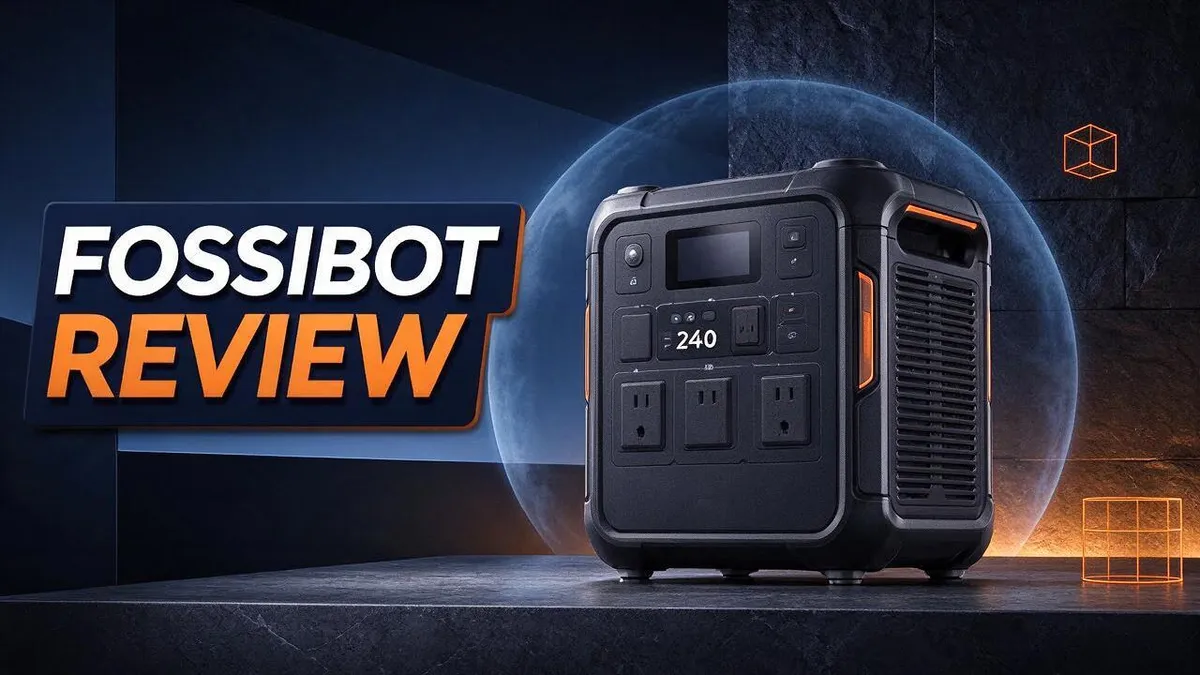
Power outages, camping trips, and job sites all need reliable energy. That is where the Fossibot F2400 shines. It packs a 2048Wh capacity into one portable power station.
It offers a 2400W pure sine wave inverter. Sensitive devices run safely on clean power.
The EVE LiFePO₄ battery is rated for over 4000 cycles. That means years of dependable use.
Charging feels fast, too. You can refill from empty to full in about two hours through AC power.
Sixteen ports give you plenty of options. You get six AC outlets, four USB-C ports, and more. The unit also runs quietly at about 20dB.
In this review, we explore what works well and what may not suit every buyer. We also compare it with other FOSSiBOT models and rivals like Bluetti and EcoFlow. Keep reading to see if this station fits your needs.
In a Nutshell
-
Generous capacity: The F2400 stores 2048Wh of energy. This gives you a strong reserve for phones, lights, mini fridges, and laptops during a long day away from the grid.
-
Quiet charging: The unit charges at about 20dB, so it stays calm in shared spaces. You can run it in a bedroom or tent without much noise.
-
Easy control: An adjustable AC charging dial lets you set the charging speed. You can use this feature without installing the app, which keeps things simple.
-
Long warranty: The brand covers the F2400 with a 5-year warranty. This gives you extra confidence after your purchase.
-
Other models to compare: The FOSSiBOT F3600 offers up to 3840Wh for bigger energy needs. The smaller FOSSiBOT F1800 suits lighter loads and comes from the same brand.
-
Mixed customer feedback: Some buyers praise the performance, while others share complaints about customer service. Read recent reviews carefully to see if this model fits your needs.
Power Output and Inverter Performance

Last update on 2026-11-05 / Affiliate links / Images from Amazon Product Advertising API
The F2400 handles power well. Its inverter turns stored energy into clean AC power for everyday devices.
Pure sine wave output keeps sensitive gear running smoothly. Laptops, cameras, and small appliances often need this type of power.
The listed peak rating reaches 4800W. This extra headroom helps during short bursts of demand.
Many tools and fridges need a brief jolt when they start. This starting surge is where peak power matters most.
Peak numbers only show short moments. The 2400W rating shows what the inverter can supply over time.
Plan your load before you plug in. Add up the watts of every device you expect to run at once.
A small fridge, a laptop, and a few LED lights make a simple example. Their combined draw should stay under the inverter limit.
Six AC outlets share the same inverter. Running several items at once means they all draw from one total limit.
Airflow matters too. Keep vents clear during long runs so the unit stays cool and steady.
Test before you need it. Run your real devices at home for a short time. This shows how the inverter handles your exact setup.
Listed specs give a helpful starting point. Real world results can shift based on temperature, load type, and runtime.
Motor loads need extra care. Power tools, pumps, and air conditioners often pull more power when they start than when they run.
Use a smaller device list for these tools. Start one item at a time and watch how the unit responds.
Good planning keeps surprises away. Write down your top three devices, their watt ratings, and the times you plan to use them. This simple list shows whether the inverter fits your plans.
Bottom line: The F2400 offers strong inverter output for most home backup and outdoor needs. Smart planning helps you get the most from it.
Battery Capacity and Recharge Speed
Battery capacity decides how long your gear stays on. Think of watt hours as the size of a fuel tank. A bigger tank keeps devices running longer before you need to refill it.
To estimate runtime, divide the watt hours by the power a device uses. For example, a 50W device could run for about 40 hours in theory. Real results come in a bit shorter, because some energy turns into heat during conversion.
Smaller gadgets stretch the energy even further. A phone may charge many times from one full charge. Tablets, cameras, and drone batteries draw small amounts of power, so they make good use of the stored energy.
Recharge speed matters just as much as capacity. The F2400 refills from empty to full on AC power in about 2 hours. That means you can restore a full charge overnight or during a short lunch break.
Your wall outlet shapes the final charging time. A steady outlet gives the most consistent results. Avoid thin extension cords, since they can limit the flow of power.
Cycle life affects how the battery ages. Charging once per day would use roughly 4000 cycles over about eleven years. Most owners may never reach that point, which gives real peace of mind.
Smart habits help you get the most from each charge. Keep the battery stored in a cool, dry spot. Avoid leaving the unit inside a hot car, because heat can speed up wear over time.
Reserve energy is another useful idea. Keep a portion of the charge in reserve for emergencies. Running the battery down to empty every time leaves you with no backup when the lights go out.
Planning ahead keeps the battery ready. Check the charge level before a weekend trip or a long work shift. A quick glance at the display tells you whether a top up is needed.
Ports and Charging Controls
The Fossibot F2400 offers a wide mix of ports. Each port type suits a different job. You get 16 ports in total, so several gadgets can charge at the same time.
Start with the USB C ports. There are four of them. They fit phones, tablets, and many laptops. The two USB A ports cover older devices and small accessories that still use the classic plug.
The DC5521 ports handle round barrel plugs. Many LED strips, camera chargers, and small electronics use this style. Two of these ports let you power them without an extra adapter.
The cigarette lighter socket and the 12V/25A port work well for car style gear. Use the 12V port for devices that need more current. Check the device label first so you match the voltage.
Charging controls focus on the AC side. The AC charging dial sets the charging speed, and you can use it without the app. This gives you a simple way to adjust things quickly.
Good habits keep your connections safe. Match each cable to its port before you plug in. Keep the ports dry and free of dust. Store spare cables in one place so you never hunt for them.
Before a trip, test each port with the device you plan to use. This quick check shows which cable works best. Label your cables so you grab the right one fast. A small test today saves you stress later.
Top 3 Alternatives
Looking for a different portable power station? These three options can handle camping trips, home backup, and daily device charging. Each one offers something a little different.
Jackery Explorer 1000

- 10 ms UPS, uninterrupted power supply: when the grid goes down, the HomePower 1000 v2 takes over in just...
- 3 kV Surge and Lightning Shield: Integrated 3,000 V surge resistance and dedicated lightning protection for...
Last update on 2026-11-05 / Affiliate links / Images from Amazon Product Advertising API
The Jackery Explorer 1000 has a simple setup. It offers enough battery capacity for phones, laptops, mini fridges, and small lights. It also charges with solar panels, which makes it a good pick for off-grid weekends.
EcoFlow River 2 Pro

- [1 Hour AC Recharge] - Power up in just 1 hour! With EcoFlow's X-Stream fast charging technology, recharge...
- [Power All Your Essentials] - With an output of up to 1000W, run 11 essential appliances simultaneously...
Last update on 2026-11-05 / Affiliate links / Images from Amazon Product Advertising API
The EcoFlow River 2 Pro is compact and light. It fits easily in a car trunk or a backpack. Its fast charging feature refills the battery in less time than many rivals, so it suits people who need power quickly.
Bluetti AC180

- [Charged in 1 Hour] - The AC180 packs a 1152Wh LiFePO4 battery, which can be fully charged in just 1 hour at...
- [Power All Your Needs] - The AC180 boasts 1800W output and 8 outlets to handle almost anything you plug in...

Last update on 2026-06-17 / Affiliate links / Images from Amazon Product Advertising API
The Bluetti AC180 is built for heavier loads. It can run power tools, kitchen appliances, and other larger devices. It can also connect to extra battery packs, so your power supply can grow over time.
Each option works well for different needs. Think about how you plan to use your power station. Then choose the one that fits your daily routine and your outdoor adventures best.
Noise Level and Everyday Usability
When you test a power station, noise matters as much as power. The Fossibot F2400 lists a charging noise level of 20dB. That sound stays soft enough for a quiet room.
Many people use a unit like this in a bedroom, a home office, or a camping tent. A quiet charge lets you keep it nearby without distraction.
Charging controls also make daily use easier. The adjustable AC charging dial lets you change the charge rate with a simple turn. You can do this without opening the app.
This matters on busy mornings. You can pick a gentle setting for overnight charging while you rest. You can also pick a faster setting when you need a quick top up before you leave home.
The app still helps people who like to track their data. However, the dial gives you a fast option when your phone is out of reach. It also works well when the signal is weak at a campsite.
Some reviewers describe the unit as powerful and quiet. One review title hints at a catch, but the source does not name it. Read recent feedback and compare it with your own needs.
Your setup also shapes how calm the unit feels. Place it on a flat, hard surface. Keep it away from soft bedding or cushions that could block sound and heat.
Think about where you will use it most. A kitchen counter, a garage, and a bedroom each have different noise limits. Choose a spot that suits your daily routine.
Before you buy, run the F2400 at home for a short time. Listen during charging and during heavy use. Your own ears give the clearest answer about whether the sound fits your space.
Warranty and Customer Support
A solid warranty shows that the brand stands behind its product. The Fossibot F2400 comes with a five year warranty, which gives you long term peace of mind.
Read the warranty terms before you need them. Look for what the coverage includes, how long it lasts, and which steps you must follow to make a claim.
Keep your proof of purchase in a safe place. Save the order email, the receipt, and a photo of the serial number label.
Support teams usually ask for these details first. Having them ready can save you days of back and forth.
Customer service experiences can vary. One review in the research gave the brand one star out of five, so it helps to plan ahead.
Document any problem as soon as it appears. Take clear photos or short videos of error screens, damaged ports, or unusual noises.
Write down the date, the time, and what you were doing when the issue started. Clear notes help support staff understand the problem faster.
Contact support in writing whenever possible. Email gives you a saved record of every message, and you can attach your photos and notes.
Most warranties cover defects in materials and workmanship. They usually do not cover damage from misuse, so follow the manual closely.
Protect your coverage from day one. Avoid overloading the inverter, keep the vents clear, and store the unit in a cool, dry spot.
Test the unit soon after it arrives. Run your main devices and check each port, including the AC charging dial.
Early testing reveals problems while your return window is still open. That simple step can save you stress later.
Keep the manual and warranty details together in one folder. Good records make every future claim much easier to handle.
Pros and Cons
Pros
- The adjustable AC dial lets you change charging without the app.
- You get 16 ports for many devices at once.
- Quiet charging at 20dB keeps the room calm.
- A five year warranty backs the product.
Cons
- One customer service review gave the brand 1 out of 5 stars.
- One review mentions a catch but does not explain it.
- The F3600 holds more energy, up to 3840Wh.
- Check recent reviews to see how support responds today.
Who Should Buy It
The Fossibot F2400 suits people who need reliable backup power at home. Storms, rolling outages, and long days working from home all test a household. This unit gives you a dependable power source when the grid goes down.
Battery life matters for buyers who plan to use the unit often. The EVE LiFePO₄ battery is rated for more than 4000 cycles down to 80 percent. That gives you years of regular use before capacity drops much.
Families with young children often value this kind of backup. Keeping a fridge, lights, and phone chargers running can ease a stressful night at home.
RV owners and road trip fans may find the output useful. The 2400W AC inverter produces a pure sine wave. This helps sensitive electronics run safely. The 12V port and cigarette lighter outlet also suit vehicle setups.
Campers with a bigger setup can plan ahead. Charge the unit at home before each trip. A full battery makes the first day of camping much easier.
Emergency planners can build a simple kit around this unit. Pair it with a flashlight, a first aid kit, and bottled water for a complete plan.
Buyers who need a lighter load should look at other models. Someone who only charges phones and laptops may not need 2048Wh. The FOSSiBOT F1800 is smaller and may fit lighter needs.
Remote workers or outdoor crews who run tools for long periods may want more capacity. Bluetti and EcoFlow also make similar units worth comparing.
Ask yourself a few simple questions before you order. How many devices run at once? How long must the power last? Write down your answers first. They guide a smarter choice.
The F2400 may not suit people who expect quick recharging from a wall. Full recharging takes about two hours on AC power. Those who need power in minutes should look elsewhere.
Final Verdict
Our final verdict is positive, with a few clear points to weigh.
The Fossibot F2400 suits people who want a capable power station for home use. It also works well for planned outages and steady camping routines.
Start by listing the devices you plan to run. Add up the watts each one uses. This simple step shows whether the unit fits your needs.
Many buyers skip this math. They then discover their power runs out sooner than expected. A short list prevents that surprise.
Think about how often you will use it. Frequent users gain the most from the unit over time. Occasional users may only need it for rare emergencies.
Storage habits matter too. Keep the unit in a cool, dry spot between uses. Check its charge level every few months so it stays ready.
Test your setup before a real emergency. Run a fridge or a few lights for a short time. This trial shows how long your power plan lasts.
Compare it with your current backup gear. Look at what you already own, such as a generator or small portable batteries. Some setups only need an upgrade, not a full replacement.
Consider your household size as well. A family with young children may need more outlets for daily life. Count the people who rely on the power.
Decide what matters most before you buy. Some shoppers focus on noise levels. Others focus on how many ports they need. Rank your priorities so you can judge the fit clearly.
Our overall recommendation is a confident yes for most home backup needs. Buyers with simple goals will likely feel satisfied. Those with very large energy needs should compare larger models first.
Match the unit to your daily needs, then buy with confidence. A clear plan turns this power station into a reliable partner.
Frequently Asked Questions
How long does it take to recharge the F2400?
Plugging into AC power refills the unit from empty to full in about 2 hours. Keep this in mind after a long outage. Plan your charging schedule so the unit is ready before the next storm or trip.
What does the 4800W peak rating mean?
The peak rating shows the short burst of power the inverter can handle. Motors, such as those in fridges or small pumps, need extra power when they start. Check that the starting load of each device stays within that peak limit.
Can I use it to power medical devices?
Some households rely on medical equipment at home. First, check the wattage of your device and confirm it fits the unit’s output. Then talk with your doctor or equipment provider about a backup plan. Never rely on one power source alone for life support.
Is it safe to use indoors?
Yes, when you set it up with care. Place the unit on a dry, flat surface. Keep the area around the vents clear so air can flow. Avoid using it in wet spaces or closed cabinets.
Is the smaller F1800 a better fit for light needs?
The F1800 is a smaller model from the same brand. It suits lighter jobs like phone charging, lamps, and a small fan. Choose it if your list of devices stays short. If you plan to run a fridge or several appliances, the F2400 is the better match.

DK is a technology expert who specializes in AI tools, software, and tech gadgets. He writes for How to Tech Info, providing detailed reviews and practical guides. DK helps readers discover the best AI applications, navigate new software, and choose the right tech gadgets.