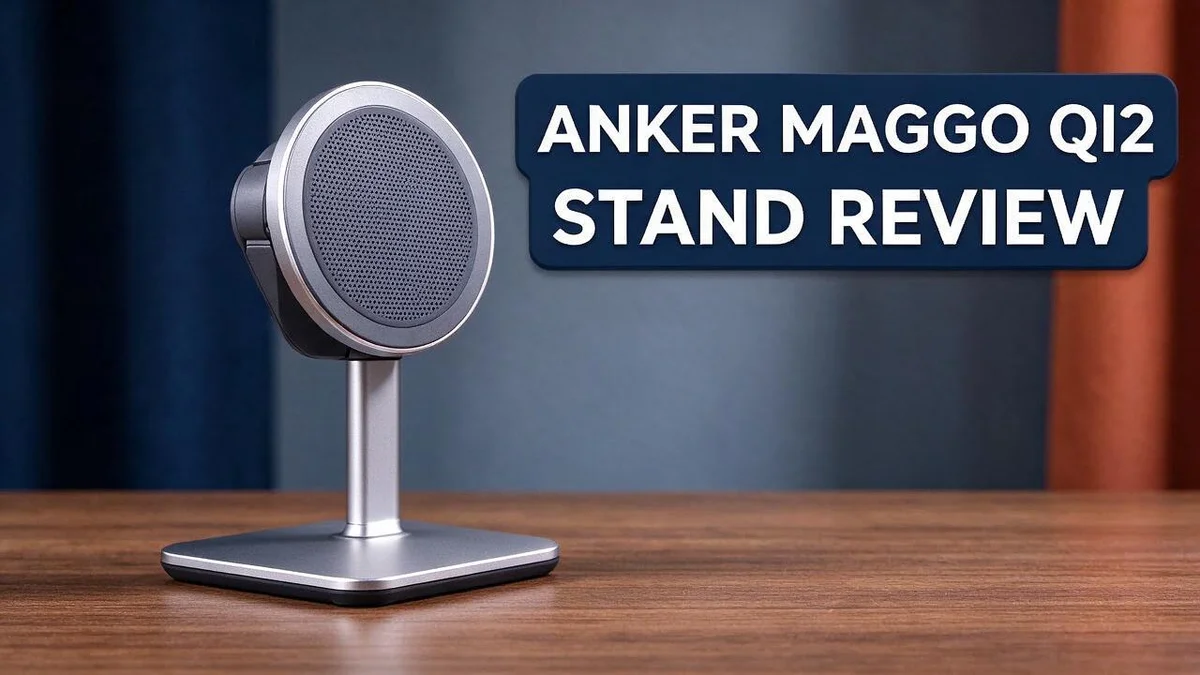
Anker MagGo Qi2 Stand Review: Is This 3-in-1 MagSafe Charging Dock Worth It?
Tired of a wobbly phone on your desk? You are not alone. Many people want one simple way to watch videos, take calls, and charge at the same time.
The Anker MagGo Qi2 Stand aims to solve that problem. It works as a wireless charger and a stand in one device. Your iPhone can sit at a 70 degree angle or switch to landscape mode.
Charging speeds can reach up to 45W, according to reviews. The base feels stable, and you can remove your iPhone with ease. You can even rotate it with one hand.
In this review, you will learn what this stand does well. You will also see where it falls short, so you can decide if it fits your desk.
In a Nutshell
-
Viewing angle: The stand tilts your iPhone to about 70 degrees. This angle feels natural for video calls, recipes, and shows on your desk.
-
Landscape mode: You can turn the phone sideways in seconds. Movies and games look better this way because more of the screen fills your view.
-
Quick removal: Lifting your iPhone off the MagSafe pad takes almost no effort. You can grab it fast when a call or message comes in.
-
Smooth rotation: You can spin the phone with one hand. This saves time when you switch between portrait and landscape views.
-
Cool performance: The stand stays cool during charging. Many reviewers say it feels similar to using a wired cable.
-
Extra weight: Some reviewers notice added weight when the phone uses a Spigen Thin Fit case. If the weight bothers you, remove the case while the phone sits in the dock.
Design and Build Quality

- 15W MagSafe-Compatible Charging: Experience fast charging with a 15W wireless output that matches the...
- Hands-Free Charging: The built-in stand ensures you can watch, work, or play while your device charges, all...
Last update on 2026-11-07 / Affiliate links / Images from Amazon Product Advertising API
When you first unbox the stand, its build feels practical and thoughtful. The design focuses on everyday use rather than flashy looks.
The base gives your phone a steady foundation. It stays put on a desk, even when you tap the screen during a video call.
Think about how much room your workspace has. A compact footprint lets the stand sit beside a laptop, a notebook, or a coffee mug without crowding the space.
The magnetic connection is the real highlight for daily use. Your iPhone lines up with the pad quickly, so you rarely need to fiddle with placement.
A tidy look matters just as much as function. Because the phone sits up off the surface instead of lying flat, the desk looks less cluttered.
Many people care about how a stand handles small bumps and daily movement. The base holds its position well when you nudge the desk or reach for a pen.
The stand also works well as a fixed point during calls or while watching videos. You can set your phone down and trust it to stay upright without holding it.
Long term durability is harder to judge from a short test. Keep an eye on the magnetic pad and the surface over several months of use to see how it ages.
Build quality also affects how often you reach for the stand. When it feels sturdy and easy to handle, you use it more often and worry less about damage.
Regular wipe downs with a soft cloth should keep the stand looking clean. Dust and fingerprints build up on any desk accessory, so a quick clean helps.
Students, remote workers, and anyone with a busy desk will likely appreciate this design. Its simple form and steady base suit both home offices and shared spaces.
Test your case and stand together to see how the setup feels in daily use. Overall, the build feels practical and dependable for people who want a stand that simply works.
Charging Performance and Heat
Charging speed is only half the story. A good stand must also keep power flowing without interruption. The magnetic pad helps the coils line up each time you set your phone down.
Proper alignment matters because a shifted phone can charge more slowly. Many people never notice this small drop. The stand holds the phone in place, so the connection stays steady.
Heat builds up in a different way than speed does. A phone that charges while you stream video or play a game will warm up faster. Give it a short break from heavy tasks while it charges.
Screen brightness plays a role too. A bright display draws more power during charging. Lowering brightness can reduce warmth during long sessions.
Your phone case also makes a difference. Thick cases can trap warmth against the back of the phone. If you notice extra heat, remove the case for a while during long charging sessions.
Room temperature affects results as well. A hot room makes the phone heat up faster. Cooler spaces help the phone manage warmth more easily.
Placement matters too. Keep the stand away from direct sunlight and heaters. Open space around the base lets warm air escape more easily.
Cables deserve a quick check. A cable that bends sharply or wears down may reduce output. Look for damage before each charge.
Overnight charging is a common habit. Many people place the stand on a nightstand before bed. Since the phone rests on a stable base, it is less likely to slide off in the dark.
Watch for warning signs. If the phone feels very hot to the touch, unplug it and let it rest. Constant strain over time can wear down a battery.
Simple habits help the stand deliver steady charging day after day. Small adjustments can keep warmth low and your battery healthy.
Stand Modes and Viewing Angles
Stand modes matter more than many people think. Each mode suits a different task. Choose the one that fits your daily habits best.
Watching videos feels best in landscape. The wide screen fills your view. You can also place the phone near eye level, so your neck stays relaxed.
Video calls need a steady upright position. Your face stays centered in the frame. Your hands stay free for notes or a cup of tea.
Reading recipes in the kitchen calls for a different setup. Prop the phone upright at a comfortable distance. Greasy fingers stay off the screen, and you can glance over quickly.
Lighting changes how the screen looks at each angle. Bright windows can cause glare on a tilted display. Shift the stand a little until the reflection moves away from your eyes.
Checking a map on the counter becomes simple too. The phone stays put, and the directions remain in clear view while you cook.
Desk space also shapes your choice. A narrow desk may suit a compact upright setup. A wider surface gives you room to test landscape mode with a keyboard nearby.
Try a few positions before you settle. Sit where you normally work. Then move the phone until the screen feels easy to read. Small changes often make a big difference over a full day.
Think about who else sees the screen. Sharing photos with a friend works best when the phone faces them. A quick turn of the stand makes sharing feel effortless.
Most people settle on two or three favorite positions. Save those habits, and the stand becomes part of your routine. Your phone stays visible, secure, and easy to use every day.
Top 3 Alternatives
Belkin BoostCharge Pro

- FAST CHARGE W/ THE LATEST Qi2 TECHNOLOGY: Conveniently fast charge your iPhone or Qi2 devices up to 25W on the...
- ULTRA-FAST CHARGING FOR ALL YOUR DEVICES: With wireless charging now as fast as wired, you can charge iPhone...

Last update on 2026-11-07 / Affiliate links / Images from Amazon Product Advertising API
The Belkin BoostCharge Pro suits people who want fast and flexible charging. It supports Qi2 magnetic alignment, so your phone snaps into the right spot every time. Many users also like that it can charge a phone and earbuds at the same time.
Good to know: this option works well for travel because it folds down small. Its sturdy base also keeps the charger steady on a nightstand or desk.
Apple MagSafe Charger

- [Qi2.2-Certified 25W Ultra-Fast Charging]- Unlock true 25W high-speed wireless charging with official Qi...
- [High Efficiency & Intelligent Temperature Control]- Qi2 25W certified with advanced heat management...
Last update on 2026-11-07 / Affiliate links / Images from Amazon Product Advertising API
The Apple MagSafe Charger is the easiest choice for iPhone owners. The built in magnets line up the coil with your phone, so you get reliable wireless power without any setup. It feels simple and fast from the first day.
Keep in mind: this charger works best with iPhones that support MagSafe. It is a flat puck, so it does not hold your phone upright. You may need to prop your phone up on your own while it charges.
Satechi Magnetic Charging Stand

- Designed for Apple Device Charging – A 3-in-1 wireless charger that simultaneously powers your iPhone, Apple...
- Foldable MagSafe Design – Compact, foldable structure with secure magnetic alignment for iPhone. Packs flat...
Last update on 2026-11-07 / Affiliate links / Images from Amazon Product Advertising API
The Satechi Magnetic Charging Stand gives you a hands free view while you charge. The adjustable arm lets you watch videos, follow recipes, or check messages at a comfortable angle. It works well with magnetic cases and many phones that use the standard magnetic ring.
Why it stands out: the clean design fits well in home offices and kitchens. You can keep your phone close and visible, which makes it a helpful pick for daily use.
Compatibility and Case Fit
Compatibility decides how well this stand fits your daily setup. Checking your case first saves time later.
Look for a case with a built-in magnetic ring. The ring lines up with the charging coil. Your phone then snaps into place with less effort.
Thin cases usually work best. Thick or heavy shells can weaken the magnetic pull, so the phone may feel loose on the pad.
The Spigen Thin Fit case deserves a closer look. A reviewer noticed extra weight when this case sat on the stand. The stand still holds the phone, but the total load feels heavier.
Weight matters more during daily use than many people expect. A heavier case can make the stand tip when you reach for the phone quickly. Pick a lighter case if you move the phone often.
Material matters too. Silicone and slim plastic shells keep the connection firm. Leather wallet cases add bulk and may block the magnets.
Metal plates or card holders behind the phone can cause trouble. Metal can interfere with the magnets, so the phone may not attach at all.
Screen protectors deserve a quick check as well. A thick protector on the back can also weaken the hold, especially on a tilted stand.
Test the fit before you rely on it. Place your phone on the stand and tilt it to 70 degrees. Then switch to landscape mode. Watch whether the phone slips or stays put.
Check the case edges too. A raised lip around the camera can stop the phone from sitting flat on the pad.
Clear cases are another option. They keep the phone slim and let you see the magnet ring underneath, which helps you line things up by eye.
Travel adds another layer. Bring the stand and your usual case together. This way you can test the fit at home before a trip.
Read the case label before you buy. Look for Qi2 or MagSafe wording. Clear labels help you avoid guesswork.
Your iPhone model also shapes the result. Confirm the model number before you order any new case.
Keep one case for daily use. You will know exactly how the phone behaves on the stand each day, and that consistency makes the whole setup feel simple.
Pros and Cons
Pros
– Stable base keeps the phone steady on your desk.
– Removing the iPhone from MagSafe takes little effort.
– You can rotate the phone with one hand.
– It stays cool while charging at fast speeds.
– It keeps your desktop clean and tidy.
Cons
– Charging speeds come from reviews, so results may vary.
– Some cases do not fit well, so check the fit first.
– A heavier setup can change how the stand feels in daily use.
Who Should Buy It
This stand suits people who already live with an iPhone on a desk. Many owners check messages, calendars, and maps all day long. A dock like this gives that phone a clear home.
Nightstand users may also find it helpful. A bedside setup can hold the phone upright for alarms and late night news. Wired cables often tangle, so a magnetic dock feels simpler at night.
Students and remote workers often juggle many tasks. They prop up a phone for notes, class videos, or a quick message, then charge it without digging for a cable. That quick switch saves small moments that add up.
Quick glances at a phone matter during busy days.
Families with shared spaces can use it too. A kitchen counter or living room table becomes a central spot for everyone. Each person can grab the phone without searching for a charger.
Frequent travelers should think twice. A stand adds bulk to a bag, and it needs a nearby power outlet. Hotel rooms may lack a clear surface, so it fits better at home.
Shoppers who dislike fiddling with cables will appreciate the simple magnetic hold. The phone snaps into place, so less plugging and unplugging happens. Anyone who wants a smoother daily routine will enjoy that ease.
Gift shoppers often look for something useful. A tech fan who already owns an iPhone may enjoy a simple charging upgrade. Check their case first, since fit matters most.
People who enjoy simple setups will like this stand. They want a device that works without extra steps. That mindset fits this product well, and it keeps daily tasks light.
Those who rely on one main charging spot will benefit most. A single dock keeps the phone in the same place each day. That habit helps avoid lost cables and forgotten chargers.
Skip this stand if your phone lacks MagSafe. The magnets need to line up with your device. A quick check of your model saves a return later.
Final Verdict
Overall, this stand works well for most iPhone owners. It combines charging, viewing, and landscape mode in one compact dock. That mix feels practical for a desk setup.
This stand suits people who want a simple setup. Instead of buying a charger and a separate holder, you get both in one unit. Fewer cables means less effort each day.
Think of it as a daily companion rather than a gadget you test once. The stand handles frequent pickups and repositioning without much fuss. Your phone stays ready for the next task.
Who should skip it? People who carry heavy cases or thick accessories may feel the extra load. Check your case before you commit to the purchase.
The research points to strong benefits, but it also lists one clear drawback. Added weight can change how the setup feels over time. That single note matters more than most spec sheets.
Speed claims deserve a careful eye. Reviews mention charging up to 45 watts, yet real results depend on your adapter and cable. Choose a compatible power source for the best outcome.
Our final take is simple. This stand suits anyone who already relies on an iPhone at a desk. It offers flexible viewing angles, dependable support, and a practical charging option.
Buyers who want a minimal setup will likely feel satisfied. Those who travel often or prefer very light gear should look elsewhere. The right choice depends on your habits, not on hype.
Start with your case, then match the stand to your viewing habits. Once those two pieces line up, the stand becomes a helpful part of your routine. That is the real test of any accessory.
Bottom line: the Anker MagGo Qi2 stand delivers a useful blend of charging and display support. Test it with your own phone and case, and you will know quickly whether it belongs on your desk.
Frequently Asked Questions
Can I use the stand for video calls?
Yes, it works well for video calls. Switch to landscape mode so the screen sits at a natural eye level. Your hands stay free while you talk.
Is it useful for following recipes?
It is. Prop the phone on your counter and follow along with step by step videos. You can read the screen without touching it when your hands are messy.
Can I watch movies or shows on it?
Yes, the wide view makes shows easy to watch. Landscape mode fills more of the screen, so movie nights feel more relaxed. It also works when you watch alone or with a friend.
Does it make a good gift for iPhone fans?
It does. Anyone who likes a neat desk or a simple bedside setup will likely enjoy it. It suits people who want one tool that does several jobs.

DK is a technology expert who specializes in AI tools, software, and tech gadgets. He writes for How to Tech Info, providing detailed reviews and practical guides. DK helps readers discover the best AI applications, navigate new software, and choose the right tech gadgets.