Sharge Icemag 2 Review: Qi2 Magnetic Charger Tested for Cooling, Power and Style
Tired of plain grey chargers cluttering your desk? You are not alone. The Sharge Icemag 2 brings a fresh look and useful features to your daily routine.
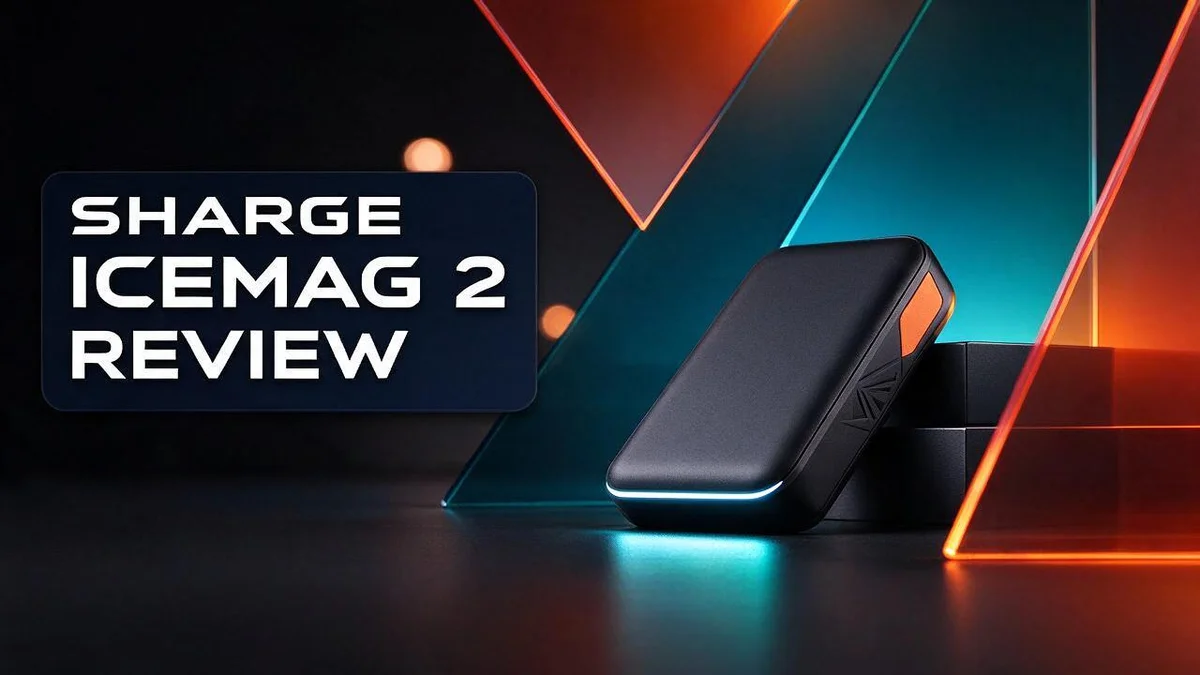
Under its clear shell, you get Qi2 magnetic wireless charging, a 30W USB C port, and a 10,000mAh battery. Your phone snaps into place and charges with ease.
A built-in active cooling fan and a foldable stand add helpful extras. Reviewers call it flashy, fun, and functional.
Still, some shoppers ask about fan noise and light annoyance at night. This review covers the design, the performance, and the features that matter most. Let’s see if this charger lives up to its bright reputation.
In a Nutshell
-
Standout style: The Sharge Icemag 2 breaks away from plain grey and black chargers. Its clear look and bright colors make it easy to spot on any desk.
-
Fun and functional: Reviewers describe it as flashy, fun, and functional. Many people enjoy having a charger that also works as a small design piece.
-
Cooling is the weak spot: One reviewer found the fan did little to lower heat. Long charging sessions may run warm, so keep an eye on your phone.
-
A newer option exists: The Icemag 3 offers 25W Qi2.2 charging and held temperatures better in testing. Buyers who want stronger output may look there first.
-
Compare with smaller options: The Sharge Flow and Flow Mini offer 5,000mAh batteries. They suit people who want a lighter, pocket friendly pick for short trips.
-
Check your phone needs: One listing shows 15W Qi2 output for this model. Fast charging also depends on your phone, so match the speed to your device before you buy.
Design and Styling

- 【Next-Gen Qi2.2 25W Wireless Charging】Enjoy the freedom of Qi2.2 25W MagSafe fast charging with up to 25W...
- 【35W USB-C Super Fast Charging】Power up your MacBook Air, iPad, or Android devices at full speed with a...

Last update on 2026-11-07 / Affiliate links / Images from Amazon Product Advertising API
Your charger sits in view every day, so its look matters. The Sharge Icemag 2 gives your desk a fresh and lively feel.
Color choices help it stand out. Many shoppers want a charger that matches their setup. This model brings a bright palette to a category full of gray and black.
Placement matters too. Its body fits well on a nightstand, in an office corner, or on a small shelf. Consider where you set it up first.
Qi2 magnets snap your phone into place. This keeps the setup neat, so you spend less time adjusting the phone by hand.
Cable routing also shapes the overall look. Keep the cord tucked behind the base so the surface stays clean and calm.
Viewing angle matters for video. When you prop your phone, the angle changes how the screen looks. Test the tilt with your own phone and case before you commit.
Case thickness can change the fit. A thick case may sit higher on the magnets, so check compatibility first.
Finish and feel count too. The open look feels modern and light. Some people prefer a solid shell for a calmer bedroom or study. Pick the finish that suits your room.
Overall, this design suits people who enjoy bold style. Minimalists may find it too lively, so consider your room first.
Desk space is a real factor. Many setups have little room for extra gadgets. Measure your spot before you choose, so the charger fits without crowding your keyboard or lamp.
Match it with your gear. Pair the charger with a case or stand that shares your color palette. A cohesive set makes your desk look planned and polished.
Ultimately, style comes down to personal taste. Choose the look you enjoy seeing every morning. A charger you like is one you will use. Your desk should feel like your space.
Charging Performance and Cooling
Heat plays a big role in how well any wireless charger performs. Phones warm up during magnetic charging, so the charger must handle that extra warmth without trouble.
Where you place the charger matters a lot. A spot in a closed drawer or against a wall traps heat. Open desk space gives air more room to move around the shell.
Your phone case also shapes the temperature. A thick or heavy case can hold warmth close to the screen and battery. Removing a bulky case during long sessions may keep your phone cooler.
Session length counts too. Watching a long video or playing a demanding game while the phone charges adds extra heat. Pause heavy tasks when you can, so the phone stays comfortable.
Pay attention to your phone’s own warnings. Many phones show a temperature alert or slow charging when they get hot. That message tells you more than how the charger feels to the touch.
Charging speed depends on the whole setup. Your phone, the cable, and the power adapter each set limits. A fast charger only helps when every part supports the same speed.
Cable quality deserves attention. Worn or poor quality USB C cables can limit power and may warm up at the connection point. Choose a cable that feels solid and fits snugly.
Overnight charging needs a little extra care. Place the charger on a hard, flat surface so the vents stay clear. Soft bedding or blankets can block airflow and trap warmth.
Cooling works best as a team effort. The charger does part of the job, while your habits, case choice, and surface all shape the final result. Small changes can make a noticeable difference.
Battery Capacity and Portability
Battery size shapes how often you reach for a wall outlet. A bigger battery keeps your phone running during long days out.
Most phone batteries hold roughly 4,000 to 5,000mAh. That means this charger can refill a typical phone about one and a half to two times.
Real results vary, though. Wireless charging wastes some energy as heat, so you never get every bit of the stored power.
Plan for real use. Screen brightness, app use, and phone size all change how fast your phone drains. Video streaming uses more power than texting.
A larger battery adds some bulk and weight. Many people accept that trade off for longer charge sessions on the road.
Carry it easily. The Icemag 2 works as a desk charger at home and a travel companion outside. Slip it into a bag, then set it on a hotel desk for a quick top up.
Check airline rules. A 10,000mAh battery holds about 37Wh at standard voltage. Most airlines allow power banks under 100Wh in carry on bags, but always confirm before you fly.
Pack a USB C cable for recharging the unit. Keep your wall adapter nearby so the battery refills before your next trip.
Choose capacity that fits your routine. If you need only a quick boost, a smaller pack may feel lighter. If you travel often, this capacity gives you more freedom.
Think about your daily habits too. Many people plug in at night, so the battery can top up while they sleep.
Check how the indicator lights show charge level when you first set it up. Knowing that early helps you plan each day with confidence.
Good planning keeps your phone ready. A little charge before you leave the house beats a frantic search for an outlet at the airport.
Top 3 Alternatives
Need a different magnetic power bank? These three options can keep your phone charged on the go. Each one offers a simple way to stay powered all day.
Anker 633 Magnetic Battery

- Power Up in a Flash: Enjoy the convenience of a 20W USB-C Power Delivery port with this portable charger...
- Effortless Charging Alignment: Benefit from the strong magnets of this MagSafe battery pack that ensure your...
Last update on 2026-06-09 / Affiliate links / Images from Amazon Product Advertising API
The Anker 633 Magnetic Battery attaches to the back of your phone. Strong magnets hold it in place while you walk or commute. It works well for everyday charging. Keep it in your bag, and your phone stays topped up.
Belkin BoostCharge Pro

- FAST CHARGE W/ THE LATEST Qi2 TECHNOLOGY: Conveniently fast charge your iPhone or Qi2 devices up to 25W on the...
- ULTRA-FAST CHARGING FOR ALL YOUR DEVICES: With wireless charging now as fast as wired, you can charge iPhone...
Last update on 2026-11-07 / Affiliate links / Images from Amazon Product Advertising API
The Belkin BoostCharge Pro offers a clean, simple design. It uses magnets to connect with your phone and includes a stand for easy viewing. This option suits people who watch videos or video calls during charging. It sits neatly on a desk or nightstand.
Mophie Snap+ Juice Pack

- EXTEND YOUR PHONE'S LIFE: 5,000mAh internal battery provides up to 100% extra battery, ensuring your device...
- MAGNETIC ALIGNMENT TECHNOLOGY: Hassle-free charging with precise magnetic alignment compatible with...
Last update on 2026-11-07 / Affiliate links / Images from Amazon Product Advertising API
The Mophie Snap+ Juice Pack combines a slim case with a built-in battery. You get protection and extra power in one piece. Many people like the easy snap on setup and the secure grip. It fits well for long travel days when outlets are hard to find.
Noise, Light, and Everyday Use
Noise is a fair question for any charger with a fan. Many people place a charger on a nightstand or near a desk. A steady hum can feel distracting in a quiet room.
The research does not say how loud the fan gets. No decibel rating or sound test was available. Shoppers asked about this too, but no clear answer exists yet.
Testing the noise yourself is the best first step. Start a charging session in a quiet room at night. Listen from your bed, then decide if the sound bothers you.
Fans often speed up when a device heats up. Long charging sessions and heavy phone use create more heat. So the sound may change over time.
Light is the second concern for nighttime use. A transparent design can show glow from inside the unit. Bright light may bother people who sleep lightly.
The research also lacks details on indicator brightness. It does not say whether the light can be dimmed or turned off.
Placement can reduce both problems. Turn the charger so the glow faces away from your pillow. Keep it on a desk or dresser instead of right beside your head.
Try a few spots at home and note which one feels quietest. Small changes in position often make a noticeable difference.
Everyday use depends on the room. A glowing charger may suit a living room or office more than a bedroom. Daytime noise often feels less noticeable than nighttime noise.
Pets and kids may notice it too. Some pets react to a faint hum or light. Children may move closer to watch the glow. Keep the unit out of reach of young children.
Light sleepers should test first. Run a full overnight session once before relying on it. Watch for sound or light that keeps you awake.
Overall, the Icemag 2 suits daytime desks well. Night use needs a personal check. Since the research lacks sound and light data, your own test gives the clearest answer.
Compatibility and Setup
Compatibility starts with your phone. The Icemag 2 uses Qi2 magnetic charging, so it works best with Qi2 phones. These phones have built in magnets that snap onto the charger.
Older Qi phones can still charge on the pad. However, they lack magnets, so they may slide around. A Qi2 ready case or magnetic ring solves this problem.
Thick cases can weaken the magnetic hold. Metal plates, card holders, and wallets can also interfere with alignment. Remove heavy accessories before you attach the phone.
Setup takes only a few minutes. Start by unfolding the stand on the back. Then plug a USB C cable into the charger port.
Next, connect the other end to a power adapter. The unit accepts 30W input, so a matching adapter gives the best results. Avoid very weak chargers, because they can hold back the whole system.
Hold your phone above the pad and let the magnets guide it. Center the phone so the coil lines up. You will feel a gentle snap when it locks in place.
Check the connection right away. Look at your phone screen for a charging icon. If the icon does not appear, lift the phone and try again. A small shift often fixes the issue.
Alignment also affects how steadily your phone charges. A slightly off center phone may charge slowly or stop altogether. Take a moment to adjust it before you walk away.
The foldable stand adds a second way to use the charger. Prop the phone upright to watch videos or follow a recipe while it charges. Fold the stand flat when you store the charger in a bag.
Cable length matters too. Place the charger close to an outlet so the cable does not pull tight. A tight cable can shift the unit and break the magnetic lock.
Finally, test the setup before bedtime. Charge for about ten minutes and confirm the connection stays stable. This quick test helps you avoid surprises later.
Pros and Cons
Pros
- It stands out from the plain grey and black magnetic chargers on most desks.
- Reviewers describe it as flashy, fun, and functional.
- The 30W USB-C port can speed up recharging the unit itself.
- Its clear look makes it a conversation piece on a nightstand or office shelf.
Cons
- One reviewer found the fan did little to lower temperatures.
- The 25W Icemag 3 held temperatures better in the same kind of use.
- Wireless output tops out at 15W, so it charges slower than the newer 25W model.
Who Should Buy It
Sharge Icemag 2 suits people who want a charger with personality. Many desk chargers look dull and forgettable. This one brings bright colors and a fun shape that catches the eye.
Students and remote workers often benefit most. A busy desk needs a tidy charging spot that holds the phone steady during video calls.
Home office workers can use it during long meetings. Long calls need a phone that stays visible. Set the phone upright and keep both hands free for notes.
Frequent travelers may also like this model. The 10,000mAh battery can top up a phone while you move around. Pack it in a bag and keep your phone charged during long days out with friends.
Gift shoppers can find it a thoughtful pick. Its playful look suits friends who love tech tools. It also makes a helpful present for a coworker.
Households with kids may enjoy the playful look. A cheerful design can make charging feel less like a chore. Teens may like it on a bedroom shelf as a personal touch.
Buyers with Qi2 phones get the most from it. Magnetic phones snap onto the pad with little effort. Owners can use one charger for both desk and bedside.
People who dislike clutter will appreciate the simple setup. One pad replaces a tangle of cords. That makes the desk look calm and organized.
Shoppers who want maximum speed should compare other options. Wired charging usually beats wireless for raw speed. Anyone wanting something smaller can look at the Sharge Flow Mini.
In short, style lovers and mobile users fit this charger best. It works well for desks, travel bags, and gift lists. Shoppers who value speed above looks may want to compare other models first. Pick the model that matches your daily habits.
Final Verdict
So, is the Sharge Icemag 2 worth your time? The answer depends on what you need from a desk charger. It works well for people who want a unique look.
Its strengths are easy to see. The design breaks from the usual dull lineup, and the Qi2 alignment keeps most phones steady. Few chargers in this style mix good looks with easy setup.
The weak spots matter too. Cooling is the main concern. The fan has a mixed record, and the research does not confirm how loud it runs.
Fan noise and light glow remain open questions. Shoppers asked about both, yet clear answers are still missing. Anyone who sleeps near the charger should check reviews first.
Speed is another factor. Wireless charging tops out at a modest level, so heavy users may feel the gap. The newer Icemag 3 offers a faster path if raw speed sits at the top of your list.
Still, the Icemag 2 remains a fun pick. It suits people who enjoy tech with personality. It also works for shoppers who want an eye-catching accessory for a shared space.
Our advice is simple. Choose it if style and a built-in stand matter most. Look at the Icemag 3 or a standard Anker model if you need steady cooling or faster output.
Some buyers should skip this model. If you need a charger for heavy daily use, pick a unit with better heat control. Steady output usually matters more in those cases.
Overall, the Sharge Icemag 2 scores well on looks and convenience. It scores lower on cooling and speed. That balance fits casual users best, not power users who charge all day.
Before you buy, test the setup with your own phone and case. Check the charging icon, then run a short session. Read recent reviews too, since newer feedback often reveals long term issues.
Frequently Asked Questions
Will the fan noise bother me at night?
The research does not answer this clearly. Shoppers ask about fan noise often, so light sleepers should test it first. Run it in a quiet room before you leave it on a nightstand.
Does the glowing design light up my bedroom?
The research also has no details on light glow. If a bright glow bothers you, place the charger where it faces away from your bed. Test it during a normal evening.
How long does the battery last between charges?
The 10,000mAh battery can top up a phone several times, depending on your phone’s size and screen use. Battery life depends on how often you use your phone, so check your own habits before you decide.
Should I pick the Flow Mini instead?
The Sharge Flow Mini has a smaller 5,000mAh battery. It suits people who only need a short top-up during the day. If you want more power and a bigger battery, the Icemag 2 fits better.

DK is a technology expert who specializes in AI tools, software, and tech gadgets. He writes for How to Tech Info, providing detailed reviews and practical guides. DK helps readers discover the best AI applications, navigate new software, and choose the right tech gadgets.