
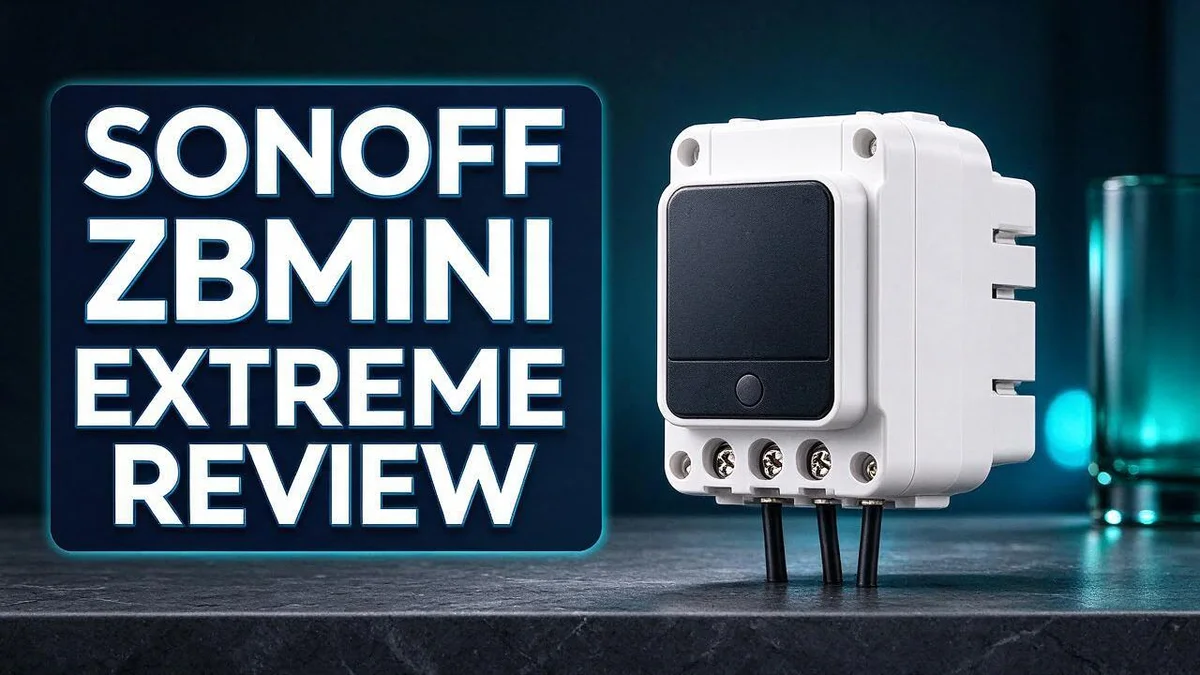
Sonoff ZBMINI Extreme Review: Compact Zigbee Smart Switch for Smart Homes
Want a smart switch that fits right into your wall? The Sonoff ZBMINI Extreme might be the answer you need.
Many smart switches are bulky. They often need a neutral wire, which makes installation hard.
This model skips that need entirely. It is ultra small and fits even the smallest EU style mounting box.
It also supports two way staircase lighting, countdown timers, and scheduled automations.
It works with Alexa, Google Assistant, and Home Assistant. Many users rely on it in large smart homes.
In this review, we cover what works well. We also explain the drawbacks you should know before you buy.
In a Nutshell
- No neutral wire needed: Many older homes lack a neutral wire at the switch point, which often blocks smart upgrades. This model still installs without one. That makes upgrading much simpler for most households.
- A strong Zigbee router: It relays signals for nearby devices, so coverage improves across the home. Your mesh network grows stronger as you add more gadgets over time.
- Reliable in large setups: Advanced automations run smoothly across many connected devices. Big smart homes benefit most from its steady performance and consistent response times.
- Missing power on state: The device has no power on state setting. This makes it less dependable when a standard wall switch sits upstream. Plan for this limitation before you install it.
- Minor flicker after pairing: Some users report that a connected lamp flickers twice during setup. The issue appears small and is usually easy to live with, but it is good to know.
- Tricky box opening: The casing is hard to open without damaging it. Plan your installation carefully and keep the right tools ready before you begin working on the wiring.
Installation and Wiring Requirements

- 【Super Tiny Size】The tiniest Zigbee smart switch can be easily fit in the smallest EU-type/86 type...
- 【Support External Switch】 Work with different type of external switches to control your devices, like...
Last update on 2026-11-05 / Affiliate links / Images from Amazon Product Advertising API
Installing this switch starts with safety. Turn off the power at the breaker before you touch any wires. Use a voltage tester to confirm the wires carry no current.
Next, take a clear photo of your current wiring. Most switch boxes hold a live wire, a load wire, and an earth wire. A photo makes it much easier to reconnect everything correctly.
Check the lamp and bulbs too. Very low wattage LED bulbs may glow faintly when the light is off. Trying a higher wattage bulb can help solve this.
Look at the wall box depth as well. Smart switches need room for the device and all the wires. Tuck the wires in neatly so the cover plate sits flat.
Plan your hub location before you start. Pairing requires a Zigbee hub or bridge. Keep the hub within reach during setup so the device connects smoothly.
If you use two switches for one light, label each wire. Mixing up the traveler wires is a common mistake. Take your time and double check each connection.
Restore power and test the switch from the app. Press the physical switch and confirm the light responds. Repeat the test a few times before you close the cover.
Keep your installation notes for future reference. Write down the date, the wire colors, and the hub name. This record saves time if you need to remove or replace the switch later.
Finally, check that the switch sits flush in the box. Loose connections can overheat over time. A snug fit keeps the wiring safe and steady.
If the wiring looks unfamiliar, call a licensed electrician. A quick visit brings peace of mind. Safety always comes first in any home project.
Key Features and Automation Timers
Automation is where this switch really shines. Each light can follow a routine that runs without any help from you.
Countdown timers suit rooms that people often leave lit. Bathrooms, closets, and garages benefit most. Turn the light on, and it switches off by itself after a set time.
Scheduled automations handle daily habits. Set the porch light to turn on at the same time each evening. You never need to remember it again.
Loop timers create a different kind of routine. The switch repeats an on and off pattern for as long as you need. This makes loop timers useful when you travel. A lamp that follows a natural pattern can make an empty house look lived in.
Timers can also run during the day. A light can turn on before you get home, so you never walk into a dark entry.
Timers also save energy in daily life. Lights turn off on schedule, so nobody forgets them in empty rooms.
Good planning makes timers work better. Start with two or three simple rules. Test each rule for a full day before you add more.
Home Assistant users gain the most control. They can combine timers with other triggers, such as motion sensors or the time of day.
Voice assistants also help. After you link the switch to Alexa or Google Assistant, you can start or change routines by voice.
Keep your timer names clear. A name like “Hallway evening” makes the app easier to use. Clear labels save time when you edit rules later.
Check your timers after daylight saving changes. A quick review keeps schedules accurate and avoids surprises.
Overall, timers turn this switch into a quiet helper. It handles the small routines so you can focus on more important things.
Smart Home Integration and Zigbee Performance
Zigbee 3.0 gives this switch a shared language for smart devices. Sensors, bulbs, and plugs from many brands can join the same network. That mix helps you build a home that fits your daily needs.
Your hub choice matters more than you might think. Most setups use a coordinator, such as a USB stick connected to Home Assistant. Pick a hub early, because moving a Zigbee network later takes time.
Pairing works best when you add the switch close to the hub. Start with the switch near the coordinator, then move it to its final wall box. This simple step reduces failed joins during setup.
Channel planning also helps. Zigbee and WiFi share the same 2.4 GHz band in many homes. Place your coordinator away from a busy router, or choose a quieter Zigbee channel in your settings. Clear airwaves mean faster commands.
Local control gives extra peace of mind. When your hub runs locally, lights respond even if the internet drops. Cloud-only setups depend on outside servers, so a local hub is a strong choice for daily use.
Troubleshooting becomes easier with the right tools. Home Assistant shows signal strength and last seen times for each device. Use those details to spot weak spots before they cause problems.
Firmware updates keep the switch current. Check the eWeLink app now and then for new versions. Updates can improve pairing and stability over time.
Group control adds another layer. You can link this switch to scenes that turn on several lights at once. Scenes trigger together with motion sensors, door contacts, or morning routines. Each device then works as part of one plan rather than a set of single parts.
Plan for growth from the start. Each new Zigbee device adds more routing paths, so your network grows stronger as you add gear. Keep a simple list of device names and locations for future upgrades.
Top 3 Alternatives
Aqara Smart Relay

- [Compatibility Features] The Dual Relay Module T2 is compatible with a variety of mainstream ecosystems, like...
- [Dry Contact Mode] The Aqara Dual Relay Module T2 supports dry (or potential-free) contact mode with both...

Last update on 2026-11-05 / Affiliate links / Images from Amazon Product Advertising API
Want a simple way to control lights and appliances? The Aqara Smart Relay offers easy setup and reliable switching. It fits neatly behind many existing wall switches. You can add it to your smart home and create automations in minutes.
It also tracks power use in some setups. This helps you see which devices run the most. Many homeowners like it for its clean design and straightforward controls.
Shelly Plus 1

- Shelly Plus 1 UL is a UL-certified Wi-Fi operated smart relay switch with 1 channel, up to 15A that can also...
- Make any electrical appliance, garage door and irrigation system smart - No need to run additional cables, do...
Last update on 2026-11-05 / Affiliate links / Images from Amazon Product Advertising API
The Shelly Plus 1 is a compact relay with Wi-Fi control. You can install it inside a standard wall box. It supports local control, so your devices can still respond when the internet drops.
Setup happens through the Shelly app. You can schedule tasks and connect it to popular voice assistants. Its open platform appeals to people who enjoy customizing their smart home.
Zooz ZEN72
No products found.
The Zooz ZEN72 uses Z-Wave technology to connect with your hub. It works well for switching fans, pumps, and other larger loads. The relay is a strong option for people who want dependable performance.
You can add it to a Z-Wave network and set custom rules. Many users pick it for reliable control in busy homes. It gives you flexible options for managing everyday electrical devices.
Staircase and Two-Way Lighting Setups
Staircases are one of the most popular reasons to choose this switch. You want to turn lights on at the bottom and off at the top. Walking up in the dark feels much safer with that option.
Traditional two way setups rely on two physical switches and extra wires called travelers. Many older homes lack those travelers. This switch gives you a different route.
It adds smart control. You can use an app, a voice command, or a scene from either end of the stairs.
Think about daily life on the stairs. One person may head upstairs late at night. Another person may stay in the kitchen.
Shared control keeps everyone on the same page. Families with kids or older adults often value this most.
Start with a simple sketch before you change anything. Mark each switch location and list the light it controls.
This quick drawing shows your options. It helps you see whether the ZBMINI Extreme replaces one switch or works alongside a second physical switch.
Keep the physical switch working as a backup. If someone uses the wall switch, the light should respond right away.
Many people forget this step. Test both switches after setup. The stairs should behave the same way from top to bottom.
You can also link the staircase light to nearby lights. A hallway lamp or landing light can turn on as someone moves through the house.
This creates a smooth path. It feels calm and welcoming at night.
Good lighting matters on stairs. Bright, even light across each step helps people see edges and avoid trips.
Look at the stairway from the bottom and the top. Spot any dark corners before you finish.
Finally, test the setup in the dark. Walk up and down the stairs, then press each control. Note any delay or missed press. Small checks now save frustration later.
Ease of Setup and Pairing
Setting up the Sonoff ZBMINI Extreme starts with the right mindset. Give yourself about an hour for the first switch. That gives you time to read each step without rushing.
Start by checking that your Zigbee hub is powered on. Open its app and place it in pairing mode. Most hubs show a clear prompt for this step.
Turn off the power at the breaker first. Connect the wires as the diagram shows. Double check every connection before restoring power.
Once power returns, press the button as the manual describes. This puts the switch into pairing mode. Your hub should then detect it within a minute.
Give the new device a clear name as soon as it joins. Good names make later steps much easier. You will thank yourself when you open the app.
Expect a quick flicker once pairing finishes. Many owners notice the lamp blink twice. This is common, so it rarely signals a fault.
Hold off on mounting the switch fully until pairing succeeds. Testing on a bench is easier than reopening a wall box.
Check how the lamp behaves after a power cut. This switch has no power on state setting, so the result may surprise you. Test it once setup finishes.
Run a quick check from the app before you close the box. Confirm the switch responds to every command. This saves time if a fix is needed.
Fitting the switch into a tight box takes patience. The casing can feel stiff, so work slowly. Gentle pressure protects both the device and your wall.
Keep the paperwork and wiring diagram handy. You may need them when you add more switches later. A photo of the wiring also helps.
Finally, plan the order for multiple switches. Pair one unit at a time. This keeps each device easy to identify in your app.
Pros and Cons
Pros
- Fits the smallest mounting boxes without crowding the wall.
- Works without a neutral wire, so installs stay simple.
- Strengthens your Zigbee mesh as a router.
- Connects with Alexa, Google Assistant, and Home Assistant.
- Offers countdown, schedule, and loop timers for hands-free lighting.
Cons
- The case is hard to open without damaging it.
- It needs a Zigbee hub to work.
- It can feel like too much for a single light with simple needs.
Who Should Buy It
The Sonoff ZBMINI Extreme suits a specific type of home owner. It works best for people who already run a Zigbee network. Think about how many devices you plan to add.
Large smart homes are a strong match. Owners with many sensors and plugs get the most from their setup. Each new device adds coverage and stability to the network.
Confident DIY fans make the best buyers. Installing this switch means working inside a wall box. Anyone who feels unsure should hire a licensed electrician. Safety always comes first.
Households that want a simpler start may prefer a lighter option. The Sonoff Basic suits people who only need basic on and off control. It skips the advanced timers and extra features.
Owners with a different wireless network should look elsewhere. Leviton switches use another protocol. This device will not join that network, so the two will not mix well.
Shelly relays suit people who want a different ecosystem. Compare your current setup before you commit to any brand. Small changes now save time later.
Renters should check first. Replacing a wall switch often needs landlord approval. Ask before you open any box.
Curious learners who enjoy hands on projects may find it rewarding. Each step teaches more about home wiring.
Homes with tight wall boxes also need a closer look. Measure the box depth and check the wires first. This keeps the install smooth and safe.
Finally, consider how many lights need smart control. A single lamp with simple needs may not justify the setup effort. Several connected lights make the switch worth the time.
Home Assistant fans gain the most flexibility. Local control and custom rules fit well with this device. Your setup can grow as your ideas change.
Take time to list your goals before you buy. Write down which lights you want to automate. A short list makes the decision easier.
Final Verdict
Final thoughts come down to one simple question. Does your home already run on Zigbee? If the answer is yes, this switch fits your setup well. If not, you may want to start somewhere else first.
Think about where your smart home is headed. Many people begin with one light and then add more. This switch can act as a stepping stone to a fuller system. If you are still exploring, the Sonoff Basic offers a simpler entry point. Ask yourself whether you need advanced timers now or later.
Weigh the downsides honestly. The missing power on setting can cause frustration later. The short flicker after pairing is minor, but it still catches attention. Neither issue ruins the switch, yet you should know both before you buy.
Patience matters during installation. Take your time with the wiring and the box. A calm, careful approach turns a tricky job into a rewarding project. Rushing often leads to mistakes that take longer to fix.
This is a strong pick for experienced tinkerers. If you enjoy building and tuning a smart network, you will likely love what this switch offers. Its timers and automation tools give you plenty to play with. Beginners can succeed too, but they should move slowly and test each step.
Also consider the other gear already in your home. Shelly relays and Leviton switches work differently. Matching your current ecosystem saves headaches later. Keep your goals in mind as you choose.
If you want one lamp controlled by voice and nothing more, a simpler device will likely make life easier. Your needs should guide the decision, not the feature list.
In short, this switch earns a confident recommendation for the right owner. Test everything before you close the wall box. Then sit back and enjoy lighting that works exactly the way you planned.
Frequently Asked Questions
Can I use this switch with staircase lighting?
Yes, it supports two way control for staircase lights. You can switch the same lamp from both ends of the stairs. Plan your wiring before you start the installation.
Why does my lamp flicker after pairing?
Some owners report that the lamp flickers twice after pairing. This comes from user reports, so it may not happen to everyone. If it does, wait a few minutes and test the light again.
Do I need a hub to use it?
Yes, you need a Zigbee hub or gateway. The switch uses Zigbee 3.0, so it connects through a compatible hub. Keep the switch close to your hub during the first pairing.
How does it compare with the Sonoff MINI DUO-L?
The MINI DUO-L is another Sonoff option with its own wiring and control style. Compare both before you choose. A simpler starter option like the Sonoff Basic may suit first time users better.

DK is a technology expert who specializes in AI tools, software, and tech gadgets. He writes for How to Tech Info, providing detailed reviews and practical guides. DK helps readers discover the best AI applications, navigate new software, and choose the right tech gadgets.

