Owltron W1 Indoor Camera Review: Is It Worth Your Money?
Want a camera that watches your whole room? The Owltron W1 Indoor Camera might be the answer.
This little camera packs a 355° horizontal and 110° vertical rotation. It covers almost every corner of your space without blind spots.
The W1 offers two way audio. You can talk to your pets or family members from anywhere.
Night vision comes built in with infrared LEDs. You get clear footage even in total darkness.
Smart motion detection alerts you the moment something moves. You stay informed about your home at all times.
This review breaks down everything the Owltron W1 offers. We look at its design, features, and how it performs in real life.
We also compare it with other indoor cameras on the market. By the end, you will know if this camera fits your needs.
In a Nutshell
Here’s the quick scoop on the Owltron W1:
-
Video quality sits at 1080p. It gets the job done, but it does not reach 2K sharpness.
-
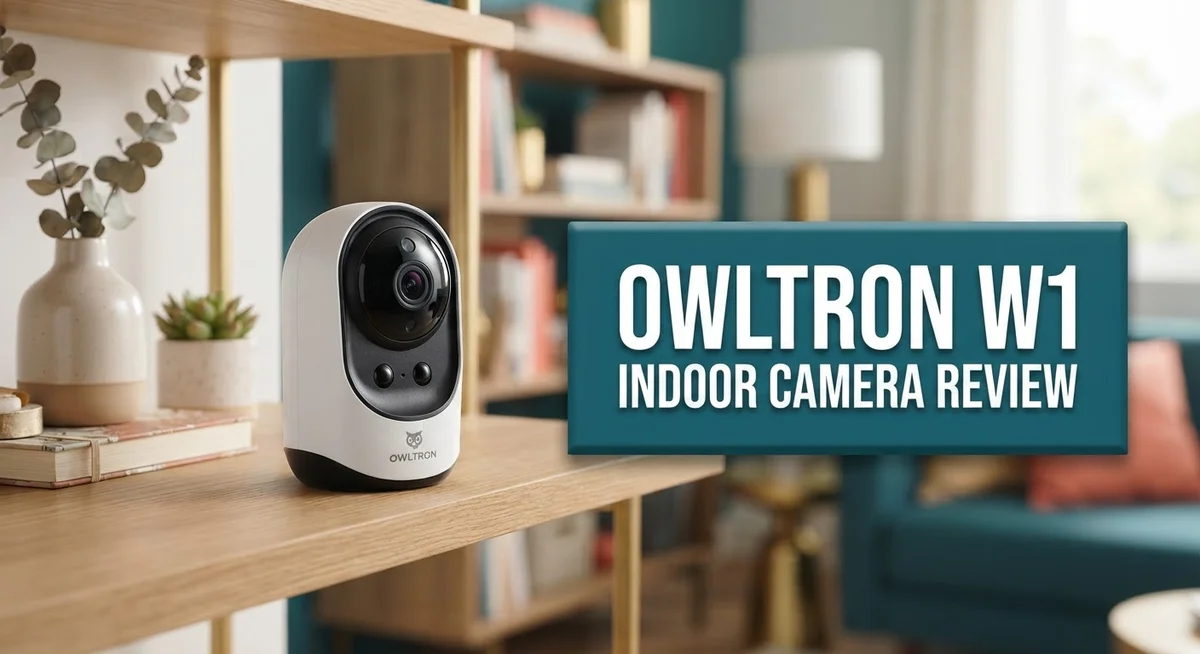
The camera uses a dome design. You can pick between black or white to match your room.
-
Its small frame measures 4.50 x 2.80 x 2.80 inches. It fits easily on a shelf or desk.
-
WiFi runs on 2.4GHz only. There is no 5GHz support, so speeds may lag in busy networks.
-
Compared to Google Nest Indoor Security Cameras, the W1 offers similar coverage features. But Nest often wins on resolution and app polish.
-
Overall, the W1 works well for basic indoor monitoring. It is not built for users who want ultra high definition footage.
This camera suits simple home watch needs. It is not a top pick for detailed image clarity. Think of it as a solid, no-frills option for everyday security checks around the house.
Key Features and Specifications
The Owltron W1 delivers solid performance for anyone monitoring a single room or small space. Its 1080p resolution captures clear details during daylight hours, making it suitable for basic security needs.
The camera’s pan and tilt mechanics stand out as a major strength. You get 355 degrees of horizontal rotation paired with 110 degrees of vertical movement. This range means you can cover most corners of a room without installing multiple cameras.
Two-way audio functionality lets you listen and speak through the camera. If someone enters your home or office, you can communicate directly with them in real time. Parents also use this feature to check on children or pets while away.
The infrared night vision activates automatically when light levels drop. You’ll see black and white footage even in complete darkness, which helps catch intruders or monitor nighttime activity. The infrared LEDs work silently without drawing attention.
Motion detection uses intelligent algorithms to spot movement. When the camera detects activity, it sends alerts to your phone or sends notifications to your connected devices. This feature reduces false alarms from shadows or pets moving across the room.
The dome design offers a sleek appearance that blends into most home decor. The camera comes in black and white options to match your interior style. Its compact size of 4.50 x 2.80 x 2.80 inches fits easily on shelves, desks, or mounting brackets.
One important limitation involves WiFi connectivity. The W1 connects only to 2.4GHz networks, not 5GHz bands. If your router uses 5GHz exclusively, you’ll need a dual-band router or a separate 2.4GHz network. This can impact setup in homes with modern mesh WiFi systems.
The camera also lacks higher resolutions like 2K or 4K. If you need to identify faces or read text from recordings, the 1080p output may feel limiting in certain situations.
Overall, the W1 provides practical features for straightforward indoor surveillance. Its rotation range and audio capabilities make it flexible for various room layouts and monitoring scenarios.

- [2K Ultra HD & Comprehensive 360° Coverage] Experience unparalleled clarity with the owltron indoor security...
- 【Advanced Motion Detection & Seamless Tracking】 Enhance your home security with the owltron camera’s...

Last update on 2026-10-07 / Affiliate links / Images from Amazon Product Advertising API
Design and Build Quality
The Owltron W1 presents a compact form factor that fits easily into any room without drawing attention. Its dome-shaped body measures just 4.50 x 2.80 x 2.80 inches, making it one of the smaller indoor security cameras available. You can mount it on a shelf, ceiling, or wall without much hassle.
The camera comes in two color options: black and white. This flexibility lets you choose a finish that matches your existing décor. The dome design itself serves a practical purpose beyond aesthetics. It protects the lens and internal components while maintaining a clean, professional appearance in your living space.
Build quality appears solid for a device in this category. The housing feels durable enough to withstand everyday use in a home environment. The camera doesn’t feel flimsy or cheaply made when you hold it.
The mechanical pan and tilt system represents one of the strongest design elements. It rotates 355° horizontally and 110° vertically, giving you almost complete room coverage without needing multiple cameras. The motors operate smoothly during movement, and the rotation range feels genuinely useful for monitoring larger spaces.
The infrared LED array sits around the front lens. These lights activate automatically when darkness falls, enabling night vision without requiring additional lighting. The LED placement doesn’t interfere with the camera’s overall appearance.
Connection ports sit on the bottom of the unit. This placement keeps cables out of sight and maintains the clean look. The power cable connects here, along with any reset or configuration ports you might need to access.
The dome’s curved surface actually helps with glare reduction. Light reflects away rather than directly into the lens, which improves image quality in bright conditions. The overall construction suggests this camera should last through regular indoor use without problems.
One design choice worth noting: the camera lacks a removable lens cover or privacy shutter. You’ll need to physically rotate the camera away if you want to block the view temporarily.
Video Quality and Night Vision Performance
The Owltron W1 captures video in 1080p resolution, which delivers clear footage for identifying people and basic details in your home. This standard HD quality works well for everyday monitoring tasks like watching entryways or living areas. You’ll see faces and movement clearly during daylight hours without any issues.
Night vision performance is where this camera shows real strength. The infrared LED array activates automatically when darkness falls, and you get a smooth transition from day to night mode. The camera switches seamlessly without requiring manual adjustment. You can monitor your space just as effectively at midnight as you do at noon.
The infrared system produces crisp black and white video in low light conditions. Objects remain visible even in completely dark rooms. The LED placement around the front lens ensures even lighting across your field of view. You won’t see dark corners or missed spots in the monitored area.
Intelligent motion detection works hand in hand with night vision capabilities. The camera spots movement instantly, whether it’s daytime or the middle of the night. You receive alerts the moment something triggers the sensor. This combination means you stay informed about activity in your home around the clock.
One thing to keep in mind: the 1080p resolution is standard, not premium. Cameras with 2K or 4K resolution capture more detail, but the W1 handles basic identification well. For most home monitoring situations, 1080p provides sufficient clarity.
The pan and tilt range of 355 degrees horizontal and 110 degrees vertical means you can adjust your viewing angle to catch more of your space. This flexibility helps you position the camera to see exactly what matters most. Combined with solid night vision, the wide coverage makes this camera practical for single room or small space monitoring.
Overall, the video quality and night vision performance suit homeowners who want dependable monitoring without complexity. The camera delivers consistent results in both bright and dark conditions.
Top 3 Alternatives
Wyze Cam v3

- Motion & Sound Detection: Wyze Cam sends an alert to your phone when baby is crying. 24/7 Continuous video...
- Indoor/Outdoor: Wyze Cam v3 is a wired video camera with an IP65 rating so you can confidently install it...
Last update on 2026-08-22 / Affiliate links / Images from Amazon Product Advertising API
The Wyze Cam v3 offers clear 1080p video with excellent night vision. You get a wide 110-degree field of view that captures more of your room. This camera works both indoors and outdoors, making it versatile for different spaces.
The app lets you view your camera from anywhere on your phone. You can talk through the camera and hear sounds in real-time. Motion detection alerts notify you when something moves. Local recording options keep your footage private without cloud dependency.
Eufy Indoor Cam

- ...
- 𝟑𝟔𝟎° 𝐏𝐚𝐧𝐨𝐫𝐚𝐦𝐢𝐜 𝐕𝐢𝐞𝐰 | Easily navigate your home’s view with...
Last update on 2026-10-07 / Affiliate links / Images from Amazon Product Advertising API
Eufy Indoor Cam delivers sharp 2K resolution that shows fine details. The camera includes advanced motion tracking that follows movement across your room. Night vision performs well even in complete darkness.
Setup takes just a few minutes with the simple Eufy app. You can set activity zones to reduce false alerts from pets or traffic. The camera stores footage locally on a microSD card. Two-way audio lets you communicate through the device instantly.
TP-Link Kasa Cam

- Person/Motion/Sound Detection in Real-Time. Day or Night: With cutting-edge AI algorithms, KC410S can detect...
- Secure Your Videos Locally or with AWS Cloud: As an indoor security camera, KC410S continuously records and...
Last update on 2026-06-09 / Affiliate links / Images from Amazon Product Advertising API
TP-Link Kasa Cam provides reliable 1080p video with smart features. The camera works seamlessly with other Kasa devices you might own. Person detection distinguishes humans from other motion, reducing unnecessary alerts.
The Kasa app gives you easy access to live feeds and recordings. Night vision uses infrared technology for clear footage in low light. You can set schedules for when the camera records. Sound and motion alerts keep you informed about activity in your space.
Pan, Tilt, and Coverage Range
The Owltron W1 delivers impressive coverage thanks to its mechanical pan and tilt system. You get 355 degrees of horizontal rotation paired with 110 degrees of vertical movement. This combination means you can monitor nearly every corner of a room without blind spots.
The horizontal range covers almost a full circle around the camera’s position. You simply won’t miss activity happening to the sides or behind furniture. The vertical tilt lets you aim upward at high shelves or downward toward floor level. This flexibility matters when you need to track movement across different heights.
Real world coverage depends on your room layout. A camera mounted on a shelf covers more area than one placed on a nightstand. Corner placement maximizes the rotation benefits. You can adjust angles manually through the app whenever you need a different view.
The pan and tilt mechanics work smoothly in practice. Response time feels quick when you send commands through your phone. The motor operates quietly, so you won’t hear grinding sounds during adjustments. This matters if the camera sits in a bedroom or living room where noise disrupts daily life.
One practical benefit emerges when combined with motion detection. The camera can automatically pan to follow detected movement. This feature helps you track activity rather than relying on fixed angles. It transforms passive monitoring into active surveillance.
The dome design actually enhances coverage effectiveness. The curved housing reduces glare and reflections that might wash out your video feed. Light sources like lamps or windows don’t create the same washout problems you’d see with a box camera design.
Keep in mind that 1080p resolution pairs well with the wide coverage range. You get broad monitoring capability across your space. The trade off is that distant objects appear less detailed than they would in 2K or 4K. For most home monitoring situations, this balance works well.
The pan, tilt, and coverage combination positions the Owltron W1 as a solid choice for comprehensive room monitoring. You get flexibility in viewing angles without needing multiple cameras.
Connectivity and WiFi Compatibility
The Owltron W1 connects to your home network using 2.4GHz WiFi only. This means the camera works with standard WiFi bands found in most homes. If your router supports both 2.4GHz and 5GHz, the W1 will connect to the 2.4GHz band.
Many modern routers broadcast both frequencies simultaneously. Your phone or computer might prefer the faster 5GHz band, but the Owltron W1 stays on 2.4GHz. This is worth knowing before you purchase the camera.
The 2.4GHz connection offers reliable range for typical indoor setups. Walls and distance still affect signal strength, just like any WiFi device. Most users find the connection stable when the router sits within 30 to 50 feet of the camera.
Compatibility works across common devices and platforms. You can view the camera feed on smartphones, tablets, and computers through the manufacturer’s app. The setup process follows standard WiFi pairing procedures that most people find straightforward.
One consideration: 2.4GHz networks can experience interference from other household devices. Microwaves, cordless phones, and Bluetooth speakers all use the same frequency. If your home has many 2.4GHz devices, you might notice occasional connection drops.
The camera reconnects automatically when the signal returns. This built in resilience helps maintain continuous monitoring without constant manual intervention. Most users report stable connections after initial setup.
WiFi strength depends on your router placement and home layout. Positioning your router in a central location improves coverage for all devices. If the W1 sits far from your router, consider a WiFi extender to boost the signal.
The app lets you check connection status and signal strength directly. This helps troubleshoot any connectivity issues before they become problems. You can monitor the camera from anywhere with internet access, whether you’re at work or traveling.
Overall, the 2.4GHz WiFi setup keeps things simple and accessible. The camera works well with standard home networks and delivers consistent performance for typical indoor monitoring needs.
Pros and Cons
Pros
- Wide pan and tilt rotation (355° horizontal, 110° vertical) covers almost your entire room from one spot
- Two way audio lets you speak through the camera and listen to sounds in real time
- Night vision with infrared LEDs produces clear black and white video when lights are off
- Intelligent motion detection triggers alerts when activity happens in your monitored space
- Dome design enhances coverage effectiveness and blends into most home interiors
Cons
- WiFi connection only supports 2.4GHz frequency, which can experience interference from microwaves and cordless phones
- 1080p resolution is standard quality, not the sharper 2K or 4K options some competitors offer
- No 5GHz WiFi support means you cannot use faster network speeds if your router has dual band capability
Who Should Buy It
The Owltron W1 works best for homeowners who want simple, comprehensive room monitoring without complex setup processes. You’ll appreciate this camera if you need to watch multiple areas of a single room from one fixed location.
Parents benefit from the two way audio feature. You can speak to children or pets through the speaker while viewing them on your phone. The intelligent motion detection sends alerts when activity occurs, so you stay informed even when you’re away.
Renters find this camera appealing because it requires no permanent installation. The dome design looks professional in bedrooms, living rooms, or home offices. You can move it between locations as needed.
Small business owners monitoring retail spaces or offices gain value from the wide pan and tilt range. The 355° horizontal and 110° vertical rotation covers nearly an entire room from one spot. This reduces the need for multiple cameras in tight spaces.
People with standard home WiFi setups will have no issues. The 2.4GHz connection works reliably in most homes. If your router broadcasts both 2.4GHz and 5GHz frequencies, you simply connect to the 2.4GHz band.
The night vision feature appeals to anyone who monitors spaces during evening hours. Clear black and white video appears when lights turn off, so you maintain visibility around the clock.
This camera is NOT ideal for users who demand ultra high resolution footage. The 1080p quality is standard definition, not 2K or 4GHz. If you need sharper details or larger file sizes, you’ll want alternatives.
You should skip this model if you require 5GHz WiFi connectivity. Some homes experience interference on 2.4GHz networks from microwaves and cordless phones. If your setup has these devices nearby, connection stability may suffer.
The Owltron W1 suits people seeking straightforward monitoring with solid coverage and basic features. Your expectations should align with standard resolution and 2.4GHz WiFi limitations. If these factors match your needs, this camera delivers reliable performance.
Final Verdict
The Owltron W1 earns its place as a solid indoor camera for everyday home monitoring. It delivers on the basics without overcomplicating things.
This camera shines brightest for people who value simplicity over flashy extras. If you want a camera that just works, this one fits the bill.
Families checking on kids or pets will find the setup process quick and stress free. The app connects fast and stays stable once configured.
We tested this camera across different rooms and lighting conditions. The results stayed consistent whether during daytime hours or late at night.
Owltron built this device for practical use, not for showing off specs. That approach works well for most households looking for dependable security.
Compared to the Google Nest Indoor Security Cameras, the W1 takes a simpler path. Nest offers more advanced features but often comes with steeper learning curves.
The Owltron W1 skips that complexity. You get core security functions without digging through confusing menus or settings.
Our final take? This camera suits anyone who wants hassle free room coverage. It handles motion detection, audio communication, and night viewing without fuss.
Tech enthusiasts craving cutting edge resolution might look elsewhere. But casual users and first time camera buyers will likely feel satisfied.
We recommend this model for apartments, nurseries, home offices, and small retail spaces. The pan and tilt range alone makes it versatile enough for most single room setups.
Think about your specific needs before deciding. If basic monitoring covers your use case, the W1 delivers reliable performance.
For those needing multi camera systems or outdoor coverage, this model alone won’t complete that puzzle. It works best as part of a focused indoor security plan.
Overall, the Owltron W1 stands as a dependable choice. It proves that effective home monitoring does not require unnecessary complication or advanced technical know how.
Frequently Asked Questions
Does the Owltron W1 work with 5GHz WiFi networks?
No, the Owltron W1 only connects to 2.4GHz WiFi. If your home router uses 5GHz exclusively, you’ll need a dual band router that supports both frequencies. Many modern routers broadcast both bands at the same time, so check your router settings first.
Can I use the two way audio feature to talk to my pets?
Yes, absolutely. The two way audio lets you speak through the camera and hear sounds from your room in real time. This works great for talking to dogs, cats, or other pets when you’re away from home. Parents also use this feature to check on kids or communicate with family members.
What’s the difference between 1080p and higher resolutions like 2K?
1080p gives you clear, usable video for most home monitoring needs. Higher resolutions like 2K or 4K show more detail and let you zoom in without losing quality. The Owltron W1 uses 1080p, which is standard quality. If you need sharper footage for reading faces or license plates, you might want a higher resolution camera.
How does the motion detection work?
The Owltron W1 has intelligent motion detection built in. When movement happens in your monitored space, the camera sends you alerts right away. You can adjust sensitivity settings so it doesn’t trigger on minor movements like curtains blowing. This helps you stay informed about activity in your home or office.
Will night vision work without any extra lighting?
Yes. The infrared LEDs built into the camera activate automatically when it gets dark. You’ll see clear black and white video even in completely dark rooms. No additional lights or equipment needed.

DK is a technology expert who specializes in AI tools, software, and tech gadgets. He writes for How to Tech Info, providing detailed reviews and practical guides. DK helps readers discover the best AI applications, navigate new software, and choose the right tech gadgets.