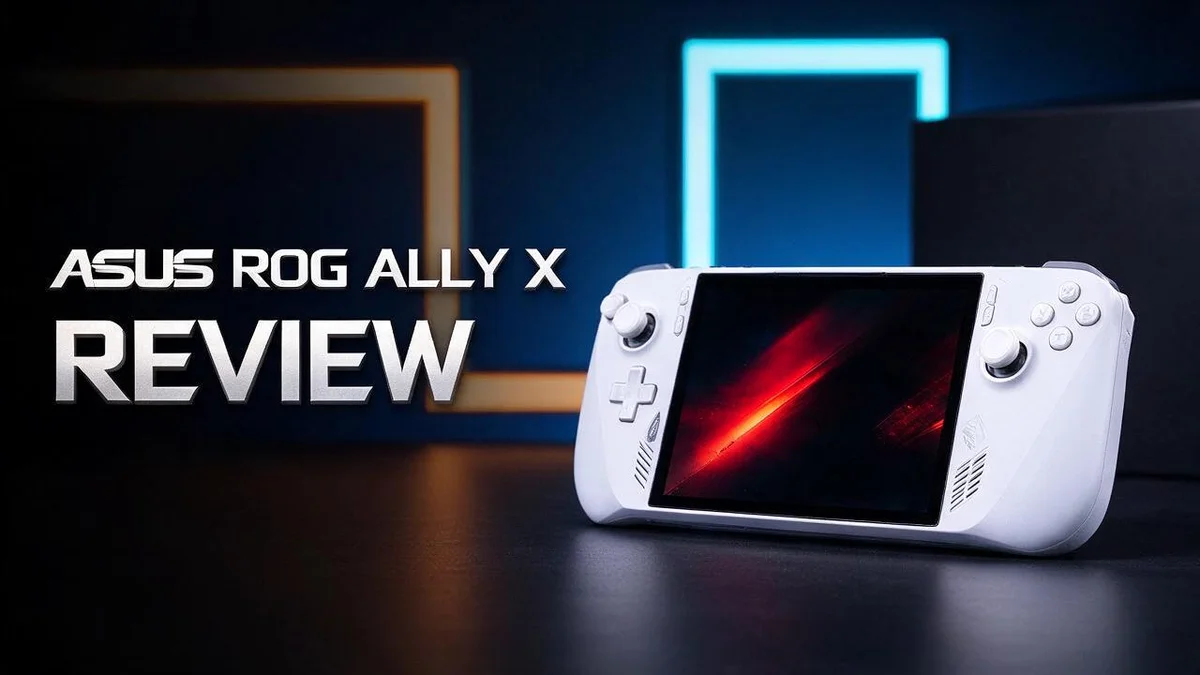
ASUS ROG Xbox Ally X Review: Performance, Battery Life, and Verdict
Are you looking for a handheld that runs big PC games on the go? The ROG Xbox Ally X could be your match. It packs a 7 inch 1080p touchscreen into a compact body.
Under the hood, the AMD Ryzen Z2 Extreme chip handles demanding titles. It offers more power than the ROG Ally X. Higher settings become possible in tough games.
You also get Game Pass, Steam, EA, and Ubisoft in one place. The Xbox experience cuts down on Windows overhead.
Is it a big leap over the ROG Ally X? Not really, since it is only slightly faster. This guide covers design, performance, and battery life so you can decide if it fits your style.
In a Nutshell
-
Grip feels better in your hands than the ROG Ally X. Long gaming sessions feel more comfortable, so you can play for hours without strain.
-
The 7 inch 1080p touchscreen shows sharp visuals on the go. Tapping menus and touch controls feels quick and natural in most games.
-
Xbox mode cuts down on Windows overhead, so more power goes straight to your games. This setup helps the device run smoother during play.
-
You get more power for demanding titles than the older model. Higher settings become possible in heavy games that need extra horsepower.
-
The 1TB storage and microSD card reader give you room for a large library. You can add new games without deleting your old favorites.
-
Wireless 6E and Bluetooth 5.4 keep connections fast and stable. Battery size varies across listings, so check the exact spec before you decide.
Performance and Frame Rates

- DISPLAY SPECS: 7-inch FHD screen with impressive 120Hz refresh rate delivers smooth, responsive gaming visuals...
- PROCESSING POWER: Equipped with AMD Ryzen AI Z2 Extreme processor for high-performance mobile gaming and...
Last update on 2026-11-07 / Affiliate links / Images from Amazon Product Advertising API
Frame rates tell the real story of any handheld. Most players want smooth motion. A steady 60 frames per second is the goal.
The ROG Xbox Ally X gets close to that target in many titles. Heavier games may need a few setting changes.
Lowering shadows and draw distance often gives the biggest boost. These options cost less visual quality than most people expect.
Small tweaks rarely ruin the look. You can keep textures sharp while trimming the heavy effects. Test a few options and see what feels best on the 7 inch screen.
The 24GB of 8000MT/s RAM on the X model gives the system room to work. Big open worlds can feel steadier when memory has space to spare.
Upscaling tools can also help. Many games render at a lower resolution, then scale the image up. This can lift frame rates with only a small loss in sharpness.
A frame cap is another handy option. Capping output at 30 frames can stretch battery life during casual sessions. Fast shooters usually feel better at a higher limit.
Battery life shifts with performance too. Running a demanding game at full power drains the battery fast. Many players lower the power limit to get more playtime on trips.
Long sessions tell a different story. A short test can look excellent. Frame rates may still dip after the device warms up. Check the temperature during longer play to spot trouble early.
Steam Deck owners will notice a clear step up. The ROG Xbox Ally X handles newer releases with more ease. Results still vary by game, so test your favorite titles first.
In short, the ROG Xbox Ally X delivers smooth play for most games. A few setting tweaks go a long way. Heavy titles still need a little patience and testing.
Display and Ergonomics
Holding a handheld for hours changes how you feel about it. Comfort often matters as much as raw power.
Weight plays a big role in that comfort. One review lists the device at 715g, although that figure may belong to the ROG Ally X.
Small weight differences add up over long sessions. Your wrists and forearms may feel the strain sooner than you expect.
Balance matters too. A heavier side can pull your hands in odd directions when you hold the unit for a while.
Testing your own setup helps. Try resting the unit on your lap, then on a table, to see which position feels natural to you.
The screen size also affects how you use menus. Windows menus can look small, so a quick tap on the touchscreen often works faster than hunting for the right button.
Viewing angle changes how the picture looks. If you share the screen with friends, tilting the device can make colors appear washed out from the side.
Glare is another issue outdoors. Bright sunlight can wash out dark scenes, so finding some shade helps you see fine details.
Brightness settings deserve attention. Lowering the brightness can stretch your playtime, which helps on a train or a long flight.
Long play sessions can also strain your eyes. If the screen looks harsh in a dark room, lower the brightness and take a short break every hour.
Players switching from another handheld may need a few sessions to adjust. Button placement takes some getting used to, and your hands will build muscle memory over time.
In short, good ergonomics keep you playing longer. A comfortable hold, a clear screen, and a few regular breaks make a real difference.
Battery Life and Portability
Battery life is one of the first things most players ask about. The ROG Xbox Ally X uses a 60Wh battery in one spec listing.
Another source lists 80Wh for the ROG Ally X. Check the exact model before you decide.
Battery drain depends on the game you pick. Demanding titles push the processor hard, so the charge drops fast.
Lighter games last much longer on one charge.
Your settings matter too. A high performance mode delivers smoother play but uses more energy. A lower power mode gives you extra time away from an outlet. Test both modes before a long trip.
Short breaks need a quick fix. Use sleep mode instead of a full shutdown. The game stays ready, so you can jump back in within seconds.
Watch the battery percentage during your first few sessions. This shows your real drain for your favorite games.
Travel adds another layer. Most airlines allow handhelds in carry on bags. Batteries under 100Wh usually fit common airline rules, so both sizes should pass. Still, check your airline policy before you fly.
Pack light for the road. Bring the charger, a short cable, and a soft case. Keep the charger in the same bag so you never forget it.
A compact power bank can add extra play time. Make sure it outputs enough power to charge a handheld.
Portability feels good for trips, yet the handheld needs a little padding inside a backpack. A soft case keeps the screen safe during travel.
Plan charging around your routine. Plug in overnight so the unit starts each day full.
Repeated full drains can wear down any battery. Keeping the charge between 20 and 80 percent helps the unit last longer.
Players who commute daily will see the biggest benefit. Good planning makes long days easier.
In short, the battery handles light play well, while heavy sessions need a plug nearby.
Top 3 Alternatives
Lenovo Legion Go

- MAX POWER, YOUR RULES – Play your way with the Lenovo Legion Go 2. Powered by an AMD Ryzen Z2 processor, a...
- MAX COOLING, MANUAL CONTROL – The Legion Coldfront thermal system is built to handle serious heat. Increased...
Last update on 2026-11-06 / Affiliate links / Images from Amazon Product Advertising API
The Lenovo Legion Go is a strong choice for gamers who want a big screen. It has an 8.8 inch display with a fast 144Hz refresh rate. The detachable controllers can slide off, so you can play in many ways. It works well for handheld play and quick trips to the couch.
Lenovo Legion Go also supports external monitors when you dock it. This makes it useful at a desk too.
MSI Claw A8

- Exposure: 8" FHD (1920 x 1200), Touchscreen, 120Hz Refresh Rate, 100% sRGB (Typical), 500 Nits (Typical), VRR...
- Processor: AMD Ryzen Z2 Extreme
Last update on 2026-11-07 / Affiliate links / Images from Amazon Product Advertising API
The MSI Claw A8 offers a clean, comfortable design for long play sessions. It runs on an AMD chip that handles modern games with ease. Its compact body fits easily in a bag. Fans of Windows will feel right at home because the device runs a full Windows system.
A built in fan keeps temperatures under control during heavy play. You can tweak settings to balance speed and battery life.
Steam Deck OLED

Last update on 2026-06-21 / Affiliate links / Images from Amazon Product Advertising API
The Steam Deck OLED stands out for its bright and colorful screen. The 7.4 inch OLED panel shows deep blacks and vivid colors. Battery life is better than the original model, which helps during long trips. Valve built this device to play your Steam library with ease.
The device also connects to a TV through a dock. SteamOS keeps your game library simple to browse.
Connectivity and Storage
Connectivity makes daily play feel simple. The handheld supports wireless 6E and Bluetooth 5.4 right out of the box. Pairing a controller or earbuds feels quick and easy.
Wireless 6E helps when your home network gets crowded. Many homes have phones, laptops, and smart TVs all sharing one router. A newer wireless band can keep your downloads and online matches running smoothly.
Bluetooth 5.4 handles your accessories well. You can link wireless headphones, a second controller, or a keyboard without fuss. Connections stay steady even when you move around the room.
The 3.5mm jack gives you a wired option, too. Some players prefer a cable for zero charging hassles. Plug in almost any standard headset and start playing right away.
Storage is the next big question. The X model includes 1TB of internal space. That gives you room for a large library without deleting games every week. Still, modern titles can take up huge amounts of space.
The microSD card reader lets you expand that space later. Insert a card, format it, and the system can use it for games. Keep your favorite titles on the internal drive and move older ones to the card.
Check card speed before you buy. A slow card can make loading screens feel much longer. Look for a card built for fast reads and writes. Your games will start faster and feel more responsive.
Moving games between drives takes a little planning. Check the storage menu before starting a large download. Remove unused titles often so your library stays tidy and easy to browse.
Cloud saves give you extra peace of mind. Your progress syncs online through your account, so a lost card will not erase your hard work. This matters most when you travel or swap storage devices.
Software and Xbox Ecosystem
The software on a handheld shapes your daily experience. The ROG Xbox Ally X runs an Xbox experience that sits on top of Windows. Many players care about this layer more than they expect.
Think of it as a simpler home screen. It guides you to games first. You spend less time hunting through desktop menus.
Less Windows overhead means more focus on play. Background tasks run quietly, so your games get more room to breathe. Lower overhead does not guarantee higher frame rates, but it helps.
One library, many stores. The Xbox interface brings Game Pass titles together with Steam, EA, and Ubisoft games. You can jump between them without digging through separate apps.
Signing in once saves time. Your Xbox account links your game list and achievements. Set up your accounts before your first trip, so you do not wait on a slow connection later.
Some stores still open their own launchers. Steam may ask you to sign in again. Keep your login details ready for those prompts.
Controller setup matters here too. Button mapping lives in the Xbox menus, and it takes a few minutes. Try a few layouts until your thumbs feel natural.
Updates arrive through Windows and the Xbox app. Keep both current so games launch cleanly. A quick check each week keeps surprises low.
The learning curve is real for some players. Windows fans may miss the full desktop at first. Give the software a few days before you judge it. Most people adapt faster than they expect.
Not every buyer feels the same way. One owner admits the handheld sat unused for long stretches. Try a short test run to see if this setup suits your habits.
Check the game library you already own. Make sure those titles run on this platform. That quick step saves frustration and keeps your plans realistic.
Pros and Cons
Pros
- Better grips make long sessions feel more comfortable.
- More power lets demanding games run at higher settings.
- The Xbox experience keeps your focus on the games you love.
- Game Pass, Steam, EA, and Ubisoft titles all work in one place.
Cons
- The speed gain over the ROG Ally X feels small.
- At 715g, the handheld can feel heavy during marathon play.
- One user reported rarely picking it up after the first few weeks.
Who Should Buy It
The ideal buyer is a dedicated handheld player. This person plays for hours and wants a screen that goes wherever they go. The ROG Ally X suits someone who treats portable gaming as a main hobby.
Windows users will feel right at home. The handheld runs a full Windows system, so familiar apps and launchers work with little effort. Installing a new app takes just a few clicks. Someone who enjoys tweaking settings will appreciate that control.
Xbox fans often make the strongest match. Anyone who already follows Xbox exclusives will feel that the device fits their habits. The hardware matches the way they already play.
Frequent travelers can get real use from it. Long flights and train rides suit a device that runs demanding titles. Players can start a session without setting up a TV or desk.
Couch players may prefer a bigger display. The 7 inch screen works well for one person on the move. Sharing a session with friends can feel cramped on such a small panel.
Casual players may not need this much power. Someone who plays a few quick puzzle games each week can use a phone or tablet instead. Heavy hardware makes the most sense for demanding games.
Steam Deck owners should weigh the upgrade carefully. The ROG Ally X runs faster, yet the gap may feel modest for some players. Upgrading makes sense when speed matters for your favorite titles.
Shoppers comparing rival handhelds should test their needs. The Lenovo Legion Go offers its own layout and feel. Make a short list of the games you play most before you choose.
Your daily routine should guide the final choice. Think about where you play, how long each session lasts, and which games matter most. A clear answer to those questions makes the decision simple.
Final Verdict
Here is our bottom line. This handheld suits players who want a full Windows machine. It also feels like a console when you want quick play.
Think about your daily habits first. Players who game every night will value this flexibility most. Occasional players may never use its full potential.
Battery life sets the real limit. Demanding games drain the battery fast. Keep a charger close, and choose lighter titles when you need more time away from an outlet.
Your current setup matters. A gamer with a strong desktop may not need a second powerful machine. A student or remote worker, however, can use it for notes, video calls, and light office work too.
Heat and fan noise deserve a look. Long sessions can warm the grip areas. The fan may also sound loud in quiet rooms, so headphones help during late night play.
Other handhelds still make sense for some players. The Steam Deck remains a strong pick for Steam loyalists. The Lenovo Legion Go may appeal to people who prefer a different controller layout.
Expect updates to shape the experience. Windows and Xbox app updates can change how the device behaves over time. Stay patient, since small tweaks often bring real improvements.
Think about where you play. Airplanes, couches, and desks each suit a different setup. A stand can make desk play more comfortable.
Our final take is clear. This device delivers strong performance, flexibility, and a Windows focused experience. It is not a must buy for everyone, but dedicated handheld fans will likely love it.
Check your expectations before you buy. Watch a few gameplay videos from owners. Read the return policy too. A clear plan leads to a happier owner.
Frequently Asked Questions
Does the ROG Xbox Ally X support extra storage?
Yes, it includes a microSD card reader. You can add a card to hold more games, saves, and media. This helps when your main drive fills up.
Can I use wired headphones with it?
Yes, the device has a 3.5mm headphone jack. Wired audio works right away, with no pairing needed. This is handy when your wireless earbuds run low on charge.
How does the wireless connection perform?
The handheld uses Wireless 6E for faster, cleaner connections. This band handles busy networks better than older standards. Online matches and large game downloads can feel smoother.
Is 1TB enough for a full game library?
The X model offers 1TB of storage, which fits many large titles. Modern games can take up a lot of space, though. Many players keep their favorite games installed and remove older ones as needed.
What should I check before buying?
Look at the games you play most and confirm they run well on Windows. Think about how long your typical sessions last. If you can, try the device in a store to see if the screen size and weight feel right.

DK is a technology expert who specializes in AI tools, software, and tech gadgets. He writes for How to Tech Info, providing detailed reviews and practical guides. DK helps readers discover the best AI applications, navigate new software, and choose the right tech gadgets.