Redragon K686 Review: HE vs PRO Specs, Switches, Connectivity and Verdict
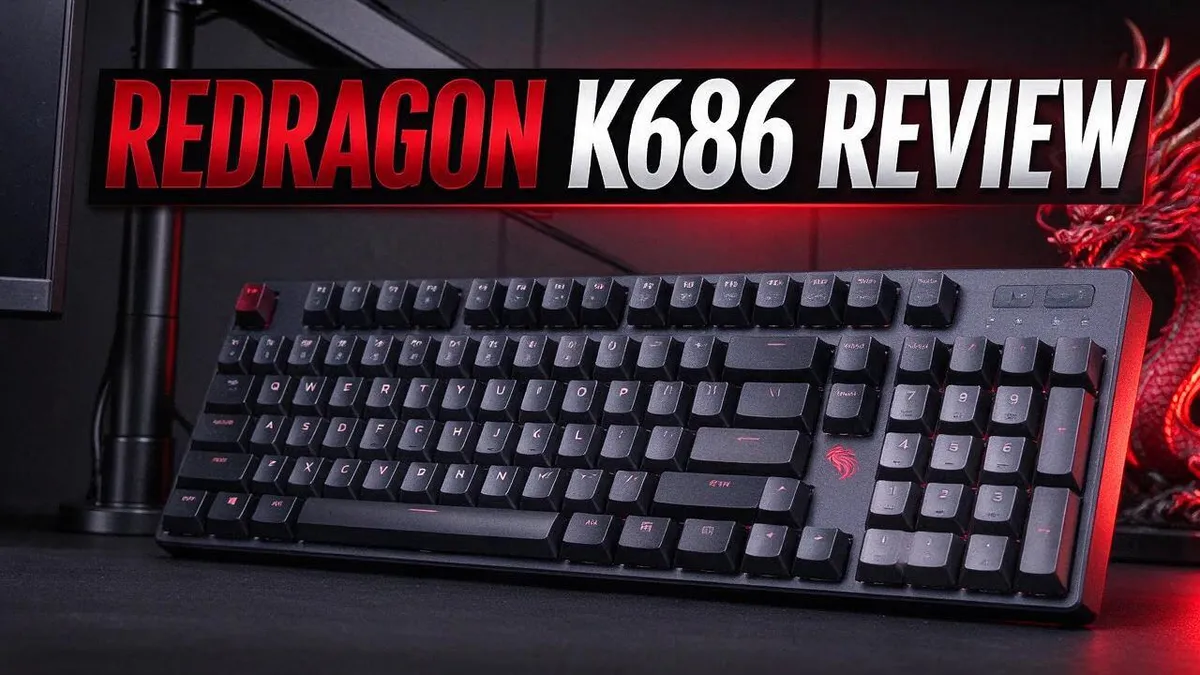
Are you hunting for a keyboard that feels fast and sounds clean? The Redragon K686 could be the one. It comes in two versions, and each brings something different to your desk.
The HE model appeals to serious players. It uses magnetic hall effect switches, rapid trigger, and 8K polling. Its dual module floating design also keeps the typing feel steady.
The PRO model focuses on flexibility. It offers wireless connection, a dedicated knob, and sound absorbing pads. You can also swap keys with its hot swap socket.
Many buyers praise the PRO version, which holds a 4.5 star rating from over 100K customer ratings. Still, the best pick depends on your needs. Keep reading to see which model fits your setup.
In a Nutshell
-
Built for quick reactions: The rapid trigger helps keys reset fast during play. This feature suits fast moving games that reward quick taps. Players who move quickly often notice the difference right away.
-
Compact footprint: The smaller layout leaves more room for a mouse. Desk space stays open for other gear. This matters for players with limited room or tight setups.
-
Check connection options: One review says there is no Bluetooth and no 2.4 GHz dongle. The review did not clearly name the model. Confirm the exact version and its connection type before you order.
-
Plan some setup time: One user spent about 2.5 hours on key swaps and resets with the PRO. Patience helps during setup. Keep the packaging and a clear plan ready.
-
Lighting fans will enjoy it: RGB lights let you choose colors and effects. This adds fun to any gaming desk. Many users like matching the glow to their room.
-
Style may not suit all: Some buyers find the look very gaming focused. Make sure the design fits your room and taste. A plain setup may need a different keyboard.
Switch Types and Actuation
No products found.
Switches sit under every keycap, and they shape how each press feels. The Redragon K686 uses different switch styles in its two versions. Knowing the difference helps you pick the right board.
The HE model uses magnetic hall effect switches. These switches sense magnet strength instead of relying on metal contacts touching each other. This design gives the board a very precise read on every key.
Precision matters most when you set the actuation point. This point marks how far you must press before a key registers. With magnetic switches, the keyboard can track that depth closely.
Because no metal parts rub together, many owners expect less wear over time. This makes the HE model a strong pick for long sessions. Still, results depend on how hard you use the board.
The PRO model takes a different path with linear red switches. Linear switches press down smoothly with no bump or click. Many players enjoy this steady motion during fast matches and long typing sessions.
Linear switches also tend to sound softer than clicky styles. The sound-absorbing pads on the PRO add to that calm feel. Together, they keep the board quiet when others share the room.
The PRO also includes a hot swap socket. This socket lets you pull out switches and drop in new ones without soldering. You can test different feels over time. Check pin layout before buying replacements.
Picking between these models comes down to your goals. Choose the HE model if you want fine control over actuation. Choose the PRO model if you want a smooth feel and easy switch changes.
Either way, try typing on a demo unit when possible. Your fingers will tell you more than a spec sheet. Trust how the keys feel to you.
Switch feel shapes daily comfort more than many buyers expect. Small differences add up during long hours at the desk.
Connectivity and Polling Rate
Connection type affects how quickly the keyboard talks to your computer. Every key press travels through that link before anything appears on screen.
Polling rate describes how often the board sends its status to your computer. A rate of 1000 Hz means updates every 1 ms.
The HE model supports 8K hyper-polling, which means it can report up to 8000 times each second. That brings the gap between updates down to about 0.125 ms.
Higher polling can help during fast reactions in shooters and rhythm games. Most players, though, will struggle to feel a big difference over 1000 Hz.
Wired use keeps things simple. A cable gives a steady link, and you never need to worry about charging.
The PRO model adds wireless options, so you can remove the cable for a cleaner desk. Wireless gear sometimes adds a small delay, so test it in your own games.
Battery life matters most in wireless mode. Check charge levels often, or keep a cable nearby as a backup.
Your computer also plays a role. Older ports or outdated drivers may limit very high polling rates, so update your software first.
Testing helps you know what you have. Several free online tools can show the polling rate your computer receives. Run a quick check after setup, so you know the board works as expected.
Competitive gamers often value the lowest possible delay. Casual players may prefer comfort and simplicity over raw speed.
Consider where you will use the board. Desk setup, play style, and cable comfort all shape which connection feels right for you. Pick a connection that matches your daily use, not just the spec sheet.
Build Quality and Noise Control
Build quality shapes how the keyboard feels and sounds every day. The Redragon K686 aims for stability, so the board stays put during fast play.
A wobbly keyboard can break your focus. The K686 uses an anti wobble design to keep the frame steady when your fingers hit hard.
The HE model adds a dual module floating design. Floating layouts often soften the sharp tapping sound that rigid boards make.
The PRO model handles noise in a different way. Its sound absorbing pads work to dull hollow echo inside the case, which keeps typing feeling quieter during long sessions.
Your desk also shapes how loud the board sounds. Hard surfaces bounce noise back up. A thick desk mat can cut that echo and make typing feel calmer.
Keycaps matter too. Thicker plastic often sounds deeper than thin plastic, so listen closely during your test.
Try this simple test before you commit. Type a few paragraphs at normal speed. Listen for rattles, ping sounds, or loose keys.
Next, press each corner of the frame. Feel for flex or creaks. A firm case usually means fewer surprises after months of daily use.
Think about your room too. A bedroom or shared apartment may need a quieter board than a gaming setup. Shared walls carry sound faster than you expect.
Cable noise can also matter. A loose cable may tap the desk during quick moves. Use a cable clip or sleeve to keep it calm.
Finally, remember your own habits. Heavy keystrokes create more noise than light taps. Practice a softer touch and the board will sound calmer.
Small changes add up. A desk mat, a cable clip, and a relaxed grip can turn a loud setup into a quiet one.
Build quality and noise control work as a team. A steady frame and soft pads help most when you use both together, so plan both.
Top 3 Alternatives
Looking for a different keyboard? These three options work well as alternatives to the Redragon K686. Each one brings something special to typing and gaming.
Keychron K2
No products found.
The Keychron K2 is a compact wireless keyboard. It uses a 75 percent layout, so it saves desk space.
You can connect it by Bluetooth or USB cable. It also works with both Mac and Windows systems.
Many users love its hot swappable switches. You can change keys without soldering.
It suits writers, students, and people who work on the go.
Logitech G915 TKL

- LIGHTSPEED wireless delivers pro-grade performance with flexibility and freedom from cords. Creates a clean...
- LIGHTSYNC technology provides RGB lighting that synchronizes lighting with any content. Personalize each key...
Last update on 2026-11-07 / Affiliate links / Images from Amazon Product Advertising API
The Logitech G915 TKL is a tenkeyless wireless gaming keyboard. It has a slim, low profile design.
Its LIGHTSPEED connection offers fast response for gaming. Customizable RGB lighting makes every key glow.
This model is a great pick for gamers who want a clean desk setup.
Corsair K70 RGB

- Magnificent Mechanical Keyboard Experience: Pre-lubricated CORSAIR Red linear mechanical switches deliver...
- Masterful Media Control: Control volume and more with a multi-function rotary dial and programmable media...

Last update on 2026-11-07 / Affiliate links / Images from Amazon Product Advertising API
The Corsair K70 RGB is a full size wired mechanical keyboard. It uses Cherry MX switches for a crisp feel.
Per key RGB lighting lets you create custom light effects. A dedicated media control area helps you adjust volume fast.
It also has a USB passthrough port. This option fits players and typists who want a classic full layout.
Customization and Hot-Swap Options
Customization is where the Redragon K686 starts to feel personal. You can change the look, the feel, and the controls. Each change takes a little planning, but the results are worth it.
Keycaps are the easiest upgrade. Swapping them changes the sound and the style in minutes. Most sets fit the standard layout, but check the bottom row and spacebar sizes first. Thick or thin keycap profiles also change how the keys feel under your fingers.
The knob adds extra control. On the PRO, the knob can handle volume, brightness, or scrolling. Assign these jobs through the keyboard settings, then use them every day.
Hot swap sockets allow easy switch changes. You pull out a switch and press in a new one. No soldering is needed, so the job stays simple.
Check pin counts before you buy. Switches come in three pin and five pin styles. Many sockets accept only one style, so read the product notes first.
The HE model has fewer custom options. It does not use a hot swap socket. Keycaps and RGB lighting remain your main tools for personal style.
Lighting sets the mood. RGB lets you choose colors, effects, and brightness. Soft colors suit long work sessions, while bright effects fit a gaming setup.
Plan your swaps before you start. One owner spent hours on key swaps and resets. Take a photo of your layout first, so every key returns to its spot.
Gather your tools first. A keycap puller and a switch puller make the job cleaner. Keep a small cloth nearby to wipe dust from the frame.
Change one thing at a time. Test each update for a few days. This shows you what you truly like, and it keeps your setup easy to fix.
Small changes build a setup that fits your hands and your room. Take your time, and enjoy the process.
Setup and Troubleshooting
Setting up the Redragon K686 takes less time than many people expect. Start with a clear desk. Check that every part is in the box before you plug anything in.
Follow this order for a smooth start. Connect the board first. Then install any software. This order keeps the process simple.
Check the connection mode first. On the PRO, the connection mode decides how the board talks to your computer. A wrong setting can make the board seem dead.
Plug in the board and look at the lights. A lit indicator shows that power reaches the board. No light often points to a loose cable or a weak port.
Use a key tester next. Open a free online key tester in your browser. Press each key and watch for missing letters. This quick check finds dead or stuck switches early.
Update your drivers before you judge the board. Old drivers can cause odd behavior. Visit the official Redragon support page to find the latest files.
Many problems have simple causes. Try a different USB port on your computer. Swap the cable if you have a spare. Test the board on another computer to see if the issue follows it.
Reset the board when keys act strangely. A factory reset clears old custom settings. This can fix keys that type the wrong letters or stop responding.
Be patient with deeper problems. One owner spent about 2.5 hours on key swapping and resets with the PRO. Set a time limit so the whole afternoon does not disappear.
Keep notes as you test. Write down each step and the result. This record helps you spot patterns and speeds up support.
Contact support when nothing works. Share your model, your computer type, and the steps you tried. Clear details help the team solve the issue faster.
Most setup issues have simple fixes. Stay calm, work in order, and test often. Your board should be ready to use soon.
Pros and Cons
Pros
- Rapid trigger lets keys reset fast for quick, repeated presses.
- The HE model’s 8K polling gives very fast response in games.
- The PRO’s linear red switches feel smooth during long typing sessions.
- The 96% layout saves desk space and keeps arrow keys.
- The PRO earns a 4.5 star rating from over 100K customer ratings.
Cons
- One review says there is no Bluetooth or 2.4 GHz dongle.
- The gamer style look may feel too bold for a quiet office.
- One PRO user lost 2.5 hours to key swaps and resets.
- Some reviews do not name the model, so check your variant first.
Who Should Buy It
The Redragon K686 suits a few specific types of people. Your daily habits matter most. Read this list to see if the board fits your routine.
Fast gamers who play shooters and rhythm titles may enjoy the quick response. The HE model suits players who want fast input. Its magnetic switches help when every frame counts.
Streamers and podcasters often need quieter typing. The PRO uses pads that soften each keystroke. That helps when a microphone sits close by.
People who want one board for many setups may prefer the PRO. It switches between three connection modes. This helps when you move between a laptop and a desktop.
Wired desk users who want a clean setup should consider the HE. It uses a cable, so there is no battery to charge.
People who dislike a wobbly keyboard may appreciate the stable frame. The HE uses a floating design that limits wobble.
Shared computer users may prefer the HE. Its wired link avoids pairing problems.
Hobbyists who enjoy keyboard builds will find plenty to explore. Mods and switch testing fill many weekends.
Anyone who wants a clear upgrade path can start small. Begin with the stock setup, then change one part at a time.
Long term keyboard fans should think ahead. A board with room for changes can grow with your needs.
People who type in short bursts may not notice the extra features. A simple board might serve them better.
Students who share a dorm may want a quieter board. Soft pads can cut noise late at night.
Buyers who plan to travel should look at the PRO. Its wireless design can connect without a cable during trips.
Match the model to your habits. The right board depends on how you use it. Compare each option before you pick. Take a moment to list your top three uses.
Final Verdict
The Redragon K686 can be a strong choice for the right person. Still, the best answer depends on your daily habits and your desk. Start by picking the version that fits your routine.
The HE model suits people who want fast, direct input. Its magnetic design and quick response help during intense sessions. It also fits a neat wired desk with few cables to manage.
The PRO model suits people who like to change things over time. You can swap parts, adjust the knob, and try new setups. Many people enjoy that hands on approach.
Think about where the board will live. A shared family computer calls for something simple and calm. A personal workstation gives you room to experiment and enjoy the extras.
Your room also shapes the decision. A bright, bold look can energize a gaming corner. A quieter office or studio may need a more subtle style.
Expect a small learning curve during the first few days. Some users spend extra time on setup, testing, and resets. Patience helps more than any single setting.
Take a moment to list your top three uses. Gaming, typing, and tinkering each pull in a different direction. Let that list guide your final choice.
Reviews offer useful clues, but they do not always name the model. Read each comment with the variant in mind. This habit gives you a clearer picture of what to expect.
Long term comfort matters as well. Notice how the board feels after several hours of typing. Your fingers will tell you more than any spec sheet.
So, is the Redragon K686 worth your time? For many people, the answer is yes. Match the version to your needs, and you will likely enjoy a board that grows with you.
Frequently Asked Questions
Is the Redragon K686 good for beginners?
It can be a good fit for new users. The layout feels familiar, and most people learn it within a few days. Start with the default settings and change only one thing at a time. This keeps the setup simple and makes problems easier to find.
What should you test first after unboxing?
Type a short paragraph and press a few keys in a game. Check that every key responds and none feel stuck. This quick check helps you spot issues early, while setup is still fresh. It also shows whether the feel matches what you expected.
Is the Redragon K686 a good gift for a gamer?
It can make a thoughtful gift. Ask whether the gamer prefers a wired board or a wireless option first. The PRO offers more connection choices, while the HE keeps things direct and simple. Knowing this helps you pick the right variant.
Does the PRO knob help with daily tasks?
The knob gives quick control for small jobs. People often use it for volume or media tasks without opening menus. Using it for a few days shows whether you will reach for it often or rarely.

DK is a technology expert who specializes in AI tools, software, and tech gadgets. He writes for How to Tech Info, providing detailed reviews and practical guides. DK helps readers discover the best AI applications, navigate new software, and choose the right tech gadgets.