
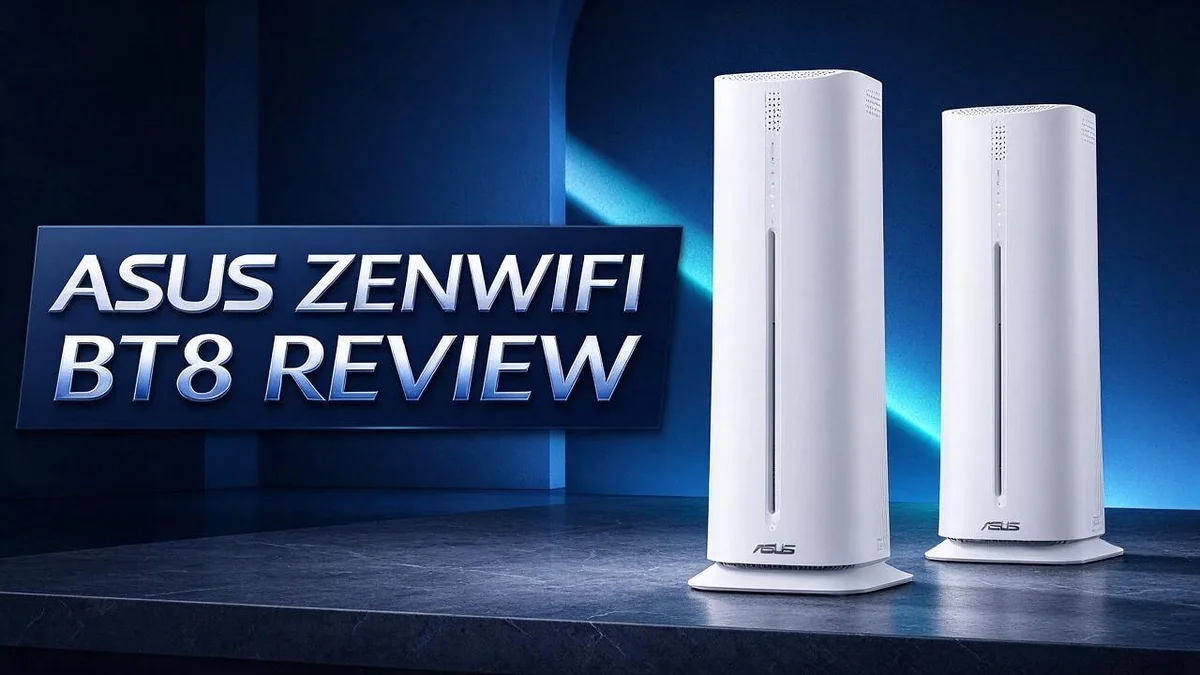
ASUS ZenWiFi BT8 Review: Wi-Fi 7 Mesh Performance, Coverage, and Real-World Test Results
Is your home Wifi slow at the worst possible moments? Many people get frustrated when video calls freeze or streams buffer. The ASUS ZenWiFi BT8 aims to fix that problem.
This Wifi 7 mesh system comes as a two pack. It uses the 6 GHz band and a 320 MHz channel width. Peak speeds can reach 14 Gbps on paper.
Wired devices get a boost too. The router offers 2.5G WAN and LAN ports. A USB 3.0 port also lets you share storage across the network.
In one six week test, the 6 GHz band hit 2.29 Gbps at 14 feet. The connection showed no issues. Some reviewers found the 6 GHz band of little use after a week.
This review covers setup, speed, security, and daily use. We also compare it with rivals like the Netgear Orbi and Eero 7.
In a Nutshell
The ASUS ZenWiFi BT8 aims to keep your whole home online with fewer dropouts. Here is what stands out most.
-
Top speed potential: The system reaches up to 14 Gbps across its bands. That leaves plenty of room for streaming, gaming, and browsing at once.
-
Strong 5 GHz reach: The high power 5 GHz band spreads signal into farther rooms. Homes with thick walls often benefit most from this.
-
Stable daily use: One tester reported no connection problems during their trial. Steady links matter most during video calls and online meetings.
-
Built in protection: AiProtection and parental controls help guard every device on your network. You can also set limits for kids with ease.
-
Room to grow: AiMesh lets you link compatible ASUS routers into one network. You can expand coverage later without starting over.
-
Honest caveats: Some owners found the 6 GHz band of little use after a week. Online ratings are middling, so check your home needs first.
Key Features and Specifications

- Tri-band WiFi 7 speeds up to 14 Gbps with 6 GHz WiFi, MLO, and 4K-QAM
- AI-powered Smart AiMesh boosts coverage up to 5900 sq. ft. (2-pack) and easy extendibility with compatible...
Last update on 2026-11-06 / Affiliate links / Images from Amazon Product Advertising API
The ASUS ZenWiFi BT8 packs plenty of useful features into one mesh system. Its key specs shape how well it handles daily home use.
The 320 MHz channel width matters a lot. Wider channels let more data travel at once. Large downloads and game updates can finish faster as a result.
Mesh units talk to each other through a backhaul link. A strong backhaul keeps satellite nodes fast. Your devices then get steadier speeds in distant rooms.
Band steering works in the background. Many phones and laptops switch bands without any manual work. Your devices connect to the best option automatically.
The USB 3.0 port turns the router into a small file hub. Plug in an external drive to share photos across the network. Family members can reach those files without using cloud storage.
A guest network keeps visitors off your main devices. You can set it up in just a few taps.
Setup runs through the ASUS app or a web panel. Both options guide you through network names and passwords step by step.
Heavy users can also check live traffic reports. These charts show which devices use the most bandwidth.
Think about your home layout first. Larger homes with thick walls benefit most from a mesh setup. Smaller apartments may not need every feature.
The ASUS BT10 and BQ16 offer related designs for buyers who want options. Ubiquiti UniFi suits people who enjoy advanced network control. Its setup asks for more technical knowledge.
Netgear Orbi and Eero 7 target different needs. Orbi leans toward power and range, while Eero keeps things simple.
Choosing the right model depends on your daily habits. Heavy gamers and remote workers often gain the most from these features. The ZenWiFi XT8 shares much of this family design. Comparing both models helps you spot the differences that matter to you.
Wireless Performance and Speed
Speed on paper and speed in real life are not always the same. A top rating looks impressive, but daily results depend on distance, walls, and the devices you own.
Older gadgets set the pace. A laptop with an old Wifi card may cap out far below the system’s limit. Your newest phone may show faster numbers than an old tablet in the same room.
Walls matter more than most people expect. The 6 GHz band travels a short distance and struggles through thick plaster or brick. Place each node in an open spot, not inside a closet or behind a TV.
Latency counts for gaming and video calls. Speed tests measure download numbers, but ping shows how fast a game responds. A steady ping often matters more than a high peak score. Gamers often notice this first.
Upload speed deserves attention too. Video uploads, cloud backups, and live streams all rely on it. Test both directions before you decide the system fits your needs.
Testing takes only a few minutes. Connect a laptop to a wired port, run a speed test, then repeat it over Wifi in each room. Note where speeds drop and compare the results. Repeat tests at different hours.
Busy homes need extra planning. Many devices streaming at once can share bandwidth unevenly. Checking the app settings can help keep work calls smooth during movie night.
Home layout shapes results as well. Open floor plans usually suit this system well. Homes with several floors and thick ceilings may need careful node placement to keep every level fast.
Speed also changes over time. Peak hours in your neighborhood can slow the internet connection before the router even gets involved.
Plan your setup with real numbers. Keep notes from each test and the time of day. Those notes help you judge whether the system meets your daily needs.
Coverage and Mesh Setup
Good coverage starts with smart placement. The ASUS ZenWiFi BT8 performs best when each unit sits in a central spot.
Place the main unit near your modem or fiber box. Put the second unit halfway between the main unit and the weakest area.
Try a wired backhaul for steady speeds. Connect the two units with an Ethernet cable through their 2.5G ports. Running a cable may feel like extra work. Still, a wired link keeps the second unit fast. A short cable through a hallway or closet works well.
Check the signal before you settle. Walk through each room with your phone and watch the signal bars. Note any spot where video calls start to stutter.
Doors, metal appliances, and mirrors can block signal in surprising ways. Move a unit a few feet and test again. Small shifts often make a big difference.
Think about height and direction. Place units on shelves or tables instead of floors. Keep them out of cabinets and away from thick stacks of books.
Homes with two floors need extra care. A unit on each floor often works better than one big jump between levels.
Give each area a clear path. Pick spots with open space around them. Avoid placing units behind TVs or inside metal boxes.
Keep the cable neat and label each end. This makes future changes easier. Tidy setups also reduce tripping hazards.
Once the units sit in place, check every room again. Repeat the check at night when the network sees less traffic.
A quick reboot after moving units helps them find each other again. Wait a few minutes for the mesh to settle before testing.
Your goal is simple. Every room should show strong signal, and the second unit should stay connected without drops.
Top 3 Alternatives
TP-Link Deco BE63

- ...
- ...

Last update on 2026-11-05 / Affiliate links / Images from Amazon Product Advertising API
Need strong coverage for a whole home? The TP-Link Deco BE63 is a mesh system built for busy households. It supports WiFi 7 and delivers fast speeds for streaming, gaming, and video calls. Each unit covers a good area, so you can move from room to room without losing your connection.
Setup takes only a few minutes through the app. You also get helpful parental controls and security tools. Your family can enjoy a reliable network that keeps every device protected.
Eero Pro 6E

- EERO’S FIRST Wi-Fi 6E SYSTEM - eero Pro 6E supports fast speeds and access to the new 6 GHz band when using...
- WIRED SPEEDS, WITHOUT THE WIRES - Game, work, or stream reliably with eero Pro 6E.*
Last update on 2026-11-06 / Affiliate links / Images from Amazon Product Advertising API
Want simple setup and easy management? The Eero Pro 6E makes home networking feel easy. It uses WiFi 6E and a clean app that guides you step by step. Many people like how quietly it works in the background.
This system fits well in apartments and medium-sized homes. Smart speakers, phones, and laptops stay connected without much fuss. If you dislike complicated settings, this option is a friendly place to start.
Netgear Orbi 770

- WHOLE-HOME COVERAGE WITH NO DEAD ZONES: The router plus satellites create a seamless mesh system that blankets...
- EVERYONE ONLINE AT ONCE, NO SLOWDOWNS: Tri-Band technology with Enhanced Backhaul helps deliver faster WiFi...
Last update on 2026-11-06 / Affiliate links / Images from Amazon Product Advertising API
Need extra power for a large house? The Netgear Orbi 770 is a strong choice for bigger spaces. It delivers WiFi 7 speeds with a dedicated backhaul that keeps the link between units fast. Heavy users can run several devices at once without slowdowns.
This system suits families, remote workers, and gamers. Its wired ports give you more ways to connect desktops, consoles, and smart TVs. You get steady performance even when everyone in the house goes online at the same time.
Security and Parental Controls
Security matters more than many people think. A router sits at the front door of your home network. Every device connects through it, so one weak spot can expose everything.
The ASUS ZenWiFi BT8 includes AiProtection security. This feature watches network traffic and helps block known threats before they reach your devices. Strong defense works quietly in the background. Many people never look at these settings after setup.
AiProtection Pro adds another layer for households that want extra control. Reviewers in the research listed it as a clear strength. It gives you a clearer view of what enters and leaves your network.
Parental controls give you a say over screen time. You can set schedules for each device, so homework time stays free from distractions. Bedtime limits also help kids wind down at night.
Content filtering is another helpful tool. You can block adult sites or pause access to certain categories. These settings suit families with young children who browse on their own.
Good settings need regular checks. Update the firmware when ASUS releases a new version. Updates patch holes that attackers look for. Change the default admin password too, because factory logins are an easy target.
Smart home gadgets deserve attention as well. Cameras, speakers, and smart plugs often run older software and may not get frequent fixes. Give each gadget a clear profile so you know what it can reach.
Start with a few simple rules. Choose one or two schedules first. Test each rule from a child’s phone before you rely on it. Then add more as your family gets comfortable. Small steps lead to a safer home without stress.
Keep a short list of your settings. Write down schedules, blocked categories, and admin details in a safe place. This habit saves time if you ever need to reset the system.
Value and Long-Term Reliability
The ASUS ZenWiFi BT8 needs to perform well for years, not just for a few days. Long term reliability matters more than a strong first test.
A six week user reached 2.29 Gbps on the 6 GHz band at 14 feet. Early numbers like that look promising.
Still, one short trial cannot show how a system behaves after months of daily use. One tester saw a stable connection with no issues during the test period. That result suggests the hardware can handle steady use.
Owner feedback tells a more mixed story. Some people praise the high power 5 GHz band and its coverage. Others say the 6 GHz band gave them little benefit after a week.
Heavy use can reveal weak spots over time. A family with many streaming devices or gamers may notice problems sooner than a small household.
Internet plans keep getting faster, so multi gig ports help the network keep pace. The 2.5G wired ports give the system room to grow. A device that handles faster plans today may also serve you well later.
Brand support matters too. Look for a company that keeps its hardware current with software fixes and new features.
Long term trust also comes from security. Regular protection updates keep the network safer as new threats appear.
Many shoppers compare this model with the ASUS BT10, Netgear Orbi, and Eero 7. Each option has its own strengths, so compare long term performance notes carefully.
Read recent reviews with care. Amazon reviews for this system sit in the middle, so look for comments from people who have owned it for months.
The system has a strong feature set, yet features alone do not guarantee lasting results. Steady hardware and clear support matter just as much. A fair test over several weeks gives the clearest answer. Track your speeds, note any drops, and decide with real results in hand.
Pros and Cons
Pros
- The two 2.5G ports make wired connections fast.
- The high power 5 GHz band offers strong coverage.
- One test showed no connection problems at all.
- AiProtection and parental controls add useful security.
- Many settings let you fine tune your network.
Cons
- One reviewer was not impressed with the overall package.
- One user found the 6 GHz band of little use after a week.
- Owner feedback is mixed and only middling overall.
- Long term reliability is still unproven.
Who Should Buy It
This system fits homes with many connected devices. A two pack lets you place one unit near the modem and another in a far corner. Busy households with laptops, phones, and game consoles often need that extra reach.
The USB 3.0 port adds another use. You can plug in an external drive and share files across the house. This feature suits families who store photos, movies, or school files.
Anyone who already uses ASUS gear should take a close look. AiMesh support helps the system work with other ASUS routers that share the feature. That makes upgrades simpler and keeps your setup in one product family.
Renters can also benefit from this kind of setup. Each unit plugs into a standard power outlet. Moving to a new place feels simpler with a system you can reposition.
Households with older homes may see the biggest change. Thick walls and long hallways often weaken signals in older buildings. Extra units can push coverage into hard to reach corners.
People with small apartments may not need this much power. A single router or a smaller mesh kit could cover a few rooms well. Extra units make less sense in tight spaces.
Remote workers should weigh their daily needs. Video calls and large uploads depend on a steady connection. Test your connection at your desk before settling on a setup.
Shoppers who want simple setup should read more first. The menus go deep, so first time owners may need extra time. Patient readers who enjoy tweaking their network will appreciate that depth.
Gamers and streamers should check their needs carefully. Speed tests alone do not show how a system handles online games. Test results from one setup may differ from your own home.
Think about your home first. Measure your space, count your devices, and list your needs. That simple step shows whether this system fits your life.
Final Verdict
The bottom line is simple. The ASUS ZenWiFi BT8 suits people who want fast wired ports and a flexible mesh setup. It is not a must have for everyone.
Think of this system as a strong foundation rather than a quick fix. Your own home layout will decide if it earns a place in your setup.
Start by sketching your floor plan. Note where your modem sits and where weak spots appear. This simple step shows whether two units will truly cover your space.
Count your devices too. A household with a few phones and a laptop may never push this hardware. Busy homes with gaming consoles, smart cameras, and streaming TVs will notice the difference faster.
Check your internet plan as well. If your provider delivers speeds far above what your current router handles, the extra capacity matters. If not, the upgrade may sit unused.
Give yourself a clear test period. Run speed checks in every room during the first two weeks. Keep notes on buffering, dropped calls, and slow uploads.
Read recent owner reports before you decide. Long term results can differ from a short trial, so look for patterns rather than single good days. Repeated complaints deserve more weight than one glowing review.
Plan for the future too. Faster plans and more smart devices will arrive over the next few years. A system with room to grow helps you avoid replacing gear too soon.
Gamers and creators who move large files may find the wired ports especially useful. Everyone else should focus first on coverage and stability in the rooms they use most.
Here is the final takeaway. Choose this system if your home is large, your devices are many, and strong security controls matter to you. Otherwise, a simpler mesh kit may serve you well.
Frequently Asked Questions
Is the ASUS ZenWiFi BT8 easy to set up?
Most people can finish setup in one sitting. Plug the first unit into your modem and follow the app prompts. Then place the second unit where the signal still feels weak.
Where should I place the two units?
Put the main unit near your modem. Place the second unit about halfway to your weak spot, not right behind a thick wall. Good placement often matters more than raw power.
Will it work with my current modem?
Most modern internet setups work with it. Connect the unit to your modem with a standard Ethernet cable. If your modem has its own wireless signal, turn that signal off to avoid conflicts.
Can I skip this system if my home is small?
Yes, you can. A smaller home may not need this much power. A simpler system could meet your daily needs with less setup work.
How do I know if the 6 GHz band helps me?
Test it near the main unit first. Your devices must support 6 GHz to use it. Many phones and laptops do not, so the band may sit unused in your home.

DK is a technology expert who specializes in AI tools, software, and tech gadgets. He writes for How to Tech Info, providing detailed reviews and practical guides. DK helps readers discover the best AI applications, navigate new software, and choose the right tech gadgets.


