Fujifilm Instax Mini Evo Review: Hybrid Instant Camera Worth It?
Instant photography feels magical. You press a button, a small card slides out, and a memory appears in your hand within seconds. The problem is waste. Traditional instant cameras print every single shot, good or bad, and each frame costs real money.
The Fujifilm Instax Mini Evo solves that problem. It is a hybrid camera. It shoots digital photos first, shows them on a screen, and prints only the ones you love. You keep the magic and skip the wasted film.
I have spent time with this camera at birthdays, weddings, road trips, and quiet evenings at home. It surprised me in good ways and frustrated me in a few small ways too. This review covers everything you need to know before you spend your money.
You will learn how the camera feels in hand, how sharp the prints look, how the 100 effect system works, how long the battery lasts, and how it compares against the LiPlay and the Mini 12. By the end you will know if the Mini Evo belongs in your bag or if another camera fits you better.
In a Nutshell
Here is the short version for readers who want answers fast.
- The Mini Evo is a hybrid instant camera. It captures digital images with a 5 megapixel sensor, shows them on a 3 inch screen, and prints only your chosen shots on Instax Mini film. You waste far less film than you would with an analogue camera.
- Print quality beats every other Instax camera. The Mini Evo prints at 635 x 318 dpi from internal memory, which is double the resolution of older Instax printers. Colours look richer and detail looks cleaner.
- The 100 effect system is the star feature. Ten lens effects multiply with ten film effects. You twist a dial and pull a lever, and every combination gives a different look.
- It doubles as a Bluetooth smartphone printer. Send photos from your phone camera roll and print them in about 16 seconds. Many owners use this feature more than the camera itself.
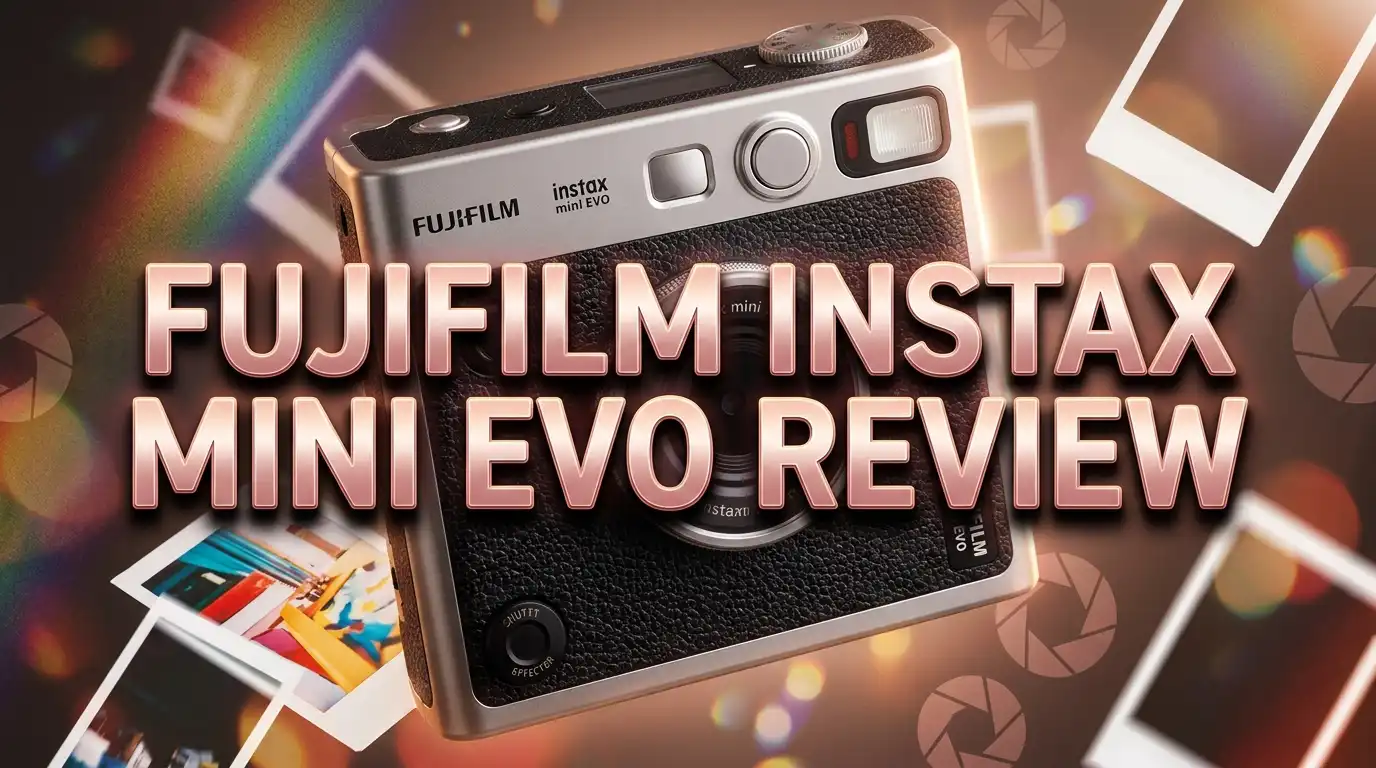
- The retro design gets compliments everywhere. It looks like a tiny Fujifilm X100 with a leather texture finish, a fake film advance lever, and dual shutter buttons.
- The digital camera is weak in low light. The 1/5 inch sensor and slow autofocus struggle indoors, so treat it as a fun camera rather than a serious one.
What Is the Fujifilm Instax Mini Evo?

- Hybrid instant film camera
- 10 Lens x 10 Film Effect Options = 100 Ways of Expression
Last update on 2026-09-11 / Affiliate links / Images from Amazon Product Advertising API
The Instax Mini Evo is a hybrid instant camera from Fujifilm. Fujifilm released it in early 2022, and it still sells strongly today.
Hybrid means two devices in one body. The first device is a small digital camera. The second device is a thermal Instax printer.
You take a photo, review it on the rear LCD, and decide what happens next. Print it, save it, or delete it. Nothing prints until you pull the film advance lever.
That single change fixes the biggest complaint about instant film. Analogue Instax cameras print blurry shots, closed eyes, and thumbs over the lens, and each mistake costs you money.
The camera holds a standard Instax Mini film cartridge with ten sheets. Each print measures 86 mm by 54 mm with an image area of 62 mm by 46 mm. That is roughly credit card size.
Photos also save digitally. The internal memory holds about 45 images, and a microSD card holds around 850 images per gigabyte. You can print any of them later.
Fujifilm sells the Mini Evo in black, brown, and a few limited colours. The brown version and newer black units ship with a USB Type C charging port instead of the older micro USB port.
The camera weighs approximately 285 grams and measures 87 mm by 122.9 mm by 36 mm. It slips into a jacket pocket or a small bag without effort.
Design and Build Quality
The Mini Evo looks like a classic rangefinder camera. Fujifilm gave it a textured black body, silver accents, and two mechanical controls that beg to be touched.
The lens effect dial sits around the lens barrel. You twist it like a real aperture ring. It clicks with a satisfying feel.
The film advance lever sits on the top plate. You pull it to print. That single design choice turns printing into a ritual rather than a button press.
A film effect dial sits next to the lever and looks like an old shutter speed dial. You turn it and the screen shows the selected look.
Two shutter buttons make framing easy. One sits on the top plate for landscape shots. One sits on the front face for portrait shots.
A small selfie mirror sits beside the lens. It is tiny but usable.
The body feels solid. It is plastic rather than metal, but the panels fit tightly and nothing creaks in hand.
The camera also includes a tripod thread and a cold shoe mount. You can add a small LED light or mount the camera for group shots.
The 3 inch LCD has around 460,000 dots. It looks fine indoors but washes out under bright sun.
The film door opens on the back. Loading a cartridge takes seconds, and a counter on screen shows your remaining sheets.
Key Specifications at a Glance
Numbers tell part of the story, so here are the important ones.
The sensor is a 1/5 inch CMOS chip with roughly 5 megapixels. It records images at 2560 x 1920 pixels.
The lens has a fixed focal length equal to 28 mm on a full frame camera. Aperture sits at F2.0, which helps a little in dim rooms.
Focus is single autofocus with an AF illuminator. The closest focus distance is 10 cm, so macro shots of flowers and food work well.
Shutter speed ranges from 1/4 second to 1/8000 second. ISO runs from 100 to 1600, and the camera picks both automatically.
Exposure compensation covers minus 2.0 EV to plus 2.0 EV in one third stops. White balance offers auto plus six presets.
The flash has three modes and reaches roughly 50 cm to 1.5 m. A self timer offers 2 second and 10 second delays.
Prints from internal memory use 1600 x 600 dots. Prints sent from the phone app drop to 800 x 600 dots.
Print time is around 16 seconds. The instax Rich Mode adds about 7 seconds after startup.
Battery is an internal lithium ion cell that is not removable. A full charge delivers approximately 100 prints and takes 2 to 3 hours.
Bluetooth 4.2 BLE handles the phone connection. The app runs on iOS and Android.
Top 3 Alternative for Fujifilm Instax Mini Evo
Not every buyer needs the Mini Evo. These three cameras solve the same problem in different ways, and each one wins in a specific situation.
The Fujifilm Instax Mini LiPlay is the smaller and lighter hybrid option. It weighs far less, fits in a jacket pocket, and adds a sound recording feature that links a short audio clip to a QR code printed on the photo. Choose it if portability and novelty matter more than print resolution.

- Capture And Instantly Print Photos From The Camera Or Directly Print From Your Smartphone/ Tablet Using...
- Choose From A Variety Of Frames And Filters For More Printing Fun
Last update on 2026-09-02 / Affiliate links / Images from Amazon Product Advertising API
The Fujifilm Instax Mini 12 is the pure analogue choice. It costs a fraction of the Mini Evo price, uses AA batteries, and prints every shot you take. It has no screen and no effects, which means the results feel raw and honest. Buy it for kids, parties, and anyone who wants zero settings.

- Compact and cute design. Easily twist the lens to turn on and off
- Built-in selfie mirror for easy selfies Close-up mode with parallax correction

Last update on 2026-09-02 / Affiliate links / Images from Amazon Product Advertising API
The Polaroid Now Generation 3 prints large square photos with that classic white frame. The film costs more per shot and the camera is bulkier, but the prints have a soft dreamy character that Instax film cannot copy. Pick it if you love the vintage Polaroid look and want bigger prints on the wall.

- Sharp autofocus: The Polaroid Now’s twin-lens autofocusing system chooses which lens is right for the shot...
- Double-exposure and self-timer modes: Take photos so nice you shot them twice with double-exposure mode. Or...
Last update on 2026-09-02 / Affiliate links / Images from Amazon Product Advertising API
Each option trades something away. The Mini Evo still holds the best balance of control, print quality, and creative range.
The 100 Effects System Explained
The effect system sounds like marketing fluff. It is actually the reason people fall in love with this camera.
Fujifilm gives you ten lens effects and ten film effects. Multiply them and you get 100 combinations.
The lens effects are Normal, Vignette, Soft Focus, Blur, Fisheye, Colour Shift, Light Leak, Mirror, Double Exposure, and Half Frame.
The film effects are Normal, Vivid, Pale, Canvas, Monochrome, Sepia, Yellow, Red, Blue, and Retro.
Some combinations are genuinely useful. Vignette plus Retro gives a warm faded look that suits family photos. Monochrome plus Soft Focus creates portraits with a gentle glow.
Some combinations are pure fun. Mirror plus Vivid produces a kaleidoscope image that kids adore.
Half Frame deserves special mention. It splits the print into two vertical frames, so you capture two moments on one sheet.
Double Exposure blends two shots into one image. You need practice to get it right, and the failures still look interesting.
The controls make the system addictive. You twist the lens ring, turn the film dial, and the live view updates instantly.
One limitation frustrates users. You cannot change the effect after the shot is taken. The effect bakes into the saved file, so pick your look before you press the shutter.
Plan your effect first and the system rewards you. Shoot carelessly and you get a folder full of odd images.
Image Quality and Print Quality
Judge this camera as a printer, not as a digital camera. That distinction explains everything.
The digital files are weak by modern standards. A 5 megapixel 1/5 inch sensor produces soft detail, limited dynamic range, and visible noise indoors.
Zoom into a digital file on your laptop and you will feel disappointed. A phone from five years ago captures more detail.
Look at the print and your opinion flips. The 2 inch by 3 inch print hides every weakness of the sensor.
At that size the softness reads as character. Colours look punchy, skin tones look warm, and the film effects add a pleasing texture.
Print resolution is the real upgrade here. The Mini Evo prints at 635 x 318 dpi from its own files, which doubles the detail of older Instax printers.
Fine text stays readable. Hair and fabric hold edge detail. Gradients in the sky look smooth rather than banded.
The instax Rich Mode boosts contrast and saturation for a bolder result. Natural Mode keeps highlights softer and tones flatter.
Daylight photos look excellent. Bright window light and outdoor shade give the best results.
Low light is the weak point. The flash reaches only 1.5 m, autofocus hunts, and noise creeps into shadows.
Colour accuracy shifts under mixed lighting. Set white balance manually in restaurants and bars for cleaner tones.
Using the Instax Mini Evo as a Smartphone Printer

- Hybrid instant film camera. Prints high-quality, 2” x 3” INSTAX MINI instant photos (INSTAX MINI instant...
- 10 Lens x 10 Film Effect Options = 100 Ways of Expression
Last update on 2026-09-02 / Affiliate links / Images from Amazon Product Advertising API
This feature changed how I use the camera. Many long term owners say the same thing.
Your phone takes far better photos than the Mini Evo sensor. The Mini Evo prints far better than any photo lab you can reach in 16 seconds.
Pair them and you get the best of both. Shoot with your phone, print with the Evo.
Setup is simple. Install the free Instax Mini Evo app, enable Bluetooth, and hold the app near the camera.
Pick an image from your camera roll. Crop it, apply an effect if you want, and tap print.
Pull the film lever and the print appears. The whole process takes under a minute.
Phone prints use a lower resolution of 800 x 600 dots. You will notice slightly softer edges, but most people never spot the difference.
The workflow shines at events. Take a group photo with your phone, print three copies, and hand them out before anyone leaves.
It also builds photo albums fast. Choose 20 favourites from a holiday, print them in a single sitting, and fill a mini album that same evening.
Older phone photos work too. Pull images from cloud storage, save them to your camera roll, and print memories from years ago.
The App Experience
The Instax Mini Evo app does four jobs. It prints phone photos, controls the camera remotely, transfers printed images, and updates firmware.
Remote shooting is handy. Your phone screen becomes a live viewfinder, and you can trigger the shutter from a distance.
Group photos benefit most. Mount the camera on a tripod, join the group, and fire the shutter from your hand.
The Save Printed Images function is clever. It sends a digital copy of your print to your phone, complete with the Instax white frame.
You can then choose a background colour or a background photo. The result looks ready for Instagram without any editing app.
Firmware updates arrive through the app as well. Fujifilm has fixed small bugs and added colour support over time.
The app has flaws. The Bluetooth connection drops sometimes, and reconnecting takes a few taps.
Transfer speed feels slow. Sending a single image takes several seconds, and batches take patience.
The interface looks dated compared to modern camera apps. It works, but it is not elegant.
Treat the app as a helpful companion rather than a polished product. You will use it often despite the rough edges.
Battery Life and Charging
The Mini Evo uses a built in lithium ion battery. You cannot remove it or swap in a spare.
Fujifilm rates the battery at approximately 100 prints per full charge. That figure matches my experience closely.
One hundred prints equals ten film packs. Most users go weeks between charges.
Shooting without printing barely touches the battery. The screen and sensor draw far less power than the thermal print head.
Charging takes 2 to 3 hours. Newer units use USB Type C, and older units use micro USB.
Check the port before you buy. The USB Type C version arrived with the brown model and later black units, and it saves you carrying an extra cable.
The camera charges from any standard phone charger or a power bank. You can charge it in a bag while you travel.
The non removable battery is a genuine long term concern. Lithium cells lose capacity after a few years of cycles.
Fujifilm service centres can replace the cell, but the cost and wait time vary by region. Plan for that possibility if you keep gear for a decade.
Cold weather reduces output. Below 5 degrees Celsius the camera may refuse to print, so keep it inside your coat on winter days.
Film Costs and Running Expenses
Film is the real price of instant photography. The camera is a one time purchase, and the film never stops.
Instax Mini film sells in twin packs of 20 sheets. Prices shift, but each sheet usually costs somewhere between 60 cents and one dollar.
Buy in bulk and the cost per sheet drops. A pack of 100 sheets almost always beats buying single packs.
The Mini Evo saves money in a way analogue cameras cannot. You only print keepers, so nothing goes to waste.
An analogue user might waste four sheets out of ten on bad shots. A Mini Evo user wastes none.
That saving adds up quickly. Over a year of regular use the camera can pay back part of its own price.
Rainbow, black frame, and contact sheet film variants also fit the camera. They cost slightly more and add character to gifts and scrapbooks.
Store film in a cool dry place. Heat damages the chemicals and shifts colours toward magenta.
Check expiry dates before buying discount stock. Expired film prints with odd casts and weak contrast.
A microSD card is worth the small extra spend. It stores hundreds of images and lets you reprint favourites later.
Who Should Buy the Instax Mini Evo?
This camera suits specific people extremely well. It suits others poorly.
Buy it if you print regularly. The Mini Evo rewards anyone who wants physical photos in hand every week.
Buy it if you host or attend events. Weddings, birthdays, and reunions turn into gift giving sessions when you hand out prints.
Buy it if you keep scrapbooks or journals. The small print size fits pages perfectly, and the film effects add mood.
Buy it if you value control. The screen, the dials, and the effects give you decisions that analogue cameras remove.
Buy it if you want a printer for your phone photos. That alone justifies the purchase for many owners.
Skip it if you want serious image quality. A used mirrorless camera costs the same and delivers far better files.
Skip it if you shoot mostly indoors at night. The small sensor and short flash range will frustrate you.
Skip it if you love pure analogue surprise. Part of the charm of film is not knowing, and this camera removes that.
Skip it if your budget is tight. The Mini 12 costs much less and still makes people smile.
Children under ten may find the menus confusing. A simpler camera fits younger hands better.
Instax Mini Evo vs Instax Mini LiPlay
These two hybrid cameras confuse buyers constantly. They share a concept but feel very different.
The LiPlay is smaller and lighter. It slips into a small pocket, while the Mini Evo needs a jacket or a bag.
The Mini Evo wins on print resolution. It prints at 635 x 318 dpi from internal files, while the LiPlay prints at a lower resolution.
The Mini Evo also wins on creative range. One hundred effects beat the smaller filter set on the LiPlay by a wide margin.
Physical controls favour the Mini Evo too. The lens ring and film lever make shooting feel deliberate and fun.
The LiPlay has one feature the Mini Evo lacks. It records a short audio clip and prints a QR code on the photo, so a print can play a voice or a song.
That sound feature delights some buyers and bores others. Decide honestly whether you would use it.
The LiPlay offers a sharper rear screen on newer versions. The Mini Evo counters with a tripod thread and a cold shoe.
Price sits close between them, and sales shift the balance often.
Choose the LiPlay for pocket size and sound. Choose the Mini Evo for print quality, controls, and creative options.
Instax Mini Evo vs Instax Mini 12
This comparison is simpler. The two cameras aim at different buyers.
The Mini 12 is analogue. It has no screen, no memory, and no effects, and it prints every frame.
The Mini Evo is digital first. It shows you the shot and prints only your choice.
Price separates them sharply. The Mini 12 often costs about a third of the Mini Evo price.
The Mini 12 runs on two AA batteries. You can buy replacements anywhere in the world.
The Mini Evo needs charging and has a sealed battery. That is a real drawback on long trips without power.
The Mini 12 is faster to use. Twist the lens, point, and shoot, with no menus to think about.
Print quality favours the Mini Evo clearly. Analogue Instax prints look softer and less controlled than Mini Evo prints.
Film waste favours the Mini Evo too. Careless shooting on a Mini 12 burns through packs quickly.
The Mini 12 handles daylight well and struggles badly indoors. The Mini Evo struggles indoors as well but at least lets you retry without cost.
Buy the Mini 12 for kids, parties, and pure simplicity. Buy the Mini Evo for control, quality, and phone printing.
Pros and Cons
Every camera has strengths and weaknesses. Here is the honest summary.
Pros
- Best print quality in the Instax Mini range thanks to the 635 x 318 dpi output from internal files
- The 100 effect system gives real creative range and never gets boring
- Physical dials and the film advance lever make shooting feel tactile and satisfying
- Works as a Bluetooth printer for phone photos, which many owners use daily
- Print only what you choose, so film waste drops close to zero
- Retro design looks premium and draws compliments in public
- Dual shutter buttons handle both portrait and landscape framing
- Macro focus down to 10 cm captures food, flowers, and small objects well
- Tripod thread and cold shoe allow tripods and small LED lights
- microSD support stores hundreds of digital files for later printing
Cons
- The 5 megapixel 1/5 inch sensor produces weak digital files that look poor on a large screen
- Low light performance disappoints, with slow autofocus and a short flash range
- Effects bake into the image and cannot be changed after the shot
- The battery is built in and not user replaceable
- Phone prints drop to 800 x 600 dots, which is softer than camera prints
- The app connection drops occasionally and transfers feel slow
- No optical viewfinder, so bright sunlight makes the LCD hard to read
- Higher price than most Instax cameras, and film costs continue forever
Tips to Get Better Photos With the Mini Evo
Small habits improve results dramatically. These tips come from real shooting time.
Shoot in good light whenever possible. Window light and open shade flatter faces more than direct sun or indoor bulbs.
Get closer than you think. The 28 mm lens pulls in a wide scene, and distant subjects shrink to nothing on a small print.
Use exposure compensation freely. Add plus 0.3 EV or plus 0.7 EV for faces, and subtract for bright snow or sand.
Set white balance manually indoors. Auto white balance drifts under mixed lighting and prints come out too warm.
Hold still and wait for the focus confirmation. The autofocus is slow, and impatience causes most blurry shots.
Try instax Rich Mode for landscapes and Natural Mode for portraits. Rich Mode adds punch, and Natural Mode protects skin tones.
Pick your effect before shooting rather than after. Plan the mood, then frame the shot.
Clean the print rollers occasionally. Streaks and lines usually mean dust inside the film door.
Never shake a fresh print. Lay it face down in a dark spot for about 90 seconds instead.
Keep spare film in a sealed bag inside your luggage. Heat and humidity ruin unused packs.
Use the microSD card for backups. You can reprint any favourite months later without shooting it again.
Final Verdict
The Fujifilm Instax Mini Evo is the most complete Instax Mini camera you can buy today. It is also the most fun.
It is not a good digital camera. The sensor is small, the files are soft, and low light exposes every weakness.
That does not matter much in practice. The prints look wonderful, and prints are the entire point of this product.
The 100 effect system, the tactile dials, and the film advance lever turn photography into a small ceremony. People gather around when you print.
The phone printing feature adds serious long term value. Owners who shoot with a good phone camera get lab style prints in 16 seconds.
The film saving alone changes the economics. You stop throwing away sheets on bad shots, and that adds up fast.
The drawbacks are real but manageable. Plan for the sealed battery, accept the low light limits, and forgive the clunky app.
I recommend it to anyone who wants physical photos as part of daily life. Families, travellers, journal keepers, and gift givers will love it.
I do not recommend it to anyone chasing image quality. Spend that money on a used mirrorless camera instead.
Score it on joy per dollar and the Mini Evo ranks near the top of the instant camera market.
Frequently Asked Questions
Does the Instax Mini Evo print every photo automatically?
No. The camera saves photos digitally and prints only when you pull the film advance lever. You review each shot on the LCD screen first and delete anything you dislike.
What film does the Instax Mini Evo use?
It uses Fujifilm Instax Mini film, sold separately in packs of ten sheets. Rainbow, black frame, and contact sheet variants fit as well. Each print measures 86 mm by 54 mm.
Can I print photos from my phone with the Mini Evo?
Yes. Install the free Instax Mini Evo app, connect over Bluetooth, and send any image from your camera roll. Phone prints use a lower resolution of 800 x 600 dots.
How many prints does one battery charge deliver?
Fujifilm rates the battery at approximately 100 prints from a full charge. Charging takes 2 to 3 hours. Newer units use a USB Type C port, and older units use micro USB.
Is the Instax Mini Evo good for beginners?
Yes. Auto exposure, auto focus, and auto flash handle the basics for you. The effect dials are easy to understand, and the screen lets you learn from mistakes without wasting film.
Does the Mini Evo need a memory card?
No, but a card helps. Internal memory holds about 45 images, while a microSD card holds roughly 850 images per gigabyte and lets you reprint favourites later.
Can I change an effect after taking the photo?
No. The lens and film effects bake into the saved file at the moment of capture. Choose your combination before you press the shutter button.
Does the Instax Mini Evo shoot video?
The standard Mini Evo does not record video. Fujifilm later released a separate model called the Instax Mini Evo Cinema that adds video capture, so check the model name carefully before buying.

DK is a technology expert who specializes in AI tools, software, and tech gadgets. He writes for How to Tech Info, providing detailed reviews and practical guides. DK helps readers discover the best AI applications, navigate new software, and choose the right tech gadgets.