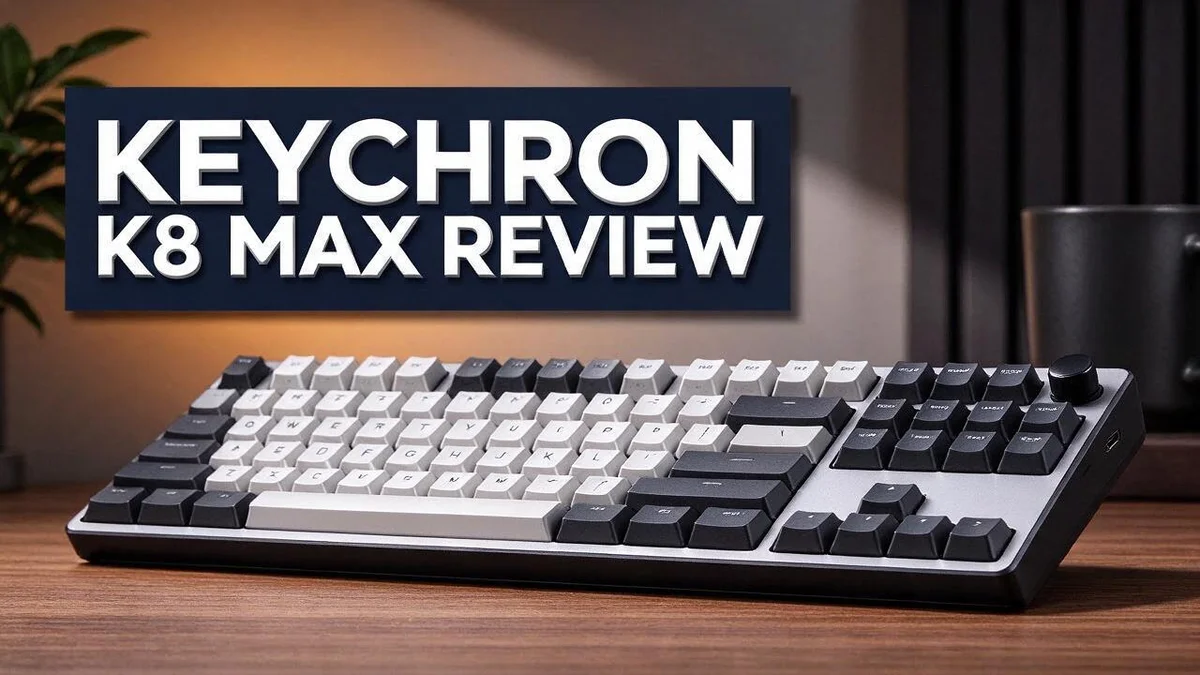
Keychron K8 Max Review: Wireless Mechanical Keyboard for Typing, Gaming, and Battery Life
Looking for a keyboard that feels great under your fingers? The Keychron K8 Max might be the one you need. It is a wireless custom mechanical keyboard that many typists enjoy.
Typing on it feels satisfying. Each key gives a clear click and a crisp clacking sound. Good typing form gets rewarded here, so your hands feel the upgrade fast.
It connects in three ways. You can use 2.4 GHz, Bluetooth 5.1, or a wired cable. The 2.4 GHz link keeps latency low, which helps casual and competitive gamers alike.
Want to customize every key? QMK support and NKRO give you full control. Add RGB backlighting that you can change to match your setup.
In this review, we will look at the typing feel, the switches, and the battery. We will also compare it with other Keychron models.
In a Nutshell
-
Who it suits: Regular typists will enjoy this keyboard most. It rewards good typing habits, so your fingers stay comfortable during long work sessions.
-
Gaming ready: The 2.4 GHz connection keeps delay low. Casual and competitive players can both enjoy quick responses during fast matches.
-
Spacebar quirk: The spacebar sounds different from the other keys. Many typists notice this right away, so try it in person if you can.
-
Bluetooth limit: Bluetooth adds more latency than the 2.4 GHz link. Switch to the dongle when speed matters most, and save Bluetooth for tablets or laptops.
-
Lighting style: Customizable RGB backlighting turns your desk into a colorful workspace. You can set the mood for work, gaming, or relaxing evenings.
-
Rival models: The K2 Max, K10 Max, and V3 Max sit close to this model in the Keychron lineup. Compare their layouts and features before you decide which one fits your setup.
-
Mixed opinions: Some reviewers praise the feel, while one called it a gimmick. Reading several reviews gives you a clearer picture of what to expect.
Typing Feel and Switches
The typing feel starts with the switches. The K8 Max uses Super Brown switches, and each press gives a soft tactile bump. Your fingers feel the key register before it bottoms out.
This bump suits people who like clear feedback. Many typists find it easier to hit each key cleanly. Less guessing leads to a smoother writing rhythm.
Good typing form pays off on this board. Keep your wrists relaxed and your fingers curved, and the keys reward that posture. Loose habits show up quickly, so the board nudges you toward better habits.
Comfort matters during long writing sessions. Many users say the keys stay comfortable after hours of work. Your hands tire less when the switches feel predictable.
The spacebar sounds different from the other keys. It has a slightly deeper tone that stands out in a quiet room. After a while, you may stop noticing it.
Sound matters more than many people expect. The switches make a noticeable sound with every press. Anyone who shares a workspace should test the noise level before deciding.
Your typing style shapes how much you enjoy the feel. Fast touch typists often love the quick response. Slow hunt and peck typists may need a short adjustment period.
Feedback from the keys also affects confidence. When each press feels clear, you check the screen less often. That focus helps during fast writing, coding, or email replies.
Overall, the switches set this keyboard apart. The bump, the sound, and the spacebar quirk all shape the daily experience. If you enjoy active feedback, this board is a strong match.
Try the keys in person if you can. Type a full paragraph and listen closely. Your own ears will tell you whether the sound fits your space.
Connectivity and Latency
Picking the right connection depends on where you work. A desk with a main computer suits a steady link. A laptop on the couch needs a different plan.
Wired mode removes wireless concerns altogether. Plug in the cable and you never worry about a drained battery. This option fits a fixed station with a long project ahead.
Bluetooth 5.1 gives you freedom to move. It connects to phones, tablets, and laptops. Many people like the clean look of a desk without extra receivers.
The tradeoff is a slightly slower response. You may notice it during fast actions. Test it with your own tasks before you commit.
Switching modes should feel quick and simple. You can move between devices in a minute. Keep your most used mode ready on the main setup.
Latency matters more for some tasks than others. Writing and browsing rarely show any delay. Fast action games reveal the difference more clearly.
Your room and devices also play a role. Thick walls and crowded desks can weaken the signal. Move the receiver closer if you notice drops.
Good habits keep connections stable. Charge the battery before long sessions. Keep your computer updated so the keyboard works without surprises.
A quick test helps you decide. Type a paragraph in each mode and listen for any lag. Play a short game in both modes too.
Compare the feel before you settle on one setup. Your own routine matters most. The mode that feels natural during your daily work is usually the right choice.
Customization and Battery Life
The Keychron K8 Max gives you plenty of control over how it behaves. It supports QMK customization, so you can change what each key does. This helps anyone who wants a layout that fits daily habits.
Remap keys to fit your workflow. You can move keys around or turn a rarely used key into something more useful. Many writers swap Caps Lock for Escape or Control, which saves finger travel. Small changes like these add up over a long day.
Build layers for extra functions. QMK layers let one key take on several jobs. You can hold a key to open a second set of commands, such as media controls or shortcuts. This gives you a full toolkit without crowding the desk with extra gear.
Enjoy full key input with NKRO. NKRO stands for N key rollover. It lets the board register many key presses at the same time. Fast typists and gamers may notice fewer missed keys during quick combinations.
Battery life depends on your habits. One source cites 190 hours of battery life. Real results change with lighting, connection type, and how often you type. Treat that number as a best case rather than a promise.
Lower the backlight to save power. Lighting draws more energy than many people expect. Dimming the backlight or turning it off extends the time between charges. This tip works well for desks that rarely need glowing keys.
Track your charge before long sessions. Check the battery level before a long writing day or a gaming marathon. A quick look helps you avoid a sudden drop in the middle of work. Keep the USB cable nearby so you can recharge fast.
Choose the mode that fits your day. Wireless modes use more power than wired mode. Switch only when you need to, and your charge will last longer.
Top 3 Alternatives
Logitech MX Keys

- Fluid Typing Experience: Laptop-like profile with spherically-dished keys shaped for your fingertips delivers...
- Automate Repetitive Tasks: Easily create and share time-saving Smart Actions shortcuts to perform multiple...

Last update on 2026-11-07 / Affiliate links / Images from Amazon Product Advertising API
This wireless keyboard feels smooth and quiet under your fingers. It pairs with up to three devices.
You can switch between a laptop, tablet, and desktop with ease. The keys have a gentle curve that supports your wrists. Its battery lasts for months on one charge.
The backlit keys help you type in dim rooms. It suits daily office work and home use very well.
Ducky One 3

- DKON2108ST-CUSPDCLAWSC1
Last update on 2026-11-07 / Affiliate links / Images from Amazon Product Advertising API
This keyboard focuses on build quality and a satisfying typing feel. It uses a solid metal frame and thick PBT keycaps.
Many fans enjoy its crisp sound and sturdy weight on the desk. The model offers many layouts and color options. Each keycap feels solid under your fingers.
Gamers and fast typists often praise its clear key response. It fits anyone who wants a keyboard built to last.
Akko 3068B

- Bigger is Better: Akko wired 3108 keyboard is in sophisticated Black & Gold, where luxury meets full-size...
- Cherry Profile & PBT Double-Shot Keycaps: Akko's cherry profile keycaps are designed to bring maximum comfort...
Last update on 2026-11-07 / Affiliate links / Images from Amazon Product Advertising API
This compact keyboard fits small desks, travel bags, and tight workspaces. It supports both wireless and wired connections.
Hot swap sockets let you change switches without any soldering skills. The layout skips a few keys, which frees up space. The case comes in several bright shades.
It is a fun option for beginners who want to explore custom typing. Its small footprint makes it easy to carry anywhere.
Comfort and Ergonomics
Good comfort starts before you type a single word. Your desk setup matters just as much as the keyboard itself.
Place the board at a height where your elbows rest near your sides. Your shoulders should stay loose and relaxed.
Keep your wrists straight while you type. Bent wrists can cause tired hands after an hour or two.
Many people rest their wrists on the desk between sentences. A wrist rest can help, but it should support your hands, not push them upward.
Keep your mouse close to the keyboard. Long reaches pull your shoulder forward and strain your arm over time.
Chairs also play a role. Sit with your back supported and your feet flat on the floor. A stable seat keeps your upper body steady while your hands do the work.
Tactile switches signal each press clearly. You can type with a light touch instead of pounding the keys.
Lighting and screen height affect posture too. A monitor placed too low can pull your head forward. Aim your eyes at the top of the screen.
Warm up your fingers before a long writing session. Gentle finger stretches help your hands feel ready and loose.
Take short breaks during long sessions. Stand up, stretch your fingers, and look away from the screen every thirty minutes.
Everyone’s hands differ in size and shape. What feels comfortable for one person may feel awkward for another, so test the board before settling into a long routine.
Try a few different positions over several days. Small changes in angle or distance can make a noticeable difference.
Watch for early signs of discomfort. Tingling, stiffness, or sore wrists mean you should adjust your setup right away.
Comfort grows from habits as much as hardware. Find a setup that feels natural, and your hands will thank you.
Price and Value
Smart buyers start with one question. What do you need from your keyboard every day?
The Keychron K8 Max suits people who type for long hours. Its Super Brown switches give clear feedback with each press. Many typists enjoy that steady rhythm.
Sound matters as much as feel. The spacebar sounds different from the other keys. Some people like this quirk, while others find it distracting in a quiet office.
Compare models side by side. The Keychron K2 Max and K10 Max appear in many review titles. Users also compare the K8 Max directly with the V3 Max in online forums.
Research does not show one clear winner. Instead, each model suits a different mix of layout, features, and typing style. Read the specs closely before you choose.
Listen to the critics too. One Bangla review called the board a gimmick, but it gave no details. A vague complaint like that should not decide your choice.
Consider your workspace. A compact board frees up desk space. A fuller layout keeps extra keys within easy reach. Measure your desk before you decide.
Think about your daily routine. Writers, coders, and gamers all use keyboards differently. A board that feels great for one task may not fit another. Gamers often look for quick response, while writers often look for comfort.
Check the features you will actually use. Wireless connections and deep customization sound impressive. Still, focus on the tools that match your habits. Ask yourself which keys you press most often.
Try before you commit. Visit a store if you can. Type a few paragraphs and listen to the switches. Notice how the spacebar feels under your thumb.
Your ideal keyboard should fit your habits and your desk. Take your time, test your options, and choose the board that feels right for you.
Pros and Cons
Pros
– Flexible connections let you switch between 2.4 GHz, Bluetooth, or a wired cable.
– Quick response on 2.4 GHz suits both casual and competitive gaming.
– Custom lighting lets you set your own RGB colors.
– Strong typing upgrade rewards anyone who already types with good form.
– Solid feel makes long typing days more enjoyable.
Cons
– Bluetooth lag means slower response than the 2.4 GHz connection.
– Spacebar tone stands out from the other keys.
– Limited reviews mean long term results remain unclear.
Who Should Buy It
This keyboard suits a certain type of person. Hobbyists who enjoy tinkering will find plenty to explore. Remapping keys and adjusting lighting can turn into a fun weekend project.
Shared spaces call for extra thought. The loud clack may bother roommates, partners, or coworkers nearby. Think about who shares your walls before you buy.
Mechanical keyboard newcomers can also enjoy this board. It offers a clear first step into the hobby. Expect a short learning period as you get used to the feel.
Remote workers who switch between devices may appreciate the options. You can pick the connection that fits each setting. One board can serve a laptop at a cafe and a desktop at home.
Gamers who also write all day should consider it. One keyboard can handle emails by morning and game sessions by night. That kind of daily flexibility keeps your setup simple.
Students who take long notes may like the typing experience. Lectures and essays become a bit more enjoyable. Comfort and speed both matter during study sessions.
Desk setup lovers often care about looks too. The board fits a clean, modern workspace with ease.
Coders who spend hours in an editor may enjoy the rhythm. Each keystroke lands with a crisp response during long debugging sessions. Your code deserves a keyboard that keeps pace.
People who want a silent office companion should look elsewhere. This board makes its presence known across the room. Quiet typing lovers may prefer a softer switch style.
Anyone who likes to grow their setup over time may enjoy this board. Firmware tweaks and key layouts invite ongoing experimentation. Small changes can make a big difference.
Overall, the Keychron K8 Max fits people who value personality in their tools. Try it in person when you can. Your fingers will tell you whether it feels right.
Final Verdict
Our final take is clear and fair. The Keychron K8 Max suits people who care about how each key feels. It is not flawless, but its strengths stand out.
The large battery adds real daily comfort. Fewer charging breaks mean less interruption during busy weeks. Many people forget to plug in a keyboard until it runs out at the worst moment.
QMK support gives tinkerers room to play. You can remap keys and build layers that fit your own habits. This kind of control keeps the board interesting long after the first week.
Still, a quick test pays off. Type for a full work session before you decide. Pay close attention to the spacebar and how your wrists feel after an hour. Notice whether the sound bothers you or adds joy.
The bottom line favors people who type often. If long sessions fill your day, the K8 Max deserves a close look. If you want a near silent board, look at other options.
Wired mode works as a safety net. If the wireless battery runs low before an important deadline, plug in and keep working. This backup keeps stress low during high pressure moments.
Lighting can support your focus too. Soft colors may make late night sessions feel calmer. Bright patterns can add energy during creative work.
Plan for a short adjustment period. Your fingers may need a few days to match the new feel. Give yourself time before judging the board.
Set up your desk first. Raise your screen to eye level and keep your wrists relaxed. Good posture helps the board feel even better.
Your keyboard shapes how your day feels. The K8 Max makes daily typing more pleasant for many people. Choose it when you want a board that feels good every single day.
Frequently Asked Questions
Does the Keychron K8 Max register multiple key presses at once?
Yes, it offers NKRO support, which stands for N-key rollover. Each key press registers, even when you press several keys together. This helps during fast typing, shortcuts, and some gaming moves.
How long does the battery last?
One source cites 190 hours of battery life. Your results can differ. Lighting and connection type both change how long the charge lasts.
How does the K8 Max compare with the K2 Max and K10 Max?
The research does not rank these models, so no clear winner exists. Reviewers often name them together. Compare the layout, size, and switch feel before you choose. The V3 Max also appears in user discussions, so it may be worth a look too.
Can I customize the keys on this board?
Yes, the K8 Max supports QMK customization. You can change key functions to match your workflow. This works well if you like shortcuts or unusual layouts.

DK is a technology expert who specializes in AI tools, software, and tech gadgets. He writes for How to Tech Info, providing detailed reviews and practical guides. DK helps readers discover the best AI applications, navigate new software, and choose the right tech gadgets.